
Hello, this is my second review and I will be reviewing the online presentation tool Prezi and will be discussing how I use this and what the ups and downs of the tool are.
Digital learning tool review – Prezi
What is Prezi?
Prezi is a presentation tool, it can be used to create presentations with a unique functionality that allows for easy user navigation. The aim of Prezi is to allow users to create PowerPoints and presentations that engage the reader whether it be in a lecture or for personal revision. Prezi was founded in 2009 by Peter Arvai, Péter Halácsy, and Adam Somlai-Fischer.
P. Arvai, P. Halácsy, A. Somlai-Fischer (2009) Prezi: https://prezi.com/about/ (accessed 18/11/2016)
So what’s so good?
Prezi makes use of a large canvas of which information can be stored and this allows presentations to flow in a much less conventional way, new links can be formed between slides and information can be reviewed easily. This unique function allows for a less boxed in form of presentation where it’s just slide after slide, you can move to and from any slide on the canvas to create a better flowing presentation. This can be used to make notes and create new links once new information has been acquired and this won’t break the flow of the presentation but could actually increase it by having small or large links between subjects that can easily be inserted between slides. The use of this large canvas with zoom means specific parts of information can be zoomed in on and allow students to focus on a particular piece of information. You are able to zoom in to a certain word and have a small diagram next to it that only becomes visible when the word is zoomed in upon so people can link this word and this word alone with a certain visual so they remember it.
Prezi also allows you to pick a template for a presentation so the presentation can be in the form of a mind map allowing you to branch of and create or add ideas or information easily, which can then be viewed from a far or up close. The easy flowing functionality means the mind map can be navigated with relative ease and can be used as a good tool for taking notes for revision when in a lecture or when you’re studying. The zoom in and out option allows small pieces of information to become noticeable when a specific topic is zoomed in upon as to help you concentrate on a particular subject of the mind map.
When creating a power point on Prezi you can leave the presentation to a side note whenever you feel like to prevent the boxed in linear motion felt on other presentation tools, it helps keep the users or viewers’ attention as to prevent them from being distracted however overdoing this is just going to annoy people and they won’t be able to keep up if the screen is spinning to new information repeatedly or moving too fast, so when using Prezi try not to get carried away with actions and keep it straight forward and simple but not too simple to keep people’s attention.
Prezi is also able to be used offline by simply downloading Prezi desktop which allows you to store more information and more presentations, apps are also available for phones and tablets so you can view your Prezi’s offline and on the go, say for that final cramming before a test or reviewing the information before a presentation.
So what are the negatives?
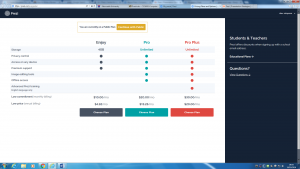
When it comes to Prezi there are very few negatives, there are interactive tutorials you can take to see how to perform certain actions which is always nice. Prezi can be used for free but premium accounts can be made which cost but these do come with the benefits of more storage, here is an image of the premium account benefits and the difference between the types of premium.
https://prezi.com/upgrade/
P. Arvai, P. Halácsy, A. Somlai-Fischer (2009) Prezi: https://prezi.com/upgrade/ (account needed to view page)(accessed 18/11/2016)
As you can see the price is quite substantial for the pro plus but that’s really only for die hard Prezi users, to enjoy the benefits of Prezi you don’t have to go pro and can enjoy the functionality by just being free user as this allows for notes and creating mind maps which is what makes it a good digital learning tool in the first place. I highly recommend using this digital tool and believe the pros heavily out way the cons so get the app or just use it online and have some fun playing around with it. But please don’t go all willy-nilly with the zooming and panning as too much is really annoying.
By Alex Simpson