
What is Crawler UK?
Crawler UK is a tool which is used for comparing prices on media you would like to purchase. It comes in 4 forms: Game Crawler UK – specifically for comparing videogame prices, Blu-ray Crawler UK – for comparing Blu-ray prices, DVD crawler UK – for comparing DVD prices, and Book Crawler UK – for comparing book prices. This is useful for anyone who likes to indulge in a videogame or film, because why not pay less money for the same content? Although it is especially useful for someone on a budget.
How do I use Crawler UK?
You can use the ‘drop t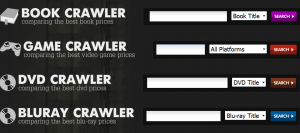 ab’ by the ‘search’ button to state whether you are searching by Platform (Xbox, Playstation etc.) for games, Title/Actor for Blu-ray & DVD and Title/ISBN (International Standards Book Number) for books. There is also a bar with several tabs on it present directly beneath the search bars which allows you to ‘browse’ the products rather than search for something specific, view their “blog” where they discuss the different products, browse using the “popular” tab which allows you to view the most popular products now, the “future/new releases” tab allows you to order/pre-order new/to-be-released games respectively, along with a “price watch” tab which I will come back to shortly. At the right-hand side of each page there will be a list of categories that you can base your search on, these categories include genr
 es, formats (mainly for books such as audiobook, Computers & the internet etc.), however for some reason, the section which lists different categories is not present on Blu-ray Crawler UK or Game Crawler UK – This is a problem for people who have an idea of what category of game or Blu-ray they would like to purchase but do not have a specific product in mind.
There is also the option to make an account on the website which will enable you to use a feature called “Price watch” which allows you to set up alerts on your email account for the price you want to pay for a book, Blu-ray, DVD or Video game. This option is made available by clicking the “login” or “register” link beneath the list of categories or on the “Price Watch” tab beneath the main search bar. Once on this page you can then proceed to enter your details and will be given a tick box at the bottom of the register asking if you would like to receive news and offers on products, this is optional which I think is very good considering a lot of people will not want to be forced into receiving emails which could clog up their inbox. Once this has been successfully completed the page will at first appear to remain the same, but if you look carefully you will notice that 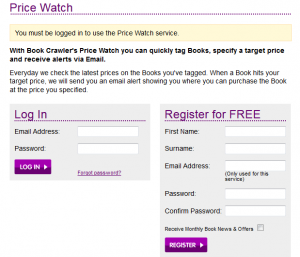 where it states “You must be logged in to use the Price Watch service”, underneath that it will now state “You have successfully registered for Price Watch. You will recieve an email shortly with instructions on how to activate your account.” They also spelled the word “receive” as “receive” which is a sign of poor/non-moderated content. Once you have received your email, it will include a link to complete your registration, this link will redirect you back to the login page, where you can log in and begin you full Crawler UK experience.
Once you begin to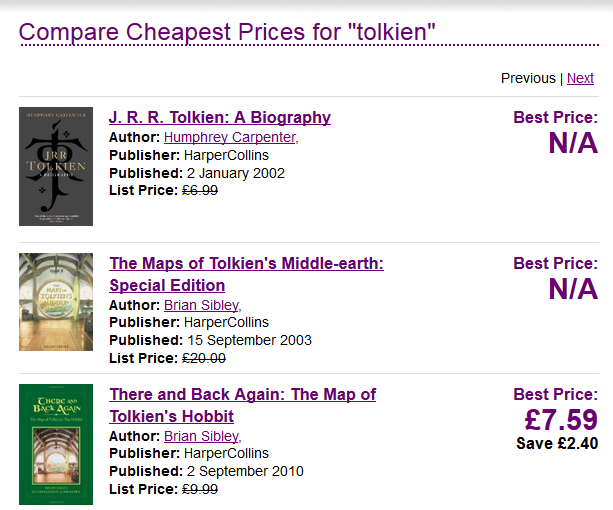 search for the product you are after, it will immediately come up with a list of products. ordered by most relevant, and will have the lowest price available shown at the right-hand side of the product, if there are no prices available – meaning that there will be no stock available, it will come up as N/A. It also shows you how much money you will have saved compared to the products listed price. Once you select the product you are after it will proceed to show you a list of st
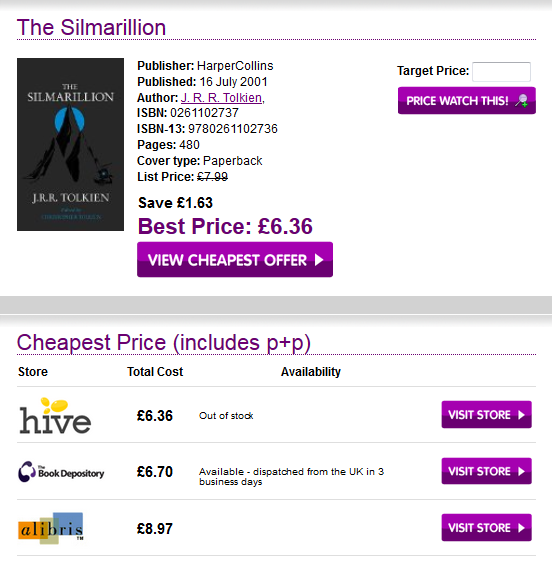 ores which are selling the product, descending from cheapest to most expensive, and will present you with an option to “visit store” which will direct you to the website which is selling that item. There will also be the option to set a target price and click “Price Watch this” so that when a store sells a desired product at or below your target price, an email will be sent to notify you. This is an extremely useful feature as it significantly lowers the chances of you potentially missing out on a product you would have been interested in.
Benefits and Drawbacks
The advantages of this tool are that it is extremely successful in saving you money on items which you may be interested in, it also lets you know how much money you are saving so that you can put into perspective how good certain deals are. It also clearly states which shop’s sell this product at which price, which means that if there happened to be a physical store near you, you may be able to go to the store and pick the product up yourself rather than waiting for delivery and paying delivery fees. The overall sight is very user friends and responsive, and its simplicity allows the customers to navigate it easily.
The disadvantages of this tool are that the search results when browsing for products are often clogged with products that are unavailable which can make looking for your product very daunting. They have also used some misspelled words in their website, which has been functional for a long time, which leads me to think the website is poorly moderated as this issue should have been identified and resolved. The fact you have to sign up to use the “Price Watch” feature also disrupts your browsing experience and causes you to have to open up your emails which you may not have open already, which makes the overall experience slightly more tedious – this feature is rather understandable however as they would require your email address to send you offers and Price Watch alerts, though only an email address is needed and the user shouldn’t be forced to make an account with them (but on the positive side, it is free!)
Conclusion
Overall this is an exceptionally useful online tool, as its advantages have provided me with life changing benefits to both my academic ability and overall mental and physical health, which I think greatly outweigh the trivial drawbacks of the website which half can be rectified with a simple google search in a different tab.
[Game Crawler, 2009]