
A reflective summary of my experiences throughout completing this assignment
This report is going to be a reflective summary of my experiences throughout this assignment, including the steps i took to create the site as well as the elements i found most straight forwards, those i found more difficult and the solutions to any problems i encountered.
Creating the Website
One of the main objectives for this task was to create a functioning, user-friendly website using a popular content management system, including a home page, two review pages, a report page and an ‘about’ page which has to include a brief description about yourself. These first step i took was registering for a Newcastle University Blog, the steps for this were as follows:
1. Visit https://blogs.ncl.ac.uk
2. Click ‘Log in’ at the top right of the website
3. Enter your university log in details
4. Click ‘My Sites’ at the top left of the website then ‘Create New Site’
5. Give your blog a name then click ‘Create Blog’
Once these steps have been taken, your blog will have been created and will be ready to use. I wanted to keep my blog very simplistic and straight forward to use so i chose the active theme called ‘Twenty Eleven’ as well as keeping a light colour scheme so that it wouldn’t take people’s attention away from the content. At the top of the page when i was creating my website, there was a took bar which looked like this: 
To create the separate pages i clicked on the ‘+ New’ tab and then clicked on page which would then insert a new page which would look like this to start with:
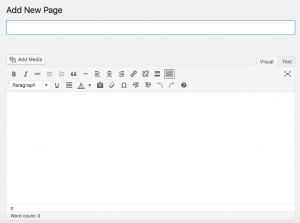
Each page would have a different title which is what i put insert into the tool box under where it says ‘Add New Page’ and then the content would go into the much larger tool box below. Once i had typed in all of the content for a page, and proof read it, i would click on the blue button on the right hand side of the page which says ‘Update’ – this will publish any work from the text boxes, onto the website.
The specification for this assignment stated that the two review pages had to be sub items of a main review page, i would say that this part of the website challenged me the most but after looking over the different tool options, i was able to figure it out. On the right side of the page when you’re creating a new page/edits a current page, is a tab titled ‘Page Attributes’ with an option saying ‘Parent’ with a drop down menu below it. This menu allows you to select if you want another one of your pages to be a ‘Parent’ to the current page you’re working on, for example, if you want a sub item, because my two reviews had to be sub items of another page, I selected my page titled ‘Review’ to be the parent page of ‘Review 1 – Newcastle University Mobile App’ as well as ‘Review 2 – Barclays Mobile Banking App’.
Strengths and Weaknesses
Throughout this assignment i would say that the elements that were the easier to complete was the ‘About’ section as well as the ‘Report’ section. This is because when it came to the about section and i had to say a bit about myself, including what i’m studying and what i’d like to do one i’ve complete my degree – these are answers that i knew straight away as my education is something i’m very passionate about so i like to know my end goal so i feel as if i have something to work towards and excite me. I found the report section of this report relatively straight forward is it was just a recap of the process i’ve taken to complete the assignment, i struggled slightly on my wording though as i wanted to keep it was simple as possible, hence why i added some images to help demonstrate what i was referring to.
The most troubling part of this assignment for me was definitely deciding which online tool/app to do my reviews on. The Newcastle University app came into my head straight away as the specification said at least one should be something i have used in relation to my recent studies at school, college or university and which this being an app i use almost every day whilst i’m in university, it seemed like a no brainer! Deciding on another one was much more difficult though as there are so many to chose from, i ended up looking through the ‘App Store’ on my iPhone and looking at the ratings, downloading the application and then coming up with my own opinion for it.
References
- BLOGS; IT SERVICE; NEWCASTLE UNIVERSITY
In-text: (Blogs; IT Service; Newcastle University, 2016)
Your Bibliography: Blogs; IT Service; Newcastle University (2016) [Online]. 2016. Available at: http://www.ncl.ac.uk/itservice/service-catalogue/collaboration/blogs/. (Accessed: 18 November 2016).