The Blackboard Mobile App is a mobile version of the Blackboard system that is used in universities all over the country. It allows you to look at your course modules and the different areas of study that you have to do. You can look at a whole range of things, from lecture presentation slides to assignment deadlines.
How the App works:
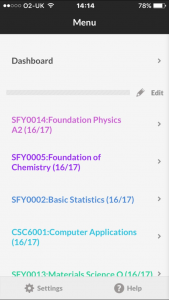
The homepage of the app looks like this, with all of the different modules you are studying displayed in a list. From here you can click on any one of the modules and look at whatever it is you are wanting to look at.
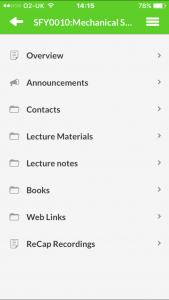
When you click on one of the options, you are taken to the page for that particular module. This contains all of the relevant features that the app has to offer, from announcements from the lecturers about any aspect of the module, to lecture notes from any of the lectures, through to ReCap recordings of the lectures so that you can listen to a lecture if you missed it.
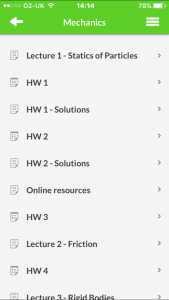
When you click on one of these headings, for example the one I clicked on here was the ‘Lecture Materials’, you are taken to another list of options. These are all of the different lecture materials that are available for me to open and view. Because this is a mobile app and these are nearly always computer presentations or word documents, they open up as a PDF file (as shown here), and then you can view them on your phone or tablet.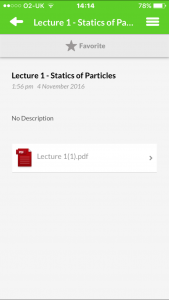
Advantages and Disadvantages:
The blackboard app is a very useful tool for a wide range of things. It can be used to look at lecture notes and slides so that you can revise something that maybe you missed or didn’t understand during the lecture, as well as being a place where you can look at any upcoming assignments that need handing in or starting. It can be used in almost the same way as the desktop version of blackboard, which is essential for studying as it is, so having a mobile version that is very quick to use is a definite advantage.
There are very few disadvantages to the blackboard mobile app. It is simple and does what you want it to, however the worse thing about it is perhaps the fact that it is quite unreliable. It does crash quite a lot, which can make using it somewhat of a chore, especially knowing that it might crash on you at any point. This means that you tend to use the desktop version more because it is reliable.
Conclusion:
The blackboard mobile app is a useful, handy version of the essential desktop website that is used by students. It can be used for a very wide range of things from checking assignments to looking at notes, and is very fast to use. It is let down by the fact that every so often it freezes or crashes, which gets very irritating, especially if you are using it.