
As of June 2025, Newcastle University has officially defined the City Campus geoboundary on iNaturalist. This means that any wildlife observations recorded within this area will automatically be grouped under the Newcastle University City Campus project. It’s an important step in helping us better understand the biodiversity across our campus.
Here’s a quick guide to what iNaturalist is, how to get involved, and why these observations matter.
What is iNaturalist?
iNaturalist is a platform used to record and share sightings of wildlife, from foxes and birds to flowers and fungi. Whether you’re an experienced naturalist or just someone who noticed an interesting insect in your garden, the app makes it easy to upload a photo, identify what you saw, and contribute to a growing global biodiversity database.
At Newcastle University, we’re encouraging colleagues, students and visitors to use the iNaturalist Classic app (or the website) to help us document the organisms on our campus. Over time, this data will give us a better sense of which species are thriving and which may need protection.
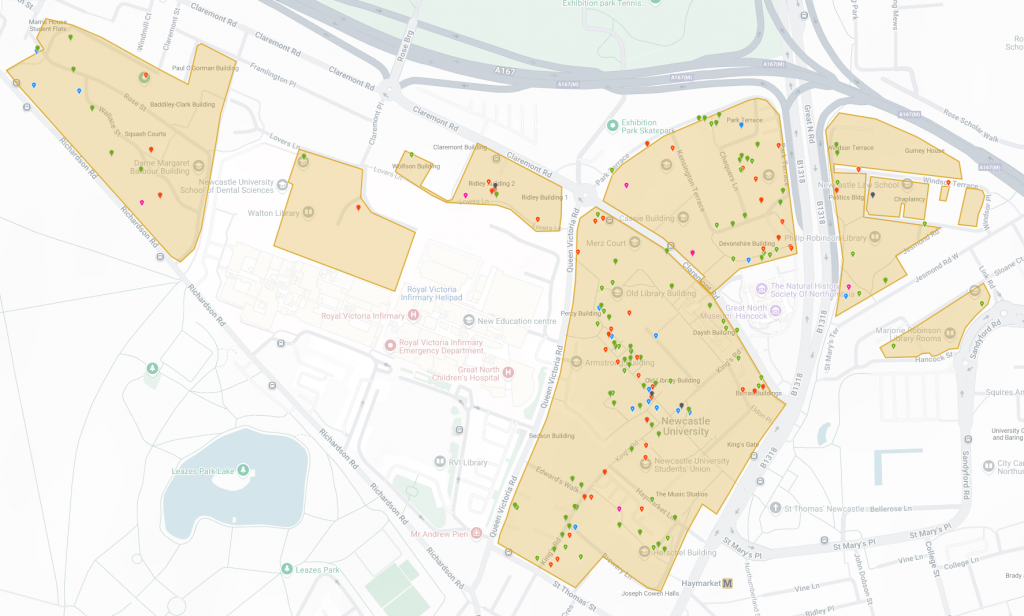
Image: A map of campus observations so far. Blue pins are bird, red pins are insects, green pins are plants, and pink pins are fungi (Source: iNaturalist 2025).
Making an observation
An observation records an encounter with an organism in a particular time and location. Observations can be uploaded via the mobile app or the webpage.
| Making an Observation with the App | Making an Observation with the Website |
| 1. Open the iNaturalist Classic app and tap “Observe.” 2. Add one or more photos or sounds as evidence. 3. Choose what you saw – either from suggested species or by searching. If you are unsure, you can keep the label as simple as “plant” or “insect.” 4. The date and location should be added automatically. If not, check your device’s location and privacy settings. 5. Does the plant look like it was planted by a human? If yes, mark the finding as ‘captive/cultivated’ 6. Tap “Save”, then “Upload” to share your observation. 7. Once uploaded, others in the iNaturalist community can help refine the identification. | 1. Log in at iNaturalist and click the green “Upload” button in the header. 2. Drag in one or more photos or use the “Add” button to manually create observation cards. 3. Choose what you saw from suggestions or by searching. If unsure, leave it blank or use a broad category. 4. Use the calendar to record when the observation was made. 5. Enter a location and adjust the map marker and accuracy circle as needed. 6. Does the plant look like it was planted by a human? If yes, mark the finding as ‘captive/cultivated’ 7. Once all details are added, click “Submit.” |
iNaturalist have shared a slideshow that contains helpful tips about how to make a good observation. The key principles are:
- Take clear, close-up photos
- Focus on wild organisms
- Document the location
- Add an identification
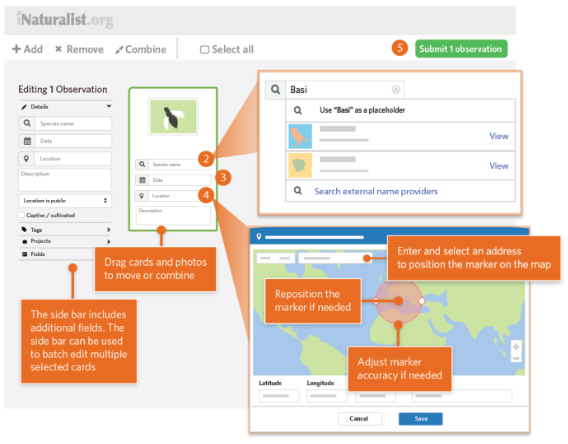
Image: How to upload an observation on the iNaturalist website (Source: iNaturalist, 2025).
Why are observations important?
iNaturalist helps individuals who may not otherwise have the knowledge to identify the biodiversity found around them, it also generates data for scientists and conservationists to help them protect nature.
Newcastle University is currently establishing its biodiversity baseline, we will monitor and measure the data submitted on iNaturalist within our project, as this data set will contribute toward our understanding of biodiversity that is present on our campus. You can find out more about our biodiversity related work on the Sustainable Campus website.
Here are some of our favourite observations of species that were found and submitted on campus over the past few weeks!
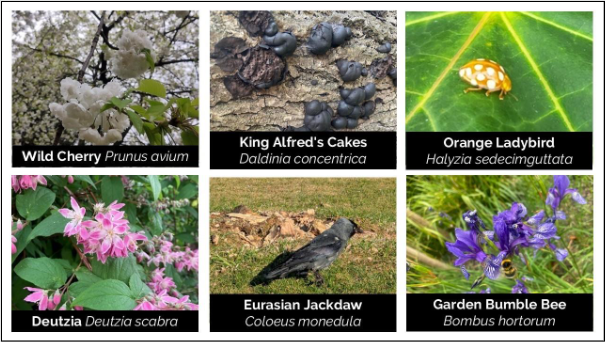
Photo credits (from top left to bottom right): rosalind24947, cer28, js94ne, psychso, nonsensical and cer28.
If you would like to find out more about other biodiversity initiatives on campus, check out our webpage. For any queries about iNaturalist or sustainability in general, please email us at sustainable-campus@newcasle.ac.uk.
Thank you for reading!