Dec 062017
 

*** Install the Windows Subsystem for Linux:

https://msdn.microsoft.com/en-us/commandline/wsl/install-win10
(Ubuntu, Ope*S*se, and SL*S are currently available. Fedora is due at some stage)

It is possible that the WLS should mount any pre-existing Windows drives automatically. This was not the case for me, so below are workarounds. It is possible that, as WLS matures, these steps are not required.

*** Add your *existing* Windows drives e.g. your University research folders

In this example, our Windows 10 PC automatically adds the Institute Z: and O: drives at login. We can use these pre-existing Windows drives and mount them.

IGM example – O: and Z: drives:

$ sudo mkdir /mnt/o
$ sudo mount -t drvfs O: /mnt/o

$ sudo mkdir /mnt/z
$ sudo mount -t drvfs Z: /mnt/z

OR directly mount University drives. In this example, we will mount the Flow Cytometry drives (amend your drive letters; these are what we use here at the IGM). S: drive represents the live/instrument data; R: drive represents archived FC data.

Example 1:

$ sudo mkdir /mnt/s
$ sudo mkdir /mnt/r

$ sudo mount -t drvfs '\\fsarchive.ncl.ac.uk\IHGScratch\FLOWCF' /mnt/s
$ sudo mount -t drvfs '\\fsresearch2-dbx.ncl.ac.uk\IGM_FLOWCF' /mnt/r

Example 2:

$ sudo mkdir /mnt/s
$ sudo mkdir /mnt/r

$ sudo mount -t drvfs '\\campus.ncl.ac.uk\scratch\IHGSCRATCH\FLOWCF' /mnt/s
$ sudo mount -t drvfs '\\campus.ncl.ac.uk\IGM\FLOWCF' /mnt/r
 

Dec 062017
 

This is currently just a list of resources kindly provided by Gary Wright, Karen Bower, and Gavin Younger.

We hope to add our own content, as we investigate EasyBuild further.

EasyBuild:

NCL EasyBuild sharepoint
https://newcastle.sharepoint.com/pss/nuit/infrastructure/isg/Services/HPC/easybuild/

EasyBuild official documentation
http://easybuild.readthedocs.io/en/latest/Introduction.html

EasyBuild community github
https://github.com/easybuilders

EasyBuild easybuild-easyconfigs
https://github.com/easybuilders/easybuild-easyconfigs

EasyBuild verdurin/easybuild-easyconfigs-devel: Development
https://github.com/verdurin/easybuild-easyconfigs-devel

NCL Rocket HPC Service
http://www.ncl.ac.uk/itservice/research/hpc/


Nov 062017
 

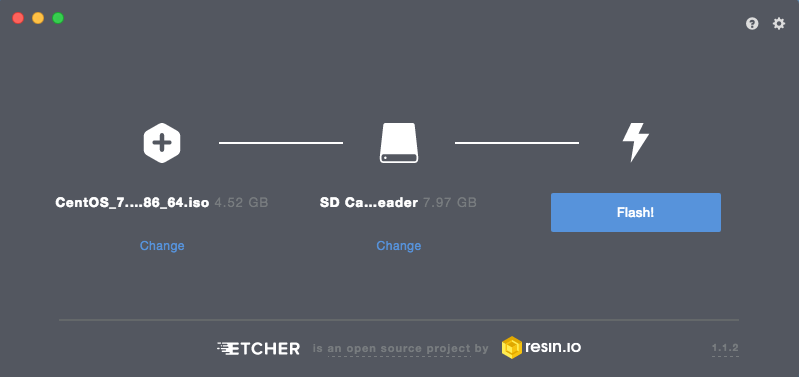
Etcher website  < https://etcher.io/ > allows you to quickly and easily create bootable USB flash drives, based on ISOs. There are installers for Mac OS X (native app and homebrew); Windows; Linux (AppImage, deb, and rpm). There is also a command line version available for Mac/Linux and Windows.

We have used Etcher for creating CentOS installers and have found it to be very reliable. A superb, no fuss, cross-platform solution.

Etcher Mac OS X version

Sep 012017
 

This is usually more relevant when installing Windows 10 on older laptops. Some of these laptops have made the jump from XP to W10!

Most will not have on-board TMP capabilities, so override this requirement by using the local group policy editor:

run gpedit.msc

Computer Configuration >Administrative Templates >Windows Components >BitLocker Drive Encryption > Operating System Drives > Require Additional Authentication at Startup

Click Enabled option
Check that ‘Allow BitLocker without a Compatible’ is ticked
Click OK and close gpedit

Enable BitLocker on the laptop, as usual

In order to check on the progress of the encryption, run an elevated PowerShell instance, where you can periodically issue this command:

manage-bde -status C:


Jun 302017
 

You may be required to adjust hibernation settings and the pagefile values for Desktop based SSDs, in order to prevent valuable storage space from being used by Windows.

Disable hibernation by running an elevated command prompt and issuing:

powercfg -h off

You should be able to confirm this via Power Options (Control Panel)

Have had no need to adjust pagefile values yet. However, the procedure would be:

Control Panel > System and Security > System > Advanced system settings > Advanced tab > Performance settings > Advanced tab > Virtual memory change

Uncheck “automatically manage paging file for all drives” box and then set desired value. If you wish, you can disable the paging file (this may upset some applications). A smaller paging file can be set by clicking on the “custom size” option and entering starting size and maximum size values.

Jun 012017
 

Last updated June, 2017:

If Not True Then False
https://www.if-not-true-then-false.com/
Worth putting up with the ads (standard google ads). Full of useful guides, on relevant topics, for fedora/CentOS/RH, updated regularly.


Live Linux distros:

Porteus : http://www.porteus.org/
Netrunner : http://www.netrunner.com/
BunsenLabs : https://www.bunsenlabs.org/
AntiX : http://antix.mepis.org/
Qubes OS : https://www.qubes-os.org/
Whonix : https://www.whonix.org/
Kali Linux : https://www.kali.org/
Grml : https://grml.org/

 Posted by at 3:54 pm
May 262017
 
CentOS 7:

https://bashtheshell.github.io/guide/ssd-trim-on-centos-7/


Windows 7:

Enabled by default but can be confirmed via elevated command prompt and:

fsutil behavior query disabledeletenotify

DisableDeleteNotify = 1 = TRIM support disabled
DisableDeleteNotify = 0 = TRIM support enabled

To enable trim, issue:

fsutil behavior set disabledeletenotify 0


Mac OS X:

Enabled by default on Apple provided SSDs.
Requires enabling on third-party provided SSDs.

To confirm via the terminal, issue:

system_profiler SPSerialATADataType | grep 'TRIM'

Enable TRIM via terminal, with this command:

sudo trimforce enable

Follow the on-screen advice.

For reference, Third-party solutions include Cindori TrimEnabler, which were
a workaround when Apple temporarily disabled default trim support
for non-Apple SSDs.
May 262017
 

This minor reset can be used when Windows 7 fails to find updates i.e progress bar never stops.

Open an elevated command prompt and run these commands:

net stop wuauserv
net stop cryptsvc

Delete or rename %windir%\SoftwareDistribution directory
Delete or rename %windir%\System32\catroot2

Restart the services we had previously stopped:

net start wuauserv
net start cryptsvc

Install latest Windows Update Client from:

W7 64bit: https://www.microsoft.com/en-us/download/details.aspx?id=53332
W7 32bit: https://www.microsoft.com/en-us/download/details.aspx?id=53335

Restart the computer
You should then be able to check for updates manually and get the PC fully patched

If the above fails, Microsoft have documented a ‘hard reset’ at:
https://support.microsoft.com/en-au/kb/971058