Vevox Updates May 2026

Within this blog post, the Vevox @ Newcastle Team share details around the success of our Vevox adoption since its launch and details of a new User Interface coming in June 2026. 

Vevox's logo

Vevox Adoption 

Vevox has been our Audience Interaction System (AIS) at Newcastle University for coming up 3 years in August 2026. The Vevox @ Newcastle Team spent some time looking at our usage statistics with our Customer Success Manager and are delighted with its adoption during this time.  

Newcastle University is performing significantly above both the overall sector average and the Large University benchmark across the measured adoption period, consistently outperforming expected adoption levels. This strong early growth demonstrates a highly successful institutional rollout, with Vevox gaining traction quickly across academic staff and becoming embedded into teaching and learning practices faster than is normally seen. 

In the past year we have seen a 20% increase in the number of new Vevox adopters. Vevox users at Newcastle have also indicated a Net Promoter Score of 8 out 10 regarding satisfaction of Vevox usage.  

New User Interface 

There is an update planned for the Vevox User Interface (UI). Within the poll creation area, you will notice a different use of space. You can still see a list of all the content in your session, but there is now more emphasis on previewing what that content looks like. This makes it easier to manage your presentation and stay focused on what your audience will see. 

This update will be rolling out to your dashboard on Sunday 7th June from 6am UTC. For more information, please see the Vevox release information about this. 

Vevox: April New Features Release

Vevox have made a series updates to their features in their April product update.

Find out more about the new features available and improvements to existing features, including:

  • New question type: Matching
  • Introduction of ‘Quick Polls’
  • Customisation of Countdown Timer Sounds
  • Timer Display
  • Improvements to the AI Quiz Generator
  • PowerPoint Slides Embed in Present View
Continue reading “Vevox: April New Features Release”

Digital Education Technologies Showcase Day: Summary

The Learning Enhancement and Technology (LET) Team in the Learning and Teaching Development Service (LTDS) were joined by colleagues from NUMBAS, Library Reading Lists, Digital Adoption, FMS Technology Enhanced Learning (TEL) Team and representatives from the Artificial Intelligence (AI) in LTDS.

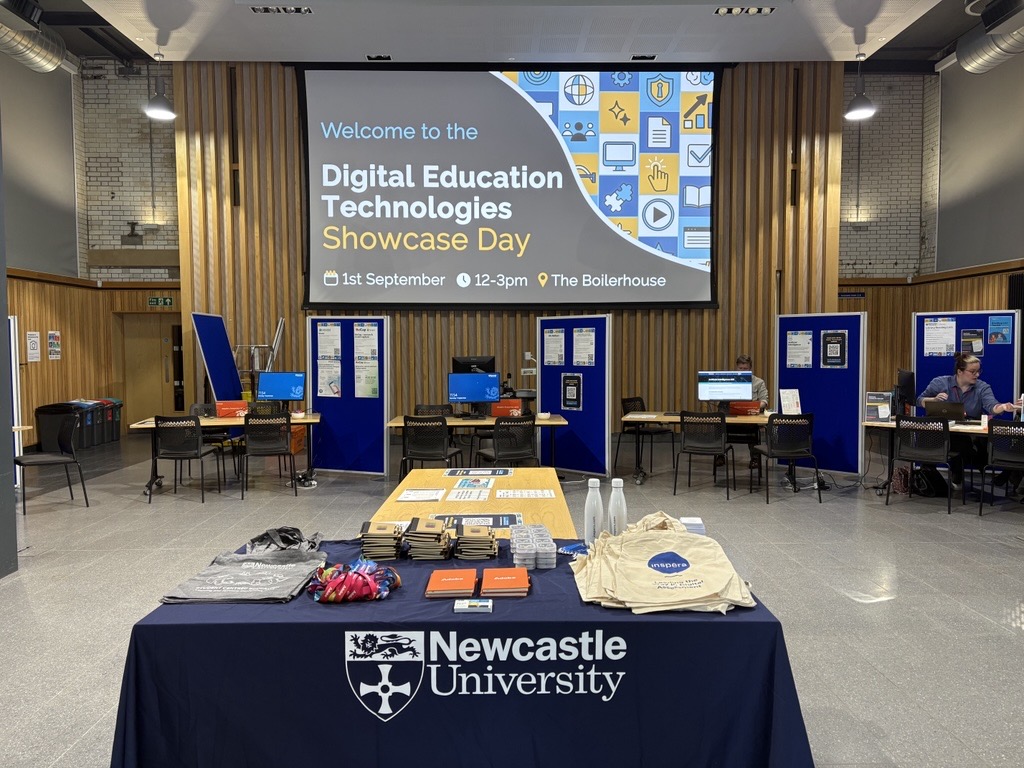
The LET Team were delighted at the turnout on the day and the fantastic conversations that were able to take place. Find out more about the event and what colleagues thought about the event within this blog post.

Stalls set up at the Showcase Day event
Stalls set up at the Showcase Day event.
Continue reading “Digital Education Technologies Showcase Day: Summary”

Vevox Customer Story

Read Vevox’s customer story about why Newcastle University chose Vevox as our go-to student response solution.

Vevox interviewed Vevox Lead, Carol Summerside, of the Learning and Teaching Development Service to find out about our use of Vevox at Newcastle.

You can check out the customer story on the Vevox website.

Vevox Logo
Vevox Logo

Save the Date: Digital Education Technologies Showcase Day 

The Learning Enhancement and Technology Team in the Learning and Teaching Development Service (LTDS) are hosting a Digital Education Technologies Showcase Day on Monday 1st September 2025 between 12 and 3pm in the Boilerhouse.

This is a fantastic opportunity to meet the teams and people behind our Digital Education Technologies here at Newcastle. This will include: Canvas, ReCap, Vevox, Inspera (Digital Exams), Assignments (Canvas, Turnitin and New Canvas Quiz), Buddycheck, NULA, NU Reflect, AI, H5P, as well as the Numbas Team, Digital Adoption (M365 and Adobe) and Library Reading Lists Team.

This event is aimed at both academic and professional services colleagues already using these systems who want to take that step further, as well as new colleagues who want to learn about the digital technologies available.

The event will take place as a drop in, so you don’t need to sign up. If you would like to make any suggestions around what you would like to see at the event, please complete our Microsoft Form.

More information will be shared about this event over the summer.

Vevox: December New Features Release

Vevox have made some updates to their features which were featured in their December product update. Find out more about the new features available, including the introduction of: 

  • Live ‘Before and After’ poll comparisons 
  • Demographic Segmentation   
  • Rich text options for question formatting 
  • Pie chart and number cloud displays available in the PowerPoint add-in 

‘Before and After’ Poll Comparison

It is now possible to run the same poll question twice and use a toggle option in present view after repeating the question in order to see a before and after comparison. This can be done live in your polls for you and your audience to see.  

This feature is only available in the present view of the Vevox Dashboard, and not in PowerPoint. 

Potential use cases: See shifts in understanding in lectures or training sessions. 

The ‘compare with previous poll’ toggle option icon in Vevox present view. 

Demographic Segmentation

It is now possible to identify trends with demographic segmentation functionality in questions. You can use the multichoice question type, to ask a demographic question such as ‘What stage of study are you in?’ at the start of your session. When you run any subsequent multichoice questions, you can choose to display the results by those demographics by using a toggle option. 

This feature is only available in the present view of the Vevox Dashboard, and not in PowerPoint. 

Potential use cases: See how answers or opinions differ among groups of students or participants. 

The ‘show a demographic split’ toggle option icon in Vevox present view. 

Rich Text Options for Question Formatting

Within the question creation area, there are now some rich text editing options available to help you when writing your questions. The new formatting available includes bold, italics, underline, bullet points, and new lines. 

The rich text editor options in the Vevox question creation area.

Pie Chart and Number Cloud Display in PowerPoint 

The option to use pie charts to display results and use number clouds as a question type were made available in the Dashboard present view back in September. They are now available in the Office 365 Vevox PowerPoint add-in. 

Additional information

For more information about Vevox, please see the dedicated Vevox webpage on the University’s Learning and Teaching website and also on Vevox’s own Blog.   

Vevox: Recent new features released!

Vevox have made a few additions and improvements to their features in recent product updates. Find out more about the new features available, including the introduction of number clouds, pie charts and the chance for participants to add labels to their Q&A questions. There are also some suggested use cases on the new features which are optional for use. 

Rating Scale Question Type 

  • This question type allows you to ask participants to rate multiple items on a scale of 1 up to 10 and create labels for the highest and lowest values.  
  • Since you can ask participants to rate multiple items under one question, this reduces the need to create multiple questions. 
  • Suggested use case: rating scale questions could be used for evaluation type questions or surveys. 

Add images to options in multiple choice questions (MCQs) 

  • It is now possible to add an image alongside every answer choice – this means you can use images as answers, or even add them for decorative purposes to help engage with participants.  

Poll creation and updates within Microsoft PowerPoint and Teams integrations 

  • The ability to create polls directly within both the PowerPoint Add-in (as well as Microsoft Teams) is now possible. This is for all question types, including the newly introduced rating scale question type and images as answer choices. 

Participant-driven Q&A labels 

  • As a session host, you can create and choose labels to share with your participants. 
  • Participants can now add these labels to their questions/comments before adding them to the Q&A board. 
  • Suggested use case: If you are delivering a session which includes different topics, you may want the ability for your participants to label questions per topic, so you can answer questions relating to each topic at a time. 

Optional downvotes in Q&A  

  • Within the Q&A function, the ability to like or ‘upvote’ responses is useful to see agreement within your audience on what questions to answer or what views attendees are agreeing with, 
  • It is now possible to ‘switch on’ the option to ‘downvote’ responses. 
  • Suggested use case: This could be used for agreeing or voting on which ‘topics’ should be explored, etc. Perhaps as an opportunity to ‘narrow down’ things. 

Pie Charts  

  • Pie charts are now available as well as bar charts for displaying results on multiple-choice polls. 
  • They are only available for poll questions that have 10 answer options or less. 
  • Suggested use case: Based on what you are asking, you can decide if the data would be best presented as a bar chart or a pie chart. 

Number Clouds 

  • As well as word clouds, it is now possible to host number clouds. 

Interactive text wall for open text questions 

  • The text wall is a new upgrade to how the ‘Open Text’ poll type responses are displayed.  
  • Responses are organised into text blocks to make it even easier to view participant responses. 
  • The blocks are also interactive, so you can quickly click on a response to spotlight it, like you can with the Q&A function. 

Live/dynamic wordclouds in PowerPoint 

  • Live word clouds are now available in the PowerPoint add-in. 
  • This matches the functionality to see the wordcloud update as responses come in like you see when using the Dashboard view. 

Additional information

For more information about Vevox, please see the dedicated Vevox webpage on the University’s Learning and Teaching website and also on Vevox’s own Blog.