Update to the workflow for setting up Turnitin assignments

Over the summer, work took place to improve the security, functionality, and performance of Turnitin assignments in Canvas. This means there is a slight change of workflow when setting up a new Turnitin assignment. 

You are no longer be required to select Turnitin as an “External Tool” from the Submission Type assignment settings. This step occurs on the assignment homepage instead, select Turnitin from the Assignment Settings (3 dots) button when creating a new assignment.
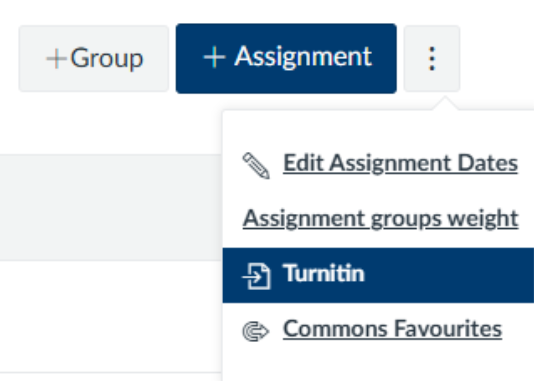
Guidance on the new steps to setting up a Turnitin assignment can be found on the Learning and Teaching website.

Please note that change will only affect how you create new Turnitin assignments; any pre-existing Turnitin assignments will still be available and any Turnitin assignments already set up for 2025/26 will not need to be changed. 

If you wish to copy an assignment from a previous year, follow the guidance for Using the Turnitin Assignment Copy tool.

It is now possible to submit a Turnitin assignment on behalf of a student, via the Turnitin inbox. Simply select ‘Submit on behalf of student’, and a drop down menu appears of all students attached to the course in Canvas. Select the student you wish to submit for, confirm your selection by clicking continue, then follow the steps to choose a file and upload the submission.

If you have any queries, please contact ltds@newcastle.ac.uk
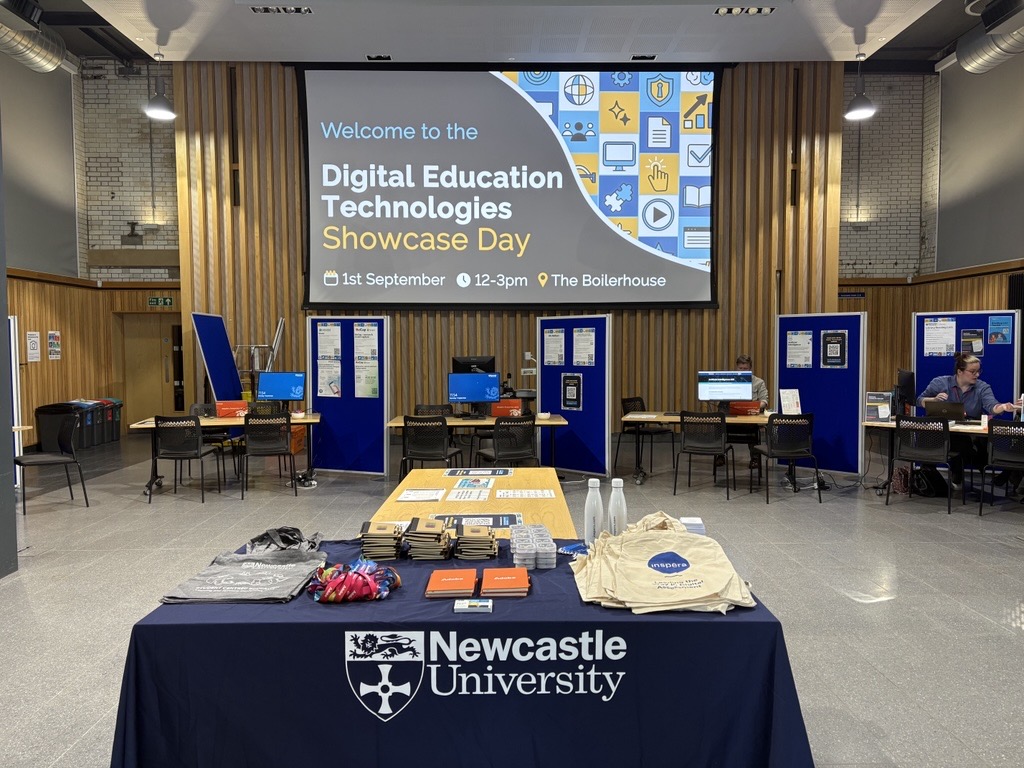
Digital Education Technologies Showcase Day: Summary

The Learning Enhancement and Technology (LET) Team in the Learning and Teaching Development Service (LTDS) were joined by colleagues from NUMBAS, Library Reading Lists, Digital Adoption, FMS Technology Enhanced Learning (TEL) Team and representatives from the Artificial Intelligence (AI) in LTDS.

The LET Team were delighted at the turnout on the day and the fantastic conversations that were able to take place. Find out more about the event and what colleagues thought about the event within this blog post.

Stalls set up at the Showcase Day event
Stalls set up at the Showcase Day event.
Continue reading “Digital Education Technologies Showcase Day: Summary”

Save the Date: Digital Education Technologies Showcase Day 

The Learning Enhancement and Technology Team in the Learning and Teaching Development Service (LTDS) are hosting a Digital Education Technologies Showcase Day on Monday 1st September 2025 between 12 and 3pm in the Boilerhouse.

This is a fantastic opportunity to meet the teams and people behind our Digital Education Technologies here at Newcastle. This will include: Canvas, ReCap, Vevox, Inspera (Digital Exams), Assignments (Canvas, Turnitin and New Canvas Quiz), Buddycheck, NULA, NU Reflect, AI, H5P, as well as the Numbas Team, Digital Adoption (M365 and Adobe) and Library Reading Lists Team.

This event is aimed at both academic and professional services colleagues already using these systems who want to take that step further, as well as new colleagues who want to learn about the digital technologies available.

The event will take place as a drop in, so you don’t need to sign up. If you would like to make any suggestions around what you would like to see at the event, please complete our Microsoft Form.

More information will be shared about this event over the summer.

Digital Assessment Upcoming Training Webinars

The Digital Assessment Team in LTDS have various training webinars covering our Digital Assessment tools starting in the next few weeks.

You can check out the full list of sessions, dates/times and the links to book in our list of sessions.

Inspera Digital Exams

Inspera for Professional Service colleagues

6 November 2024, 10:00 AM – 11:00 AM

Creating and managing exam questions in Inspera

2 October 2024, 2:00 PM – 3:00 PM

7 November 2024, 9:00 AM – 10:00 AM

Marking an Inspera exam with auto marked questions

16 December 2024, 11:00 AM – 12:00 PM

22 January 2025, 9:00 AM – 10:00 AM

Marking and moderating an Inspera exam with manually marked questions

17 December 2024, 11:00 AM – 12:00 PM

23 January 2025, 9:00 AM – 10:00 AM

Digital Assignments: Canvas and Turnitin

Creating and Managing Digital Assignments

2 October 2024, 9:00 AM – 10:00 AM

Online Marking & Feedback (Canvas)

4 December 2024, 9:00 AM – 10:00 AM

Online marking and feedback (Turnitin)

11 December 2024, 9:00 AM – 10:00 AM

Digital Assessment Webinar Training Programme Available

A photo of hands typing on a laptop keyboard.

We are pleased to share our Digital Assessment Training Programme for 2023-24. Our training sessions are delivered as webinars via Microsoft Teams.

Inspera Assessment (the university system for centrally supported digital exams) is supported by the Learning and Teaching Development Service with a range of training options open to all staff.

Follow the links below to find out more about each session and to book onto individual sessions via the University’s elements system. 

Inspera Webinars

Inspera for Professional Service Colleagues

  • 9 October 2023 – 11:00-12:00
  • 8 February 2024 – 10:00-11:00

Creating and Managing Exam Questions in Inspera

  • 23 October 2023 – 9:00-10:00
  • 19 February 2024 – 14:00-15:00

How to Grade using Rubric in Inspera

  • 9 November 2023 – 10:00-11:00
  • 26 February 2024 – 14:00-15:00

Marking and moderating an Inspera exam with manually marked questions

  • 13 December 2023 – 09:00-10:00 
  • 25th January 2024 – 10:00-11:00 
  • 1st May 2024 – 14:00-15:00  
  • 6th June 2024 – 14:00-15:00 

Marking an Inspera exam with auto marked questions

  • 14 December 2023 – 09:00-10:00 
  • 24 January 2024 – 09:00-10:00 
  • 29 April 2024 – 14:00-15:00 
  • 3 June 2024 – 14:00-15:00 

Digital Assignments: Canvas and Turnitin

Creating and Managing Digital Assignments

  • 19 October 2023 – 11:00-12:00 
  • 29 January 2024 – 15:00-16:00 

Online Marking and Feedback (Canvas)

  • 5 December 2023 – 14:00-15:00 
  • 24 April 2024 – 14:00-15:00 

Online Marking and Feedback (Turnitin)

  • 4 December 2023 – 14:00-15:00 
  • 22 April 2024 – 14:00–15:00 

Any queries?

If you have any queries on any of the above sessions, please contact digital.exams@newcastle.ac.uk.

Meet the Team

You can meet the Digital Assessment Team in this LTDS Blog post.

Meet the Digital Exams Team

As the new 2023-24 academic year begins, we’d like to introduce the Digital Exams Team here in LTDS, who lead on the University’s Digital Exams via Inspera. A team of Learning Enhancement and Technology Advisers work together to facilitate digital exams through Inspera Assessment. Inspera Assessment is the University’s Digital Exam system used for present-in-person secure online assessments.

Meet the Team

First up we’ve got Maddie Kinnair who is one of our two Inspera Co-Leads. Maddie joined the team in September 2022 and has worked within the area of Learning and Teaching for 6 years. Maddie first joined HE in 2014 and has previously worked in the School of Computing, HaSS Faculty and within Central Services.

Maddie is also the lead for our peer assessment and feedback tool Buddycheck.

Next up, we’ve got Kimberly May-O’Brien, our second Inspera Co-Lead. Kimberly joined the team in July 2023, having worked at the University since 2019. Kimberly previously worked in the School of English Literature, Language and Linguistics, as well as the central Equality, Diversity and Inclusion team.

Finally, we have Susan Barfield who started working at the University 13 years ago, initially in NUIT as part of the ReCap team, she then joined LTDS in 2019 as lead on online marking and feedback using Canvas and Turnitin, whilst also supporting digital exams.

More Information

You can find out more about Inspera and the training webinars and videos available to colleagues via the LTDS website.

If you have any queries around Digital Exams, you can contact the Digital Exams Team via Digital.Exams@newcastle.ac.uk.

Numbas is the other centrally supported Digital Exam platform. You can contact the Numbas team via Numbas@ncl.ac.uk.

Canvas & Turnitin Assignments: Key Issues

LTDS have offered each School the opportunity to receive a presentation ahead of the new academic year highlighting the key issues that should be considered when deciding how to implement coursework submission and marking procedures.​

For Schools and subject areas who are not able to take up this offer, or as a refresher for those who have been able to, a recording of the presentation and the presentation slides are now available.

​The presentation includes issues that have occurred across the last academic year that have caused extra workload for colleagues and impacted the student experience​, including:

Assignment Types

Canvas or Turnitin Assignment?

Using Similarity Checking 

Online assignment submission principles

Assessment and Feedback Procedure​

Avoiding common issues

Assignment, online marking and feedback guides

Student assignment submission guidance (ASK Website)

​Delegated Marking​

Canvas Delegated Marking

Turnitin delegated marking

Moderated Marking​

Moderated grading and double blind marking

Where to find help

Canvas orientation

All L&T Workshops and webinars

To discuss any of the issues raised further, or if are any issues that we have not captured, please contact LTDS@ncl.ac.uk

Online Assignment Submission Principles

In 2014  University Learning, Teaching and Student Experience Committee agreed a set of principles which stated that all appropriate assessments should be submitted through Turnitin. 

Now we have moved to Canvas as the Virtual Learning Environment, this has opened up some new options for online submission. Alongside the Turnitin tool it is now possible to create Canvas assignments, which offer features like double blind marking, group submission and moderated marking, whilst still using the Turnitin similarity checker.    

Given the new functionality now available, this is an appropriate time to revisit the principles.  The updated Online Assignment Submission Principles were approved by University Education Committee in August 2020.   

These principles are guidelines for how to get the most from submissions, advising that the Turnitin Similarity checks are carried out on Canvas and Turnitin assignments. If you allow students to submit multiple drafts they should not be allowed to see the similarity score, unless the assessment is focused on improving the students’ academic writing. Where appropriate the students’ work should be added to the Turnitin repository.   

The principles recommend that Schools communicate to their students when their work is going to be put through the Turnitin similarity checker.    

Full details are available in the Online Assignment Submission Principles document Online-Assignment-Submission-Principles.pdf  

If you require support creating assignments, or using the marking tools, please see our list of Canvas webinars https://services.ncl.ac.uk/digitallearning/canvas/colleagues/training/ 

or the Flexible Learning 2020 Webinar programme https://services.ncl.ac.uk/digitallearning/contactandsupport/dropins/ 

Support for online marking

Books and a computer screen

There are an extensive range of new resources available on the Digital Learning Website to support you with setting up assignments and marking online.

These include screencasts and TEL Guides that you can work through in your own time, as well as daily webinars and drop ins, if you would prefer some real time support.

A number of resources cover how to get started with Turnitin and how to get the most out of the marking tools in Turnitin Feedback Studio. There’s a summary of what’s available below.

The website also includes support for other tools including Blackboard Tests, Numbas and how to use Recap assignment folders for presentations.

Turntin

Getting started with marking online

For colleagues who want to find out:

  • How to access the Turnitin assignment
  • How to use the main marking tools including bubble comments, inline comments, feedback summary and audio feedback.

Support available


Making use of the additional tools in Turnitin

As well as the tools outlined above you might also be interested in additional marking tools including:

Quick Marks

Comment libraries that can help speed up your marking.

Support available

Rubrics

Rubrics can help the marker provide consistency in marking, and will help students clearly understand what is required to improve on future assignments.


Have a question about marking online?

Come along to an online drop in session, happening everyday, to speak to a member of the team. We can help with questions about the application of any of the tools and approaches to support remote delivery of teaching and assessment.

You can also send your questions to LTDS@ncl.ac.uk or to the IT Service Desk.

New Digital Learning Website

Student working on laptop

We are excited to announce the launch of a new Digital Learning website go.ncl.ac.uk/digitallearning

This new site brings together the digital learning activities taking place across the University, providing you with information, step by step guides and ideas to help you to get the most out of digital technologies for learning, teaching and assessment.  

Visit the site to find out about: 

Canvas– the University’s exciting new Virtual Learning Environment replacing Blackboard from 1st August 2020. Staff and students can find project updates, information about the support available, answers to FAQs and upcoming events. 

TEL Services, lots of information about our centrally supported technologies and systems, digital exams and access to TEL guides providing you with step by step instructions. 

Blended Learning, if you want to explore online educational materials and collaborative learning opportunities with traditional face-to-face delivery, visit these pages for inspiration and support. 

We will be continuing to update the site with resources so please let us know if there is anything else you would like to see that can support you in your role. Get in touch at LTDS@ncl.ac.uk