
Use Tables for Data, Not Layout
Tables should be used to organize data only, not for layout purposes. Ensure tables have a header row that repeats on each page if the table spans multiple pages. Tables are read from left to right and top to bottom, so structure them accordingly.
How To Guides
How to Add Table Header Rows in Tables in Microsoft Word
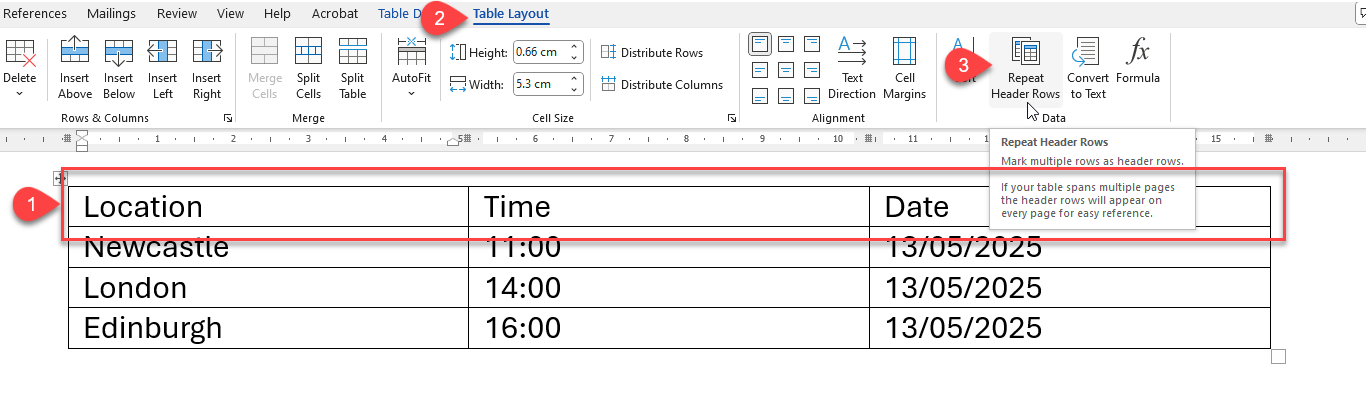
- Select the header row you want to repeat (shown in 1 in the image below).
- Go to the Table Tools Layout tab on the Ribbon (shown in 2 in the image below).
- In the Data group, click Repeat Header Rows (shown in 3 in the image below).
How to Add Table Header Rows in Tables in Microsoft PowerPoint
- Select any cell within the table.
- Go to the Table Design tab on the Ribbon (shown in 1 in the image below).
- In the Table Style Options group, tick the Header Row checkbox (shown in 2 in the image below).
- Enter your column headings in the first row of the table.
