Announcing the University’s new Digital Exam System: Inspera Assessment

In September 2021 we will be launching a new system for centrally supported digital exams, called Inspera Assessment. Implementing the system will enable the Digital Exam Service to: 

  • Deliver secure locked down present-in-person exams on University computers and students’ own laptops, monitored by University invigilators 
  • Ensure that digital exams are accessible to all our students, and enhance the student experience of exams 
  • Increase the University’s digital exam capacity in the long term 
  • Enable more authentic exams by introducing new functionality

New exam types possible with Inspera will include:  

  • Students taking written exams online, by typing their answers on computer, and incorporating drawings or written calculations done on paper into their online answers where needed. 
  • Allowing access to specific online resources or applications during a secure exam, using allow listing functionality. 

Introducing Inspera is a big step forward for education, assessment and feedback at Newcastle University.  Adopting a specialist digital exam system allows us to do much more than would be possible if we continued to use the Virtual Learning Environment for digital exams.

Choosing a digital exam system 

Inspera has been selected as our digital exam system following a rigorous procurement process, which began with requirements mapping workshops in February 2020, attended by over 60 academic and professional services staff.  The procurement was postponed for a year as a result of the global pandemic, and restarted in semester 2 2020/21 when colleagues had the opportunity to feed in any new or updated requirements via an online survey.   

Once the tender was issued key digital exams stakeholders contributed to a rigorous evaluation process to decide on the system that best fit our requirements.  Students and staff were invited to volunteer for usability testing in each system that met the mandatory technical requirements. The team are very grateful to the 36 colleagues, and 13 undergraduate and postgraduate students, who completed a total of approximately 150 hours of usability testing between them! 

Inspera scored the highest overall for both usability, and for technical and functional requirements. 

Rolling out Inspera 

As standard all 2021/22 modules that have a present-in-person digital exam in MOFS will use Inspera.  If the public health situation requires, it will be possible for these modules to use the system for open book take home exams.

Numbas maths assessment system remains an option digital exams that need specialist mathematics functionality.

The system will be available for additional new digital exams from 2022/23 onwards.  There will be opportunities in the coming months to see demonstrations of the software, and learn more about the new types of assessment that it makes possible.  If you would like to learn more now, please contact digital.exams@newcastle.ac.uk

How to get started  

The Digital Exams Service team will contact all 2021/22 module teams with a digital exam in their MOF at the beginning of September, with details of the process for preparing their exam. 

Training will also launch in September 2021, and all colleagues who will be using Inspera in the new academic year are encouraged to sign up.   

Online resources to help students prepare for a digital exam will be published in September, and students will also be able to try out a demo exam in Inspera to help familiarise themselves with the system. 

If you are interested in introducing a new digital exam using Inspera in future, or if you have any queries about a 2021/22 digital exam, please contact digital.exams@newcastle.ac.uk

NU Reflect: engaging with reflective practice

An image of hands typing on a laptop keyboard

ePortfolio is being redeveloped and relaunched as NU Reflect for September 2021 to help support personal, professional, and academic reflection in both modular and non-modular contexts. For improved functionality and ease of use, the system will be split into two landing pages in Canvas:

The NU Reflect landing page will provide the opportunity to record and share reflections, recognise and categorise personal skills being developed, e.g., against the Graduate Framework, and to participate in Groups and collaborate with other students in Communities.

The Personal Tutoring and Support landing page will provide options to engage with tutors/tutees, create and manage individual and group meetings, and for students to access School specific and global support and guidance materials.

The benefits of reflective practice

Incorporating reflection in programmes and modules provides an effective way to support students to understand their own learning processes, and to develop their awareness of their own skills and abilities and evidence these, applying theoretical knowledge to real experiences and supporting employability. Guidance and case studies on how colleagues at the University have incorporated reflective practice are available.

If you have any questions regarding NU Reflect, please contact ltds@newcastle.ac.uk

Coming Soon: Interactive Content Made Easy with H5P

Example H5P Hotspot item – click the + to try it out

Adding engaging and interactive content to your online course materials will get easier very soon.  The University has bought an enterprise licence for H5P for use by colleagues for a year.  Towards the end of August we’ll be making it available to all Canvas and MLE Teachers giving them the ability to make accessible interactive widgets, like the ones on this post. H5P isn’t just restricted to Canvas and MLE, it can be used on web sites too. 

We’re particularly excited about H5P!  Once it is turned on there will no longer be a need to be an HTML guru to do things like: 

  • Add accordions 
  • Add single question formative quiz questions 
  • Generate branching scenarios 
  • Create 360 degree virtual tours … and much more 

H5P has been successfully used by our friends in other universities– it’s very well documented and each content type has its own tutorial. 

We will be using the fully supported (H5P.com) version of H5P and, while we are plumbing this in, if you would like to have a peek at what is in store do check out H5Ps web pages for their documentation.  We would recommend holding fire on creating accounts on H5P.org and wait instead until we have our Newcastle H5P site up and running. It won’t be long! 

How you can help us? 

We have H5P for a one-year pilot initially – so we will need feedback on how you are using it, how your students are finding it, and how you would like our H5P support to develop. 

If you would like to get early access to H5P, receive updates, or help our evaluation please  JOIN OUR H5P COMMUNITY by filling out this form.

Sample H5P Course Presentation – try moving between the slides and answering the questions

Conversations about Canvas Commons

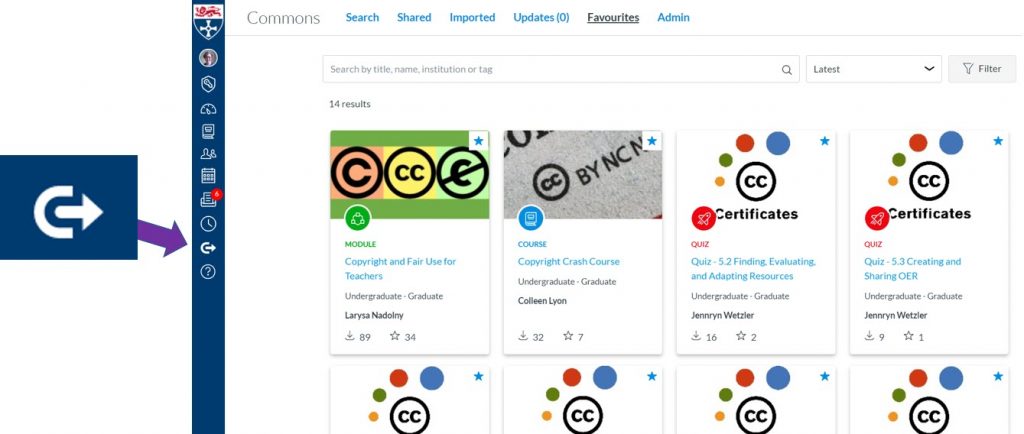
Canvas Commons

All colleagues who have a Teacher role in Canvas can access and contribute to a huge repository of content in Canvas Commons.  You can use Commons to share content with the global Canvas community or choose to restrict its visibility to teachers at Newcastle University.  You can also share content with yourself!

For the Art of the Possible we hosted workshops to explore Commons with Colleagues.  Our participants got stuck in enthusiastically.

What we liked:  

  • Commons is a great way to access generic content e.g. getting started with the library, or to share content across programmes.  (Our induction project team are using Commons to share induction materials with schools this year.)
  • Even if you don’t want to use the content it’s helpful to see how others have approached teaching your subject – it can give ideas and inspiration
  • The ability to gather quiz questions to adapt
  • It could help improve consistency between modules / courses
  • Commons is a good way to hold content that needs to be included in all/some courses – assignment templates, school policies, supports consistency.
  • You can use Commons to hold content that is private to you – making it easy to add content into multiple courses.
  • It makes it easy share content across the institution – rather than importing/exporting or adding permissions
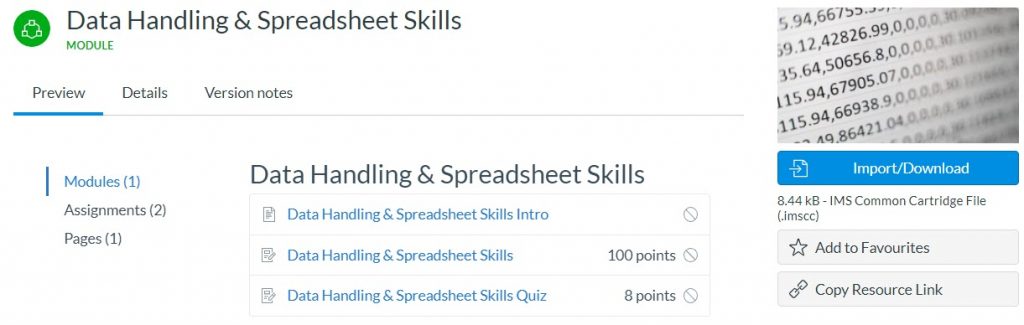
Commons example

Why would you share content to Commons?

  • A way of sharing effective practice, building your reputation, and that of the University
  • Evidence your impact / influence for promotion
  • Building in consistency
  • When you don’t know who specifically will need to access the content
  • By sharing you are contributing to the educational community
  • To share knowledge and expertise

Some Cautions

Several participants commented on the huge amount of material in Commons, we saw how we could filter this by stage (UG/PG) or restrict our searches to content shared just with the Newcastle University.   We saw how we could share permalinks to content elements in Commons to make finding resources easier.

Canvas Commons content isn’t policed so we had good discussions about the need to check content for accuracy, and also to look out for international differences (eg prescribing guidance, legal regulations etc…).  We spoke about how different creative commons licenses could be added to support reuse and about how to give attribution to Commons Content shared with CC licenses.

Coming soon: NU Reflect

Man working on laptop

Driven by a need to engage better with reflective practice, a strategic review of the University’s current ePortfolio system has taken place. In line with the outcomes of the review, and feedback from colleagues and students, the system will be redeveloped and relaunched as NU Reflect for September 2021.

NU Reflect will be relevant to all students and provide the tools to support personal, professional, and academic reflection in both modular and non-modular contexts, as well as providing opportunities for students to discuss their personal development.

Incorporating reflection in programmes and modules provides an effective way to support students to understand their own learning processes, and to develop their awareness of their own skills and abilities and evidence these, applying theoretical knowledge to real experiences and supporting employability.

NU Reflect will also support Personal Tutoring as colleagues can use the system to create and record meetings with any student. Meetings can take place in a variety of contexts, such as Personal Tutor meetings or group meetings for student projects. It will also offer access to individual records of all tutees including their UCAS Personal Statements, assessment marks through NESS, timetable, and student information from SAP.

Guidance and case studies on the use of reflective practice are available, and further information about NU Reflect will follow soon.

If you have any questions regarding NU Reflect, please contact ltds@newcastle.ac.uk

Eportfolio redevelopment workshops

The ePortfolio system is being redeveloped and relaunched for academic year 2021/22 and we would like your feedback. We aim to develop a system that emphasises reflection and supports students to capture and develop their learning activities whilst at Newcastle University, supporting employability in the future.

After consultation with colleagues and students, prototype designs have been created to show how the key tools within ePortfolio will appear in Canvas.

The ePortfolio team will be holding 30-minute workshops for colleagues on Thursday 20 May to explore the prototype designs and to answer any other questions. To sign up, please declare your interest in this sign-up sheet.

Workshop times:

  • 09:00 – 09:30
  • 09:30 – 10:00
  • 12:00 – 12:30
  • 12:30 – 13:00
  • 16:00 – 16:30
  • 16:30 – 17:00

Your feedback is valuable in helping us to redevelop the system to support student reflection and enhance skills development.

If you have any questions regarding ePortfolio, please contact ltds@newcastle.ac.uk

E-ASsessment in mathematical sciences conference (EAMS) 2021

The fourth international conference on E-Assessment in Mathematical Sciences (EAMS) takes place between 21st June and 2nd July 2021. The conference brings together researchers and practitioners with an interest in e-assessment for mathematics and science. 

EAMS 2021 will again be an entirely online conference, following last year’s successful move to a fully virtual format. The conference will feature a mix of live sessions and web-based activities, with plenty of opportunity for discussion and collaboration. 

As many of us have spent much of the last year delivering teaching and assessment online, EAMS 2021 presents an opportunity to share best practice, for experts in the field to present the latest developments, and for those new to e-assessment to get hands-on with software. 

Live talks will take place over Zoom at 9am or 4pm BST (UTC +1) each day, with recordings available later. We hope that the online format and longer timescale will allow participants to engage more deeply with the material presented. 

The call for talk and workshop proposals is currently open. If you have some research or an innovative technique related to mathematical e-assessment that you would like to present, then please submit an abstract at eams.ncl.ac.uk/call-for-speakers

To attend the conference, please register for free at eams.ncl.ac.uk/register

Sharing video – ReCap or Stream?

In an earlier post we showed demonstrated how to host videos on ReCap and Stream and then add them to Canvas.  But how do they compare?

Let’s take a student perspective what are the differences between these two as a consumer?  If you are making notes from video you’ll value things like variable playback speed, the ability to view full screen and the option of viewing or searching the caption/transcript — all of these are easy to find whether video is hosted on Stream or ReCap.

ReCap

ReCap has a handy rewind facility – if you miss something you can go back 10 seconds with one click. It also lets you make private timestamped notes on the video – so you can mark places you want to go back to.  If the video is long you can help students find their way around by adding Content items.

Stream

Stream videos can be added to a watchlist, they can be liked and, if you permit it, students can add comments to the videos.  These will be visible by anyone with permissions to view the video.  Stream helps you find your way around content by converting any timestamps you put in comments or the video description into clickable links.

There are good reasons to turn comments for particular circumstsances – eg are providing feedback, pointing out helpful sections or taking part in peer review.

Permissions

Stream videos are only available to people with @newcastle.ac.uk email addresses, so you’ll need to sign in to view the content above. ReCap videos are normally shared with those on a particular course, but you can make them public as we have done with the first video here.

Buddycheck Updates

There has been a system update to Buddycheck which alongside some improvements to the student view has opened up some new functionality when creating evaluations. The major changes that users will notice are described below. User guidance available on the Digital Learning webpages has been updated to reflect these changes.

Creating an evaluation and reusing questions

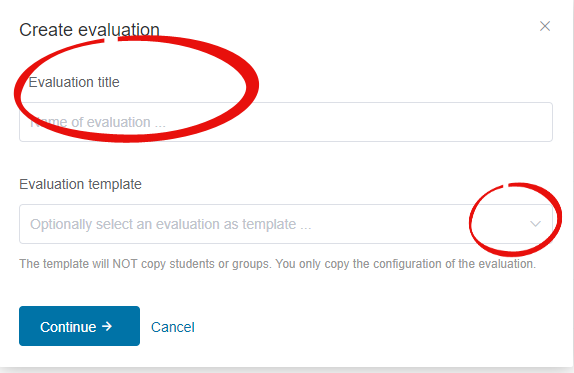
When creating a new evaluation you will now be asked to add a title before moving to the full evaluation set up page. There is now the option to use a previous evaluation as a template. To use existing questions in a new evaluation you now need to select an old evaluation as a template.

Buddycheck create evaluation screen with title entry and template selection hihglighted

Student introduction

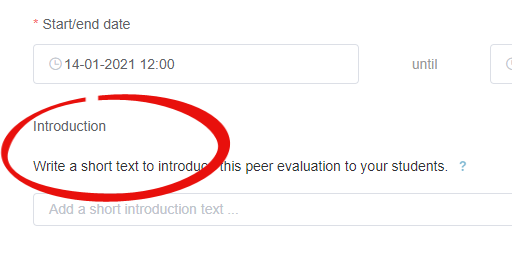
There is now an option to add in an introduction to the evaluation for students. This will appear to students before they begin an evaluation alongside some new additional guidance on the question types included in the Buddycheck evaluation.

Student introduction test entry

Question ordering

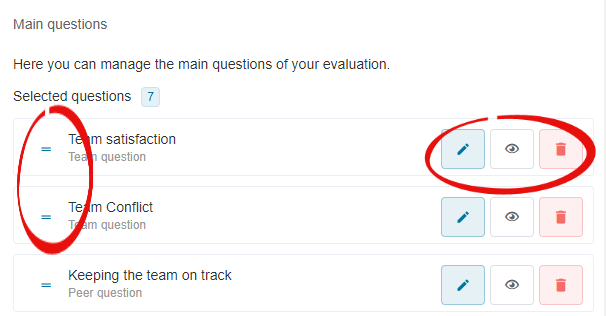
Question order can now be updated by using drag and drop. You can preview, edit or remove questions from an evaluation using the appropriate icon.

question ordering alongside edit, preview and delete icons

Adjustment factor cap

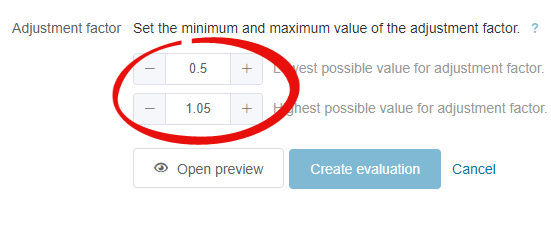
It is now possible to set a minimum and maximum value adjustment factor cap for an individual evaluation.

The adjustment Factor is the average rating of the student divided by the overall average rating for all members of the team. This is used to adjust the individual student mark

It is possible to use either the capped adjustment factor or the original factor with no cap applied when deciding final marks.

For more information on how the adjustment factor may impact marks see the adjustment factor guidance and the adjustment factor excel example.

adjustment factor amendment options

Adding team questions

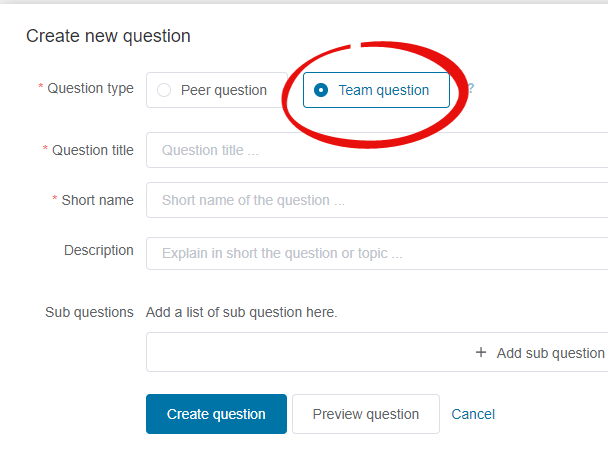
Alongside the existing ability to create scored questions, it is now possible to create team questions that ask students to answer a 5-scale question about the team as a whole (strongly agree to strongly disagree). Team questions do not contribute to the adjustment factor. 

Team question creation screen

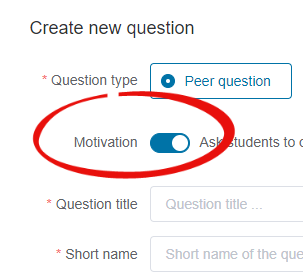
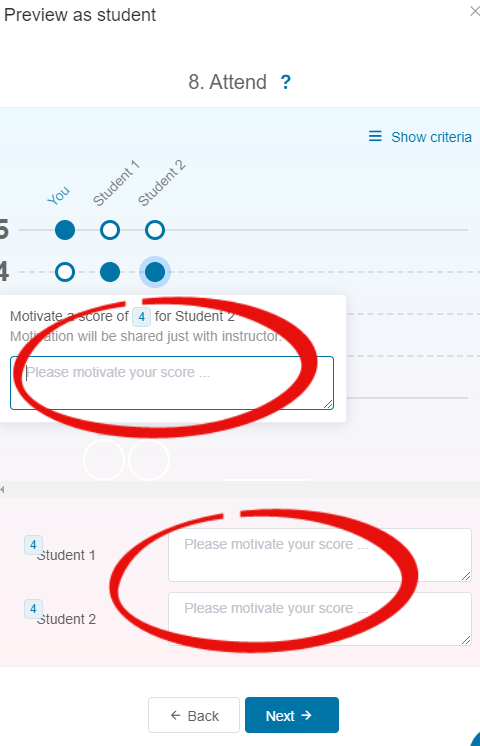
Option to ask students to ‘motivate’ peer question score

When creating a peer question it is now possible to ask students to optionally motivate  scores, i.e. provide a comment as to why they have selected a score for their peer. This is now possible as part of the question rather than through the use of open questions at the end of the evaluation.

For any queries on these changes please contact LTDS@ncl.ac.uk or see the guidance at the Digital Learning webpages.