
Vevox has made some updates to their features in their June product update. Find out more about the new features available and improvements to existing features, including:
- Updated view when adding content to polls
- Introduction of non-polling ‘presentation content’
- Updated ‘Present View’ with improved accessibility
- Improvements in PowerPoint
Updated view when adding ‘content’ to polls:
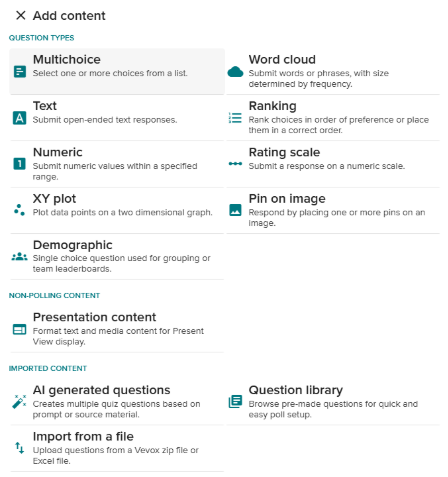
When navigating to the ‘add content’ area, you can see all available polling and non-polling display content that is available to use in one place, which can be viewed in a screenshot below.
Non-Polling ‘Presentation Content’ Now Available
This exciting new feature expands on the capabilities within Present View. It is now possible to add non-polling display content directly into your sessions. This includes: text, images, animated GIFs or YouTube videos.
This new functionality can improve the flow of your presentations. The ‘Presentation Content’ is shared not only in your Present View screen but on every participant’s device too. Note: Any YouTube Video/Audio does not show on participants’ devices.
Vevox have released this incredibly useful function and will continue to develop its functionality.
Updated Present View
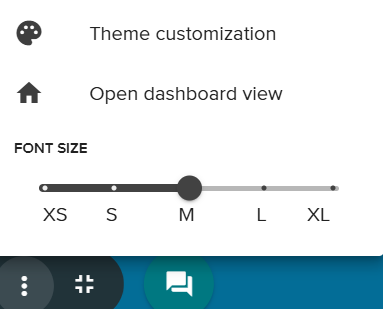
Within the Present View of the Vevox Dashboard, you can now resize fonts without affecting the rest of the display.
You can also display joining instructions, images and QR codes more clearly, with more control over what you display and when.
Polls using images now make better use of space and improve image clarity with a more balanced screen split.
Team Quizzes and Polling improvement in PowerPoint
There have also been some updates to the PowerPoint add-in. Team leaderboards are now available in PowerPoint, as well as an increased range on numeric polls. Or numeric polls you can now have questions with a range larger than 100 or using decimals.
Additional information and training
For more information about Vevox, please see the dedicated Vevox webpage on the University’s Learning and Teaching website, and also on Vevox’s own Blog. The Vevox Product Update: June 2025 is also available to read from Vevox themselves.
Newcastle-hosted Webinars
Colleagues can sign up to training sessions hosted by the Vevox@Newcastle Team (based in LTDS) via Elements. New dates are being added for the 2025-26 academic year very soon.
Vevox-hosted Webinars
Vevox are also running weekly sessions for colleagues at Newcastle to use from 20th August through to 17th October. Find out more about the two sessions available and how to book onto these: