
Vevox have made a series updates to their features in their October product update. Find out more about the new features available and improvements to existing features, including:
- Spin the wheel
- Advanced options in surveys and quizzes
- Advanced scoring options
- Presentation content support for hyperlinks
Spin the Wheel
Spin the Wheel is Vevox’s virtual spinning wheel. This new content type is a way to make random selections in various scenarios. Potential use cases: being used as a random name picker or a topic selector within teaching or training.
This new ‘content’ can be found under the ‘non-polling content’ area of all the content types you can add in Vevox.

You can find out more about Spin the Wheel on Vevox’s website.
Advanced options in surveys and quizzes
Advanced options in surveys and quizzes now include:
Survey schedules – You can now automate the times when a survey is opened and closed for your participants to be able complete it. This can be set within the ‘advanced settings’ area of individual surveys.
Self-paced quiz time limits – Set a limit for how long a participant has to answer a self paced quiz from when they begin. This can be set within the ‘advanced settings’ area of individual quizzes.
Self-paced quiz summary screen options – You now have more control and functionality relating to what participants see when they complete a self paced quiz. You can choose between nothing, score only, score, correct answer explanations and also a leader board. This can also be accessed within the ‘advanced settings’ area of individual quizzes.
Advanced scoring options
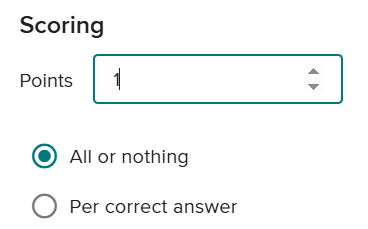
You can now customise point allocations per question. This includes:
- Adjustable points scoring per question – you can now allow individual questions to be worth more than one mark.
- Partial scoring – for questions with multiple correct answers
- Pin on Image – this content type now supports multiple correct answers and improved selection methods for correct answer areas.
You can adjust points per question and enable partial scoring on the ‘settings’ area of individual questions:
Presentation Content Support
Presentation content now supports hyperlinks which are clickable in present view or in participant device. You can embed URLs within the presentation content for you to easily click and share in your session, and for your participants to click and open on their devices.
We are also seeing advancements in terms of video integration – keep an eye out for a future blog post around how you will be able to integrate Panopto videos in Vevox sessions.
Training Webinars
Colleagues can sign up to the LTDS training sessions led by Carol and Kimberly scheduled during Semester 1 and 2 of the new academic year. You can sign up on Elements for the following sessions:
- Using Vevox in PowerPoint (New for 24-25 AY in response to user feedback that further support is needed for those wishing to use the PowerPoint add-in)
Additional information
For more information about Vevox, please see the dedicated Vevox webpage on the University’s Learning and Teaching website and also on Vevox’s own Blog.
If you have any questions, please contact ltds@newcastle.ac.uk.