
Introduction
Inspera have developed a new digital drawing tool which has increased functionality beyond the existing drawing tool. In terms of what is new, the new tool allows you to enable the drawing tool at a question level, rather than at a test level. Colleagues can choose what questions they wish to enable the drawing tool on for their students to use in their Inspera digital exam.
The new Digital Drawing Tool is now available to use on Inspera as of Friday 27th February 2026.
Within this blog post you can find out how you can enable the new drawing tool on your Inspera exam questions in your question sets and the functionality available within the tool.
How do I add the drawing tool to questions?
The drawing tool option is available for all marked question types. It cannot be added to Documents or Form.
To add the drawing tool to your exam questions:
- Navigate to the Author tab and select your question set where you would like to enable the digital drawing tool on your question(s).
- Create a new question or edit an existing question.
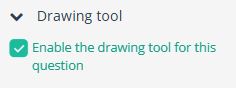
- In the right panel, expand and enable Drawing tool option.
What functionality is available within the Digital Drawing Tool?
Students can draw using the different tools, colours, and shapes and interact with the elements such that each element can be moved, modified, and deleted.
The tool bar available to students includes various options. It is useful to familiarise yourself with this and see what is available and how this may help you give guidance in your question.
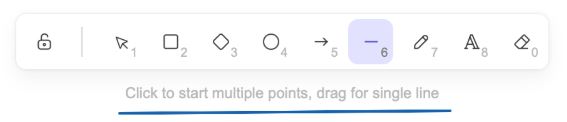
You can test out the the tool via Inspera’s digital drawing tool drawing demo. This is a great way to fully experience the functionality and drawing features available.
Can I let my students practice with the digital drawing tool before their Inspera exam?
Yes, students will be able to test the digital drawing tool in the demo Inspera exams available on the Inspera Academic Skills Kit webpage where it is enabled in actual demo exam questions. They can also test out the the tool on its own via Inspera’s digital drawing tool drawing demo.
Further information and guidance
For further information and guidance on the new Digital Drawing Tool, including how to grade exam questions where you have enabled the tool, please see the Inspera Content Creation Features webpage.
If you have any questions about the Digital Drawing Tool, please contact the Inspera Digital Exams Team via digital.exams@newcastle.ac.uk.