Inspera Customer Story

In this post we will share a recent customer story that Inspera created alongside our Inspera Digital Exam Co-Leads, Maddie and Kimberly.

Customer Story

At the 2026 International e-Assessment Awards in London, Newcastle University was the winner of the Best University Digital Assessment Programme.

The recognition marked a major milestone in a journey that began in the 2021/22 academic year. What started as a rapid response to pandemic-era take-home testing has evolved into a fully invigilated, campus-wide digital exam operation that rivals traditional paper-based testing.

You can read the full customer story on the Inspera website.

Inspera and Newcastle University Logos

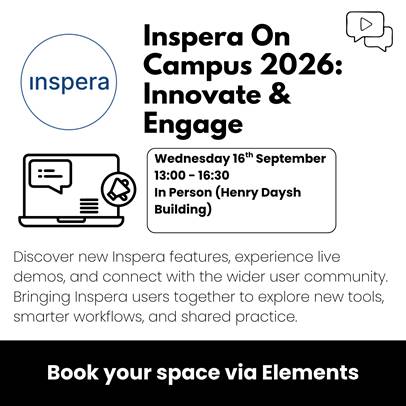
Inspera On Campus 2026: Innovate & Engage event – afternoon of Wednesday September 16th

Inspera users (and those interested in the system) are invited to the Inspera On Campus 2026: Innovate & Engage event on Wednesday 16th September, 13:00-16:30. This event will take place in person in the Henry Daysh Building.

This year’s event has two key focusses:

  1. Sharing applicable updates to the system with our users that will be available from the new academic year.
  2. Opportunity for users to take part in Inspera-led discussion sessions with other Inspera users across our University.

If you’d like to join us, please sign up to attend the event using the Elements booking form. This will enable you to keep up to date with communications about the event and assist with our planning. The full agenda will be released in later this month with details of the new features we are adopting.

If there is anything that you’d like to find out about at the event, please email digital.exams@newcastle.ac.uk.

Inspera New Digital Drawing Tool

We are excited to share a new Digital Drawing Tool is available in Inspera, which has increased functionality compared to the existing legacy tool. From 2026-27 academic year, the existing tool will be removed in place of the new drawing tool only.

How is the tool different from the existing tool? 

Previously, our team would enable the existing drawing tool across your entire test (if you selected this on your Digital Exam Form), where it would be available for students to use in any/all essay questions in your question set. The new tool allows you to enable the drawing tool at a question level, rather than at a test level. Colleagues can choose what questions they wish to enable the drawing tool on for their students to use in their Inspera digital exam. 

Continue reading “Inspera New Digital Drawing Tool”

Inspera: Sharing Best Practice Event 2025

Introduction

Colleagues in the Inspera Digital Exams Team of the Learning and Teaching Development Service (LTDS) invited colleagues from Inspera Assessment to visit Newcastle University for the third year in a row to host an on campus event with our users.

Fiona Orel and Ishan Kolhatkar visited Newcastle on Wednesday 5th November for this year’s ‘Inspera: Sharing Best Practice’ Event.

Our Inspera users were invited to come along to find out updates about using Inspera at Newcastle and upcoming features on the Inspera roadmap. The event is a great opportunity for colleagues to learn about how they can enhance their use of Inspera and ensure best practice. The Inspera Digital Exams Team arranged for some demonstrations on features and functionality listed in the agenda below.

The agenda included:

  • Welcome and Introduction – An update from the Inspera Digital Exams Team and update from Inspera Assessment around their Roadmap
  • Inspera demonstration – Rubrics Functionality, Manually Marked Multiple Attempts Assessments and Feedback Release Features
  • Questions and Discussion – Colleagues submitted their questions for Inspera to answer.
Continue reading “Inspera: Sharing Best Practice Event 2025”