
Vevox have made a series updates to their features in their April product update.
Find out more about the new features available and improvements to existing features, including:
- New question type: Matching
- Introduction of ‘Quick Polls’
- Customisation of Countdown Timer Sounds
- Timer Display
- Improvements to the AI Quiz Generator
- PowerPoint Slides Embed in Present View
Matching Question Type
‘Matching’ is a new question type allowing you to ask participants to match items with their corresponding answers. You can use this question type for anything that benefits from pairing two lists. Matching questions are now available for use in live polls and surveys. Example use cases include definitions, concepts and images.
Quick Polls
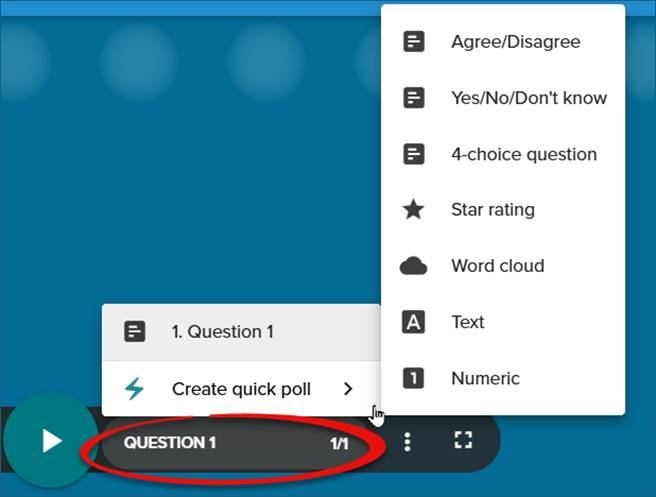
Quick Polls allow you to launch a poll instantly while presenting, without creating it in advance in your dashboard. When launching a quick poll, you can choose from a selection of template questions including agree vs disagree, yes/no/don’t know, word cloud and text response.
To access quick polls select the question menu within the Present View (circled in the screenshot below) and then select ‘Create quick poll’. From here you can pick from the list of quick polls. Vevox has shared guidance on how to use quick polls.
Customised Countdown Timer Sounds
Custom Countdown Timer Sounds now makes it possible to upload your own MP3 audio to play alongside your countdown timers. For example, you could enable a more calming audio if you are using this in a wellbeing session or make use of fun sounds for quizzes or student engagement.
Countdown timers and sounds are optional within the system and Vevox does have its own inbuilt timer sounds available to you.
Timer Display
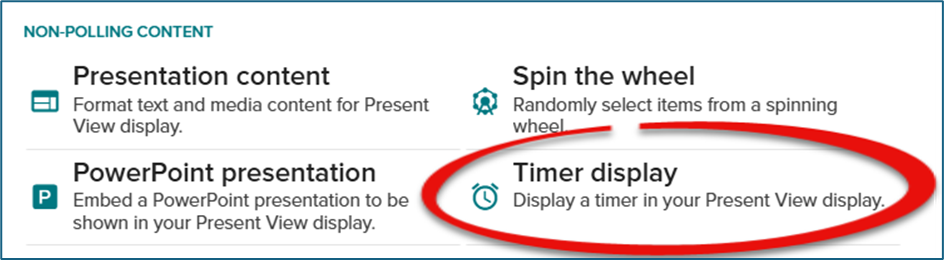
The Timer Display is a tool to add a clear, visual countdown to your session. It helps you manage pacing, keep activities on track and set clear expectations for your audience.
This feature could be used for breakout exercises, session timings (e.g. 5-minute break) or timed challenges.
You add a ‘Timer display’ as a piece of non-polling content.
Improvements to the AI Quiz Generator
There have been a few updates to the functionality of the AI quiz generator. These include:
- Ability to add subtopics
- Option to confirm who your target audience is
- Ability to upload multiple documents as your source material
- Ability to use a website URL as your source material
Embed PowerPoint Slides in Vevox Present View
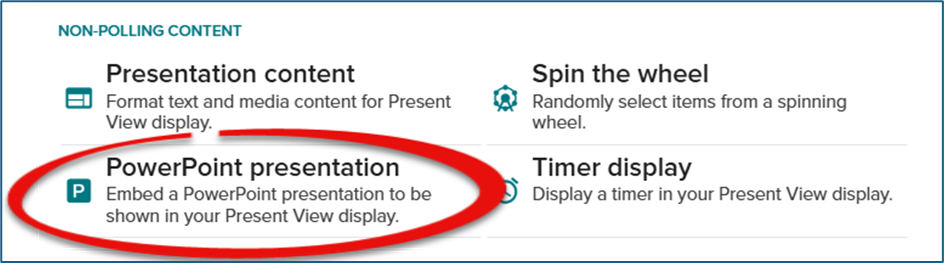
You can now embed PowerPoint Online presentations into Vevox Present View. This allows you to incorporate PowerPoint slides directly within the Vevox platform removing the need to switch between PowerPoint and Vevox.
Add a ‘PowerPoint presentation’ as a piece of non-polling content. Please see the Vevox guidance on how to embed PowerPoint Online into Vevox for further information.
Note: you can still use the Vevox PowerPoint 365 Add-In to run your Vevox sessions in PowerPoint if you wish.
PowerPoint Add-Inn Performance Improvements
There are also two key performance improvements for the Vevox PowerPoint add-in:
- Faster processing and results display once the poll has closed.
- Improved formatting for Polling questions with long titles and/or questions options.
Further support
You can find out more about Vevox as an Audience Interaction System (AIS) via our Vevox Learning and Teaching webpage.
User guides for all Vevox functionality are available on the Vevox Helpsite.
If you have any questions, please contact LTDS@newcastle.ac.uk.