
Canvas has informed us that they will no longer develop or improve Classic Quizzes and recommend using New Quizzes instead. Although there is currently no confirmed date for the removal of Classic Quizzes, we also recommend making the transition to New Quizzes where possible, particularly for any new quizzes you create.
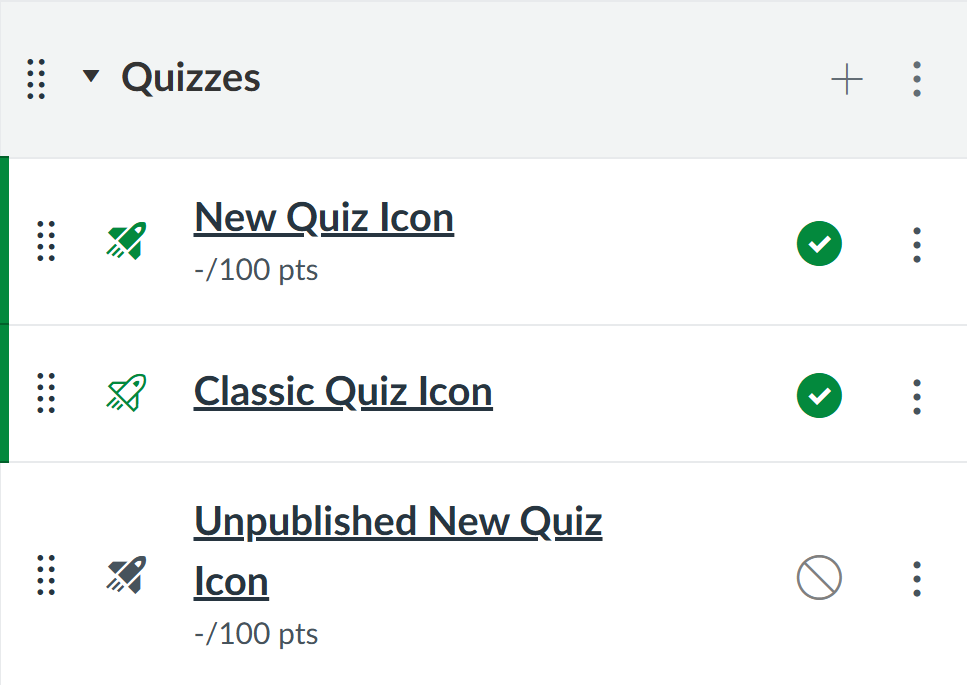
You can identify whether a quiz is Classic or New by looking at the rocket icon next to the quiz name:
· A solid rocket icon indicates a New Quiz.
· An outlined rocket icon indicates a Classic Quiz.
· A greyed-out icon indicates that the quiz is not published.
To help you understand the differences between Classic and New Quizzes, please see the feature comparison table.
If, after reviewing the features, you feel your Classic Quiz is suitable for moving to New Quizzes, Canvas provides a straightforward migration option. Please see the guidance on how to migrate a Canvas quiz to New Quizzes.
If you have reviewed the New Quizzes features and do not feel that your quiz can currently be migrated, please get in touch via LTDS@newcastle.ac.uk to arrange a Teams call to discuss your requirements and the options available.