
You can now choose to mark per student or per question:
Within new Grade navigation, Graders can choose to mark submissions per student submission or per submitted question:
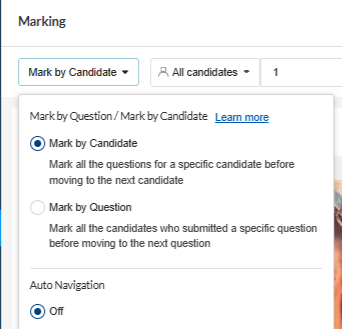
Important Note: For Graders who’ve been using Inspera prior to academic year 2026-7, please note that the marking per student (called ‘Marking by Candidate’ within Inspera) gives you the most similar Grading experience to that which you’ll be already familiar with. However when moving to a different student the system will automatically select their first question. Previously, navigating between student would not change the selected question.
Marking per student: ‘Mark by candidate’ enables graders to move between students using the search/drop-down feature (showing a list of all students) or by using the ‘next’ blue arrow button on the right, which will move to the next student:
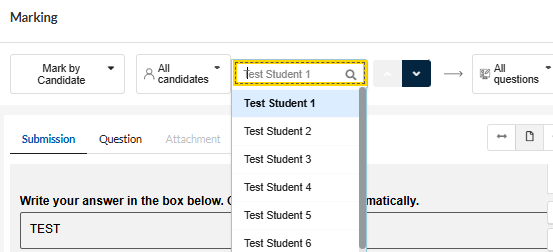
Please note: if you are moving between students, the question currently viewed will automatically show for the next student i.e. if viewing Student X Question 1, and you press the blue ‘next’ button you’ll be viewing Student Y Question 1. Important Note: if the next student has not answered the current question, the marking flow will divert to the next available question. This can occur for exams using Candidate Selected Questions.
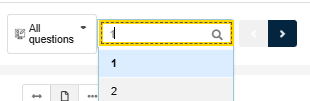
To navigate using questions submitted by your selected student, use the search/drop-down (showing a list of all questions) or by using the next arrow button on the right, which will move to the next question:
Marking per question: When marking by question, the Grader will first select the question they want to mark and then navigate through the candidates who submitted that question. Turn this on within the marking drop down:
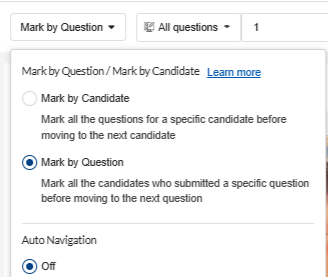
The question information will display on the left, before the candidate selection. All the questions that were submitted (by at least one student) are listed and can be navigated using the drop down arrows:
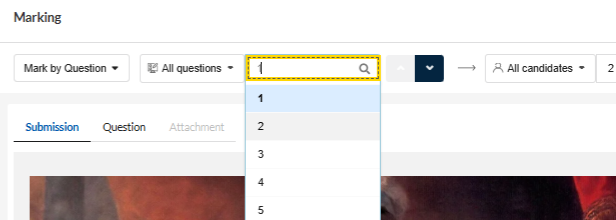
When marking by question, the Grader will select the question they want to mark and then navigate through the students who submitted that question.
If the Grader selects a question and only certain students submitted that question, then only those students will be listed within ‘all candidates’ to the right hand side. When clicking on next/previous candidate, the Grader will move to the next student who submitted the pre-selected question.
Queries are welcomed to Inspera@ncl.ac.uk