Leading Edge Curriculum Resources

To support curriculum transformation LTDS colleagues have redeveloped a number of new resources.

A new LEC landing page on the Learning and Teaching Site

Our University Learning and Teaching site is provides guidance on learning and teaching, digital technologies and professional development. We have taken the “effective practice” branch and reorganised it around the eight sections of LEC.   

You can see the new site here: Leading Edge Curriculum | Learning and Teaching @ Newcastle | Newcastle University 
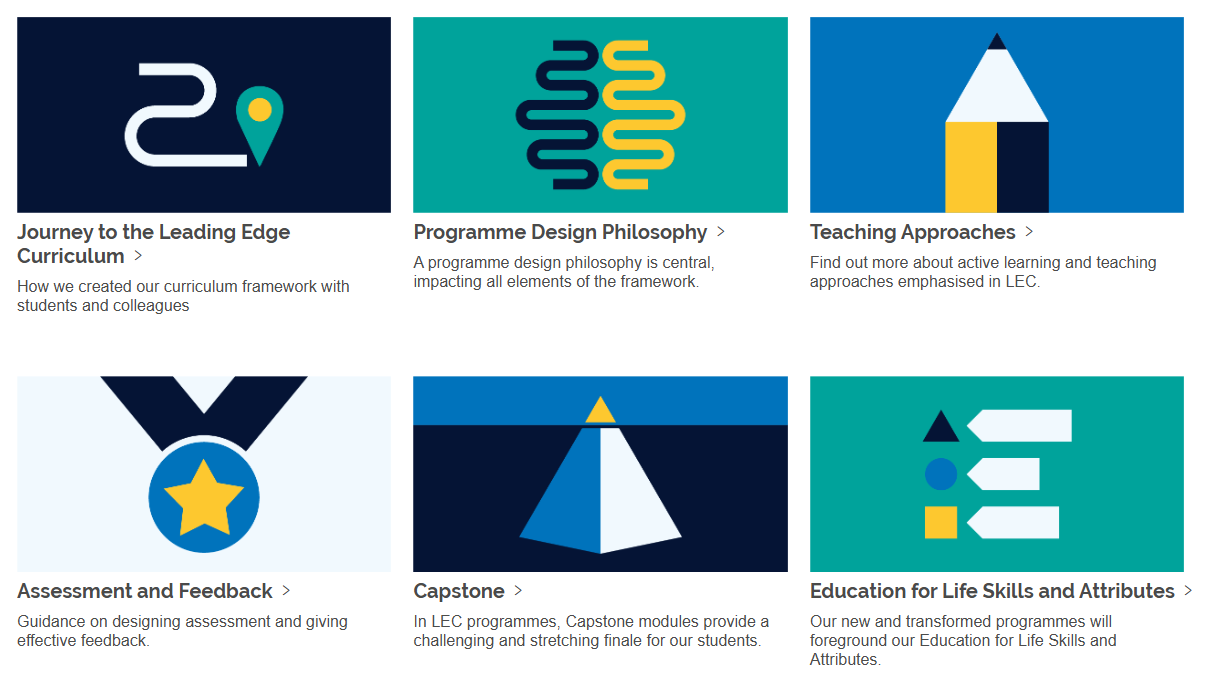
Screenshot from https://www.ncl.ac.uk/learning-and-teaching/lec/

New pages include: 

The site has prominent links to the Enabling Policy for the LEC (EPGS) and to the Education Strategy SharePoint site where you can find out more about the LEC Implementation support and progress. 

LEC Orientation Canvas Course

We have also published a short self-paced Canvas course designed for colleagues to work through before curriculum transformation. It outlines the benefits that our Leading Edge Curriculum Framework will bring, introduces key LEC requirements, and directs you to key resources that will be useful to explore before a supported design period supported by the Curriculum Transformation Team.

The orientation acts as a starting point for a more detailed study of the LEC Framework and supporting policy.

You can self enrol using this link: https://ncl.instructure.com/enroll/7NW9GC

We are continuing to develop these resources

Colleagues are working on new resources we will be adding in examples from the Curriculum Transformation pilot, guidance from the Encounters workstream and LEC Fellows, as well as case studies illustrating LEC parameters.  

Do get in touch (ltds@newcastle.ac.uk) if you have feedback or have examples of practice you would like to share.


New assessment resources: assessment briefs and programme perspectives

We have recently added two new assessment resources to the Effective Practice branch of our Teaching and Learning site.

Both of these draw on the outputs and findings from our Assessment and Feedback Sprints. These brought together student, academic and PS colleagues to tackle common issues that student experience with assessment.

In this post we’ll fill you in on the background to new resources.

Continue reading “New assessment resources: assessment briefs and programme perspectives”

Art of the Possible – Retrospective

On Friday, at the end of this Art of the Possible event, we got together with Dr David Kennedy, Dean of Digital Education, to look back over the main themes and to find out his views on some of the common questions and challenges running through the week.

Many thanks to David for this conversation, to all our speakers and presenters who have contributed over the week, and to colleagues who have come along and shared their insights and questions.

Let’s keep these conversations going!

You can catch up on recordings and resources from links on this blog:

Key University Resources on AI

The art of the Possible banner with the dates 26-30 June 2023

Microsoft and AI

In this Art of the Possible presentation, Jack Ennis and Jo Robinson-Lamb from NUIT’s Digital Adoption Team walked us through some of the AI driven productivity tools that are already available in Microsoft products and then whetted our appetites with previews of Microsoft products being developed now.

Their Microsoft and AI presentation covers:

  • Introduction to NUIT Digital Adoption Team
  • What is possible now – Editor, PPT Designer, MS Designer, Bing Chat
  • What is coming – Copilot

The Copilot videos that Jack played in the session were omitted from the recording – to see them follow the links we have added in the recording or go to them directly with the links below:

If you would like to keep up to date with the latest news and events relating to M365, please join Teams@Newcastle.

The art of the Possible banner with the dates 26-30 June 2023

Putting AI to work

On Wednesday morning as part of our Art of the Possible week, we heard from three colleagues who have been working with and using AI. They brought very different perspectives:

  • Dr Stephen Parnell, from APL, described his experiments with Midjourney, an image generating tool. Stephen outlined and illustrated how he has used AI generated images to explore his own research interests and catalyse creativity with his students. (View Steven’s slides).

  • Dr James Stanfield, ECLS presented reflections from his students’ use of AI in a Masters module, revealing their sophisticated multi-tooled approaches. For his students of Technology Enhanced Learning, James encouraged experimentation and positive use of AI to help support their learning.  Acknowledging the use of AI was an integral part of their assessment. (View James’ slides)
  • Dr David Grundy, NUBS, described his own use of AI as a productivity tool and walked us through how he uses AI to produce audio podcasts feeding the output from ChatGPT prompts into his own AI generated cloned voice to make MP3 files. (View David’s slides)

You can catch up on this session from the recording below:

Use the contents page in the recording (^) to jump to specific segments or scroll to the following timestamps: Stephen 0.00; James 16:16, David 34:24

Embracing AI – opening our Art of the Possible Week

We were delighted to welcome Debbie Kemp, MBA director from Kent Business School to open our Art of the Possible week. Debbie described her practical experience of openly embracing AI in her module on “Delivering Innovation”. She shared her initial fears and concerns and reflected on the response of students and the wider impact of AI use on their programmes.

We said to the students “we have taught you how to use AI in an ethical way… use it”

Many thanks to Debbie for such an engaging talk and for giving permissions to share the recording. It generated many questions and comments.

The art of the Possible banner with the dates 26-30 June 2023

Art of the Possible – AI in Education 26-30 June 2023

This year there have been many conversations about AI in Education – at School level, with our students and between colleagues. Next week we have further opportunities to keep the conversation going and learn together. What’s clear is that no one person is the expert in this fast moving space.

Over the week we have a number of in-person and online events. We will also be adding to this blog over the week. Come back to see posts about AI, outputs from our events and the next AI themed episode of our Learning and Teaching @ Newcastle podcast.

Add your thoughts

Throughout the week we will be collating questions and opportunities and adding them to two Padlet boards. Get involved by adding your own thoughts to these boards or upvoting ideas that resonate with your own. At the end of the week we’ll revisit these with our Dean of Digital Education, Dr David Kennedy.

Questions about AI

Made with Padlet

Open Questions Padlet in a new window

Opportunities

Made with Padlet

Open Opportunities Padlet in a new window

What’s on over the week

We have a few places left on many of our in-person and online events:

Monday 26 June 

  • Embracing the AI Landscape: Debbie Kemp from the University of Kent will open our week, sharing and reflecting on how she has incorporated AI in her teaching and assessment. 
    Online 10:00-10:45 
  • Introduction to AI: a one-hour overview from LTDS and FMS TEL colleagues.   
    In person 14:00-15:00 

Wednesday 28 June 

  • AI and Assessment: a one-hour session exploring the impact of AI on assessment.  
    In person 10:00-11:00 
  • Embracing AI @Newcastle: find out how colleagues at Newcastle University are embracing AI in their teaching and learning.  
    Online 14:00-15:00 

Thursday 29 June 

  • Hands on Explore AI Tools: Join us in the Herschel Learning lab to try out a range of AI tools. 
    In-person, bring your own device: 10:00-11:30 
  • Microsoft 365 and AI: Join the NUIT Digital Adoption team for an overview of what is currently possible, and what the future holds, for AI in Microsoft 365.  
    Online 14:00-15:00 

Friday 30 June 

The art of the Possible banner with the dates 26-30 June 2023

Visualising programme level assessment

As part of our Assessment and Feedback Sprint Series. A small team of students and colleagues have been investigating the question: 

How do we articulate a meaningful programme experience that ensures a cohesive assessment journey for all of our students?

Feedback (Stage Surveys, NSS etc.,) tells us that students and colleagues struggle to see assessments from a programme perspective and this disconnection can lead students to feel like assessment isn’t part of a wider programme and that their skills/feedback don’t link across modules and assessments.  

Being able to visualise the assessment journey across a stage or programme is important because, as one colleague said,

“An assessment journey builds confidence in the education (and the education provider) and underscores the importance of each individual assessment towards an overarching goal. Articulation of assessment journeys allows for broader reflection and helps explain the skill development (rather than focussing on siloed, module specific content).”

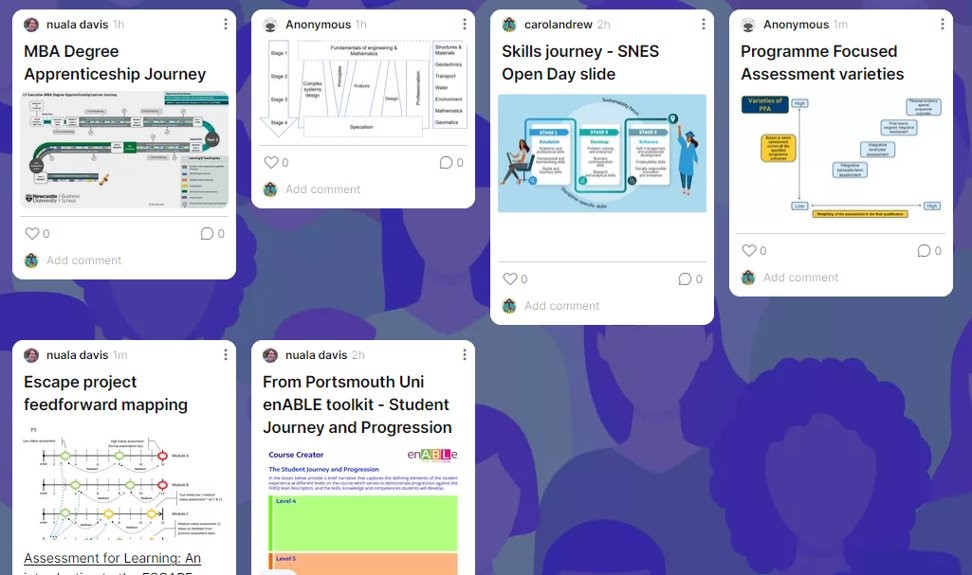
An overview of some of the visuals we found from within Newcastle University and other HE Institutions are shown below. In summary, we found a range of approaches, often highlighting the ‘journey’ through the stage or programme, making it easier for students to reflect on progress. 

What have we created?

Using these findings, we created some template visuals which were then validated by colleagues and students along with feedback incorporated from our first showcase.

We decided to create a variety of templates to reflect diverse practices/skillsets across programmes and areas. Some are more suitable for Semester-based programmes and others for block-taught programmes. 

You can explore these yourself:

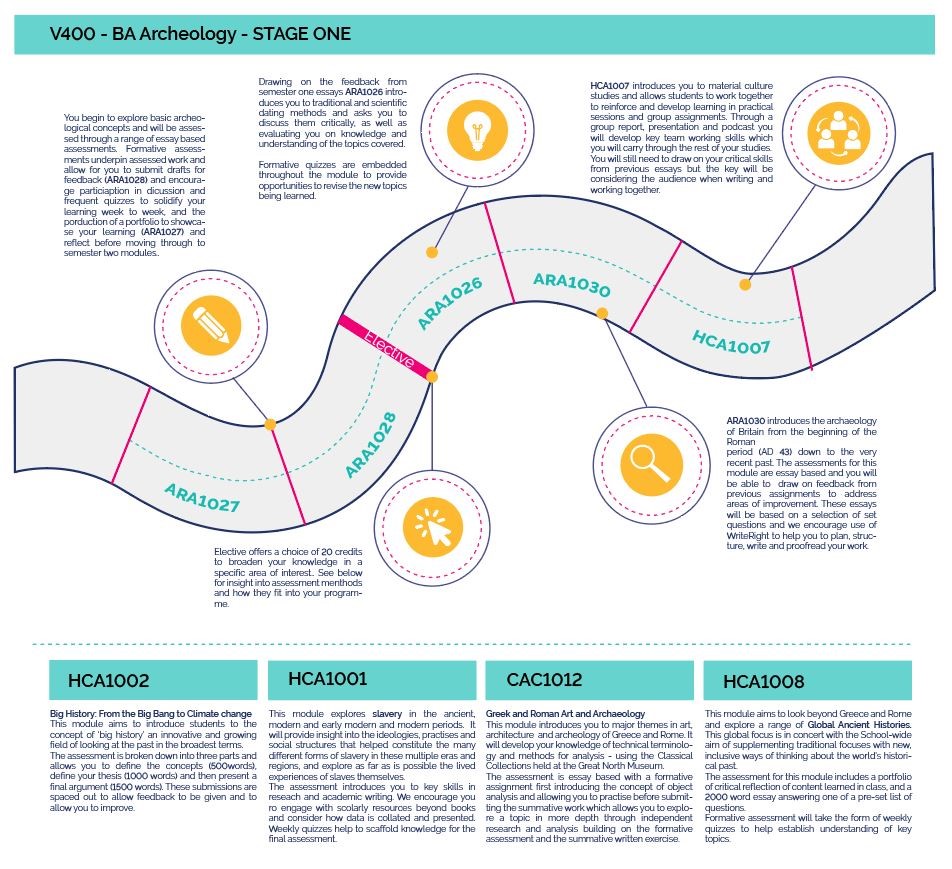
We started by looking at a standard linear stage one programme – V400 BA Archaeology. We initially had a large amount of text on the visual explaining each assessment and how it aligned to the wider programme learning objectives. However, it quickly began to look overwhelming.

We then started to explore using H5P as a way to keep the visual relatively simple but incorporate pop up boxes to make it more interactive and engaging. The version below has dummy text – click on the questionmarks to see how it would work.

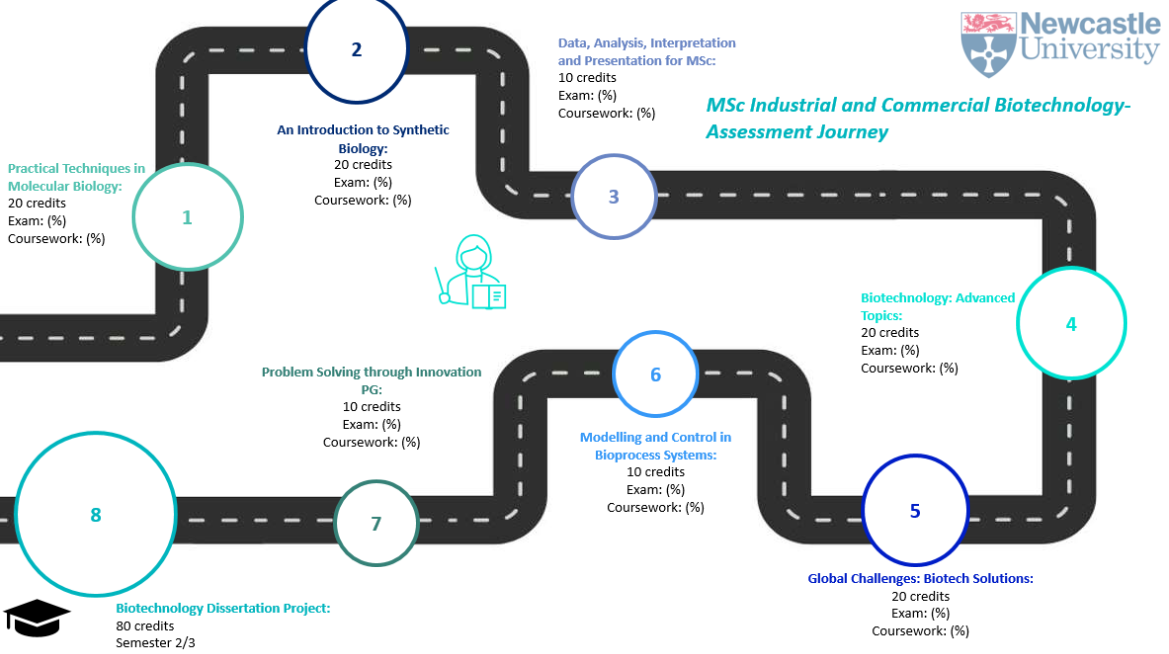
We also considered how to visually represent a block-taught postgraduate programme and incorporated feedback from a Degree Programme Director (DPD) to represent larger-weighted modules with bigger circles. The DPD said this would be a useful tool for both staff and students including at recruitment and Induction events. 

The intention is that these editable templates will be useful for both students and programme teams to visualise assessment across a programme or stage. The visual could be produced as part of a workshop reviewing programme level assessment or could be a standalone tool designed to be student-facing. 

Find out more about our Sprint

We presented our Sprint adventures at the Sprint Showcase event on Friday 10 March, and you can watch the recording here:

To find out more about the Assessment and Feedback Sprint Programme contact Conny.Zelic@ncl.ac.uk in the Strategic Projects and Change Team.

Interactive Content with H5P

Introducing H5P in Canvas (5 min video tour)

Adding engaging and interactive content to your online course materials just got easier with H5P.  

This new online tool allows you to create custom learning resources such as branching scenarios, accordions, interactive images and videos, 360 degree virtual tours, simple formative quizzes, and so much more.   

The feedback we have from colleagues is that it is easy to use and that the built-in tutorials walk you through what to do.  No coding or software is required – all you need is a web browser.   

In Canvas you can work with H5P from the Rich Content Editor. 

H5P icon on the Canvas editing toolbar

MLE and blog authors can create H5P content to embed in pages and posts. 

Try it out 

Coming Soon: Interactive Content Made Easy with H5P

Example H5P Hotspot item – click the + to try it out

Adding engaging and interactive content to your online course materials will get easier very soon.  The University has bought an enterprise licence for H5P for use by colleagues for a year.  Towards the end of August we’ll be making it available to all Canvas and MLE Teachers giving them the ability to make accessible interactive widgets, like the ones on this post. H5P isn’t just restricted to Canvas and MLE, it can be used on web sites too. 

We’re particularly excited about H5P!  Once it is turned on there will no longer be a need to be an HTML guru to do things like: 

  • Add accordions 
  • Add single question formative quiz questions 
  • Generate branching scenarios 
  • Create 360 degree virtual tours … and much more 

H5P has been successfully used by our friends in other universities– it’s very well documented and each content type has its own tutorial. 

We will be using the fully supported (H5P.com) version of H5P and, while we are plumbing this in, if you would like to have a peek at what is in store do check out H5Ps web pages for their documentation.  We would recommend holding fire on creating accounts on H5P.org and wait instead until we have our Newcastle H5P site up and running. It won’t be long! 

How you can help us? 

We have H5P for a one-year pilot initially – so we will need feedback on how you are using it, how your students are finding it, and how you would like our H5P support to develop. 

If you would like to get early access to H5P, receive updates, or help our evaluation please  JOIN OUR H5P COMMUNITY by filling out this form.

Sample H5P Course Presentation – try moving between the slides and answering the questions