Digital exam system usability testing

Are you a member of academic or professional services staff interested in digital exams?

The digital exam system procurement process is going ahead as planned, and we are making adjustments to enable staff to participate in usability testing while remote working. 

We appreciate that this is a very busy time for colleagues across the University. However, it is necessary to go ahead with usability testing now to support the digital exam system procurement process.  If you are interested and have capacity to participate in usability testing your contribution will be very valuable. 

We are looking for volunteers to test digital exam systems, to help assess how user friendly each one is.  Testers’ feedback will be a key part of the evaluation stage of the tender process, and have a direct impact on which digital exam system the University introduces from next academic year.   

Usability testing is open to all University staff.  You can choose to test from the perspective of either: 

An exam administrator testing how to create exam settings, and manage marking and moderation processes.  Approximately 90 minutes per system. 

An academic testing how to create exam questions, and carry out marking and moderation.  Approximately 2 hours per system. 

To participate you need to commit to test all of the systems that meet the University’s mandatory requirements, which we estimate may be between 2 and 4 systems.  This is required to ensure that the evaluation process is fair, and we’ll be able to confirm the number of systems being tested the week before the testing begins.   

Full instructions and video demonstrations will be provided for each testing task. You can complete the testing tasks at any time that suits your schedule over the usability testing period from Monday 1 June to Monday 15 June. 

To register your interest in doing usability testing please complete this form by 12 noon on Tuesday 26 May 2020.  Please contact digital.exams@newcastle.ac.uk with any queries. 
Fast Web view in .pdf documents

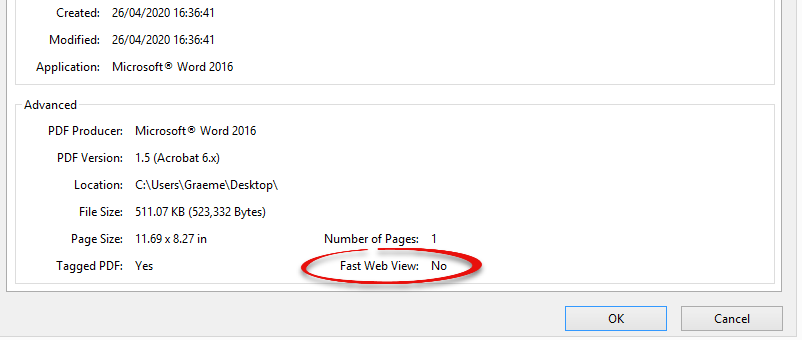
When viewing .pdfs online, there is a feature called fast web view. This is meant to help users by opening the first page of the .pdf before the rest of it has loaded, but sometimes this causes an error in Google Chrome. This results in only the first page being visible.

When creating exam questions, please ensure that any .pdfs created to not have fast web view enabled to ensure all students will be able to open the document in any browser.

To check to see if a .pdf has Fast View Enabled, look at the properties of the document (File > Properties). In the bottom right hand corner it will say Fast Web View Enabled: [Yes or No]


PDFs with Fast Web View are normally created from the Adobe suite of software tools. If you are creating a .pdf from Word you will not have this issue.

To disable fast view in Acrobat, go to Edit > Preferences > Documents > Save Settings > Save As optimizes for Fast Web View [deselect] .

Canvas training now available: Book a session now

Canvas logo

You can now book onto one hour webinars which will cover the core functionality and exciting new features of Canvas, providing colleagues with the skills and knowledge to set up their Canvas courses ready for the 2020/21 academic year. All sessions are available to book on Elements.

You can find details of sessions below and further information and resources are available at services.ncl.ac.uk/digitallearning/canvas/colleagues/ (including answers to Canvas FAQs) and on NUConnect. 

Get Started 

Canvas Fundamentals

A one hour introduction suitable for all staff.

Begin your Canvas journey with this workshop which will explain how to navigate the key areas of Canvas and how to utilise Canvas to provide engaging learning materials and communicate with students.

Sign up to Canvas Fundamentals.

Canvas PS session 

For Professional Service colleagues who will be responsible for supporting Canvas in their academic unit.

Sign up to the Canvas PS session.

Find out more with these webinars

Assignments

You will learn about:

  • How students interact with Canvas when submitting assignments.
  • The Canvas Assignment tool and Turnitin Assignments and the differences between them.
  • How to decide what the most appropriate option will be for the assignment(s) you are setting up.

Sign up to Canvas Assignments.

Quizzes

 You will learn:

  • How students interact with Canvas when completing quizzes.
  • How to use the powerful quizzes functionality within Canvas. You will see the wide range of question types available and the extensive feedback made possible by the Canvas Rich Content Editor.

Sign up to Canvas Quizzes.

More dates to come

We know that the demands on colleagues mean that many may not be able to engage with the training opportunities at this time. The team will be offering a comprehensive programme of webinars throughout the summer, so we hope that if you wish to participate in a webinar you will be able to do so at a time that fits with all your other commitments.  

You can also find out more about the range of self help resources available on the Canvas website.

For any queries get in touch at Canvas@ncl.ac.uk

Latest Update on Transition to canvas

As many of you know, the University will be moving to Canvas on the 1 August 2020 and all use of Blackboard will end on the 31st July.

We know colleagues across the University are working incredibly hard at the moment to implement the remote delivery and assessment of the University’s programmes. We have therefore postponed the start of the workshops for colleagues in academic units from this week, until after the Easter break.

The way we are delivering this support is also changing. The face-to-face workshops we had intended to deliver will not now take place. These will be replaced by a programme of shorter webinars, supported by a range of online resources. We have arranged these webinars so that in total, there will be the same number of spaces available on webinars as we had planned to deliver in face-to-face workshops. As with the face-to-face workshops, there is no requirement to attend these webinars if your preference is to get familiar with Canvas via the other online resources we are providing.

We know that the demands on colleagues means that many will not be able to engage with the training opportunities at this time. We will be offering a comprehensive programme of webinars throughout the summer, so that if you wish to participate in a webinar you will be able to do so at a time that fits with all your other commitments.

If you are unable to attend a webinar, you also have access to the Canvas Online Orientation Course available on the dashboard when you log in to Canvas. This has been designed by University colleagues to support you in using the key features and tools in Canvas and there are a number of self-check quizzes for you to check your understanding as you work through each section.

If you have any queries please contact the Canvas implementation team.


Support for online marking

Books and a computer screen

There are an extensive range of new resources available on the Digital Learning Website to support you with setting up assignments and marking online.

These include screencasts and TEL Guides that you can work through in your own time, as well as daily webinars and drop ins, if you would prefer some real time support.

A number of resources cover how to get started with Turnitin and how to get the most out of the marking tools in Turnitin Feedback Studio. There’s a summary of what’s available below.

The website also includes support for other tools including Blackboard Tests, Numbas and how to use Recap assignment folders for presentations.

Turntin

Getting started with marking online

For colleagues who want to find out:

  • How to access the Turnitin assignment
  • How to use the main marking tools including bubble comments, inline comments, feedback summary and audio feedback.

Support available


Making use of the additional tools in Turnitin

As well as the tools outlined above you might also be interested in additional marking tools including:

Quick Marks

Comment libraries that can help speed up your marking.

Support available

Rubrics

Rubrics can help the marker provide consistency in marking, and will help students clearly understand what is required to improve on future assignments.


Have a question about marking online?

Come along to an online drop in session, happening everyday, to speak to a member of the team. We can help with questions about the application of any of the tools and approaches to support remote delivery of teaching and assessment.

You can also send your questions to LTDS@ncl.ac.uk or to the IT Service Desk.

Education Continuity

A new resource has been created to support colleagues in the move from campus teaching to alternatives in light of the changes to practices due to COVID-19.  

The Education Continuity pages of the Digital Learning website provide information, guidance and user guides for colleagues.  

The information provided currently covers the key initial considerations for staff making changes to their modules and programmes, and guidance on communication, lectures, seminars and accessibility. 

The resources will continue to evolve and be added to substantially, so please check back regularly.   

There is support for remote teaching delivery including a number of daily webinars and a twice daily online drop-in session to get real time help with delivering teaching remotely. These currently run until Friday 3 April. 

Examining Different Learners’ Development of Critical Learning Skills: University Education Development Fund

lightbulb

Dr Lana Liu, Newcastle University Business School and Dr Mei Lin, School of Education, Communication and Language Sciences.

Critical thinking is one of the core skills for academic success but can be one of the biggest challenges for students studying one-year taught masters programmes. 

Dr Lana Liu, Newcastle University Business School and Dr Mei Lin, School of Education, Communication and Language Sciences set out to explore how critical thinking can be enhanced in their most recent project, funded by the University Education Development Fund: 

Examining Different Learners’ Development of Critical Learning Skills in Postgraduate Taught Programmes: A Comparative Study in MSc Accounting, Finance and Strategic Investment and in MA Applied Linguistics and TESOL 

This collaborative project is well underway with surveys and first round of interviews with postgraduate taught students nearly completed and evaluation of the transcripts about to begin. We caught up with Lana and Mei to find out more: 

What motivated you to begin your project? 

We teach on Masters courses in quite different subject areas. Over the years we both identified common challenges in terms of lack of critical thinking our students were demonstrating when they started their course.  This may arise from our expectation, as we were assuming a high level of critical thinking skills because of our set entry criteria to masters programmes. However it became clear that not all students were working at the same level. This was evident from in class discussions, the questions students were asking and in some cases we directly asked students about their understanding of critical thinking at both the start and end of their course.  This has led both of us to investigate underlying issues.  

Continue reading “Examining Different Learners’ Development of Critical Learning Skills: University Education Development Fund”

Accessibility and inclusion update

Four students accessing electronic resources together

This blog post is to provide an update on the work that has been undertaken over this academic year to raise awareness of the need to create digitally accessible content. The aim is to support staff to develop the skills required and helping them to make simple changes to their practice that will result in more accessible resources to enable all our learners to take part in their learning without having any barriers in their place.

Visits to academic units

33 presentations to academic units have either taken place, or are scheduled to take place in the 2019-20 academic year. The reception from staff to the information in the presentation has been extremely positive with colleagues keen to find out how they can engage with the work to improve accessibility for all. The team are very happy to present at all appropriate forums so if we haven’t visited your area, please get in touch with LTDS and we can arrange this.

Accessibility in Practice Workshop

The “Accessibility in Practice” workshops ran in academic units, and centrally and is always well received. In this workshop we focus on quick wins to create accessible documents. We support staff to use accessibility checkers on documents and, they experience how learners adapt and work with digital content. We explore how SensusAccess can empower students and staff to make the inaccessible accessible. This is a hands-on workshop, staff will take away ideas, check-lists and tools that support inclusive practices. Feedback from staff to the session include:

  • “Great for someone new to the topic but also still valuable to someone who is aware of the basics.”
  • “Super practical. Learnt about loads of features I had no idea about.”
  • “I enjoyed learning about the resources available within Newcastle University and on software such as Office 365, an often ignored topic in teaching training I’ve attended in the past”

Accessibility and Inclusion on the Digital Learning website

An accessibility and inclusion section has been added to the Digital Learning Website that highlights how inclusive teaching practices can support all learners, not just those with particular learning requirements. The site covers the requirements and deadlines from the most recent accessibility regulations, the Public Sector Bodies (Websites and Mobile Applications) Accessibility Regulations 2018.

There are useful links to many of the resources across the University that will help you make your content more accessible including updated NUIT Guidance, and SensusAccess. Further resources relating to the University approach to accessibility and inclusion are available, including a screencast of the presentation we have been providing to academic units.

Access Canvas and book on to the first phase of Canvas training now

Canvas logo

All Learning and Teaching colleagues can now log in to Canvas, our new Virtual Learning Environment, which will be replacing Blackboard from 1st August 2020. This is an exciting milestone as we transition to Canvas and with access to a personal sandbox (practice) course and an online Canvas Orientation course, colleagues have an early opportunity to familiarise themselves with the platform.  

How do you get access? 

Go to https://canvas.ncl.ac.uk and log in with your nid@newcastle.ac.uk account. Once you have access you will see your personal sandbox (practice) course and the Canvas Orientation course on your Canvas dashboard. Please do not use Internet Explorer as this browser is not supported by Canvas. 

What training and support is available? 

To support you with the transition from Blackboard to Canvas and to help you to get the most out of Canvas, a comprehensive suite of training has been developed including Canvas Fundamentals, Professional Service sessions, Assignments and Quizzes and more. 

Sessions taking place throughout April-June are now available to book. There will be further sessions released in March to run from July 2020 onwards.  

If you are based at our London, Malaysia or Singapore campuses and are unable to attend face to face training sessions in Newcastle, we are working with colleagues at each campus to organise suitable sessions, which will be communicated to you shortly.  

Further information regarding PGR access to training will also be communicated soon. 

In addition to training, the following support is available: 

  • Access to the 24/7 help from Canvas. This is a fantastic resource and is available to all staff and students. You can contact Canvas via live chat, from within the platform, phone or email for all of your ‘How do I’ questions. 
  • The online Canvas Orientation course accessed from the Canvas dashboard. This has been designed to support you in using the key features and tools in Canvas and there are a number of self-check quizzes for you to check your understanding as you work through each section.  
  • A comprehensive library of Canvas step-by-step guides and video tutorials. These can all be accessed via the digital learning website or the Canvas Community or from the Help Menu within Canvas. 
  • The digital learning website. This is a key source of information with answers to FAQs, upcoming events and project timelines. 

If you have any queries about any of this information or would like to speak with a member of the project team, please contact canvas@ncl.ac.uk. 

Vice-Chancellor’s Education Excellence Awards 2020

We are pleased to announce that the Vice-Chancellor’s Education Excellence Awards 2020 are now open for submissions.  The closing date is the 15  April 2020.

The Vice-Chancellor’s Education Excellence awards aim to raise the status of teaching and learning at Newcastle University by rewarding those individuals and teams who make a marked impact on enhancing our student educational experience.

The Award is open to all members of staff, at Newcastle, NUIS, NUMed and NUL, whose work enhances the student educational experience. In addition, applications are welcome from staff of associated employers with direct and substantive involvement in the delivery of the student experience at Newcastle, for example, staff of INTO Newcastle University. Groups of colleagues who work closely together are invited to apply for the team award.

The awards fall into the following 2 categories:

Category 1: Individual award

  • Up to 4 awards for individual members of staff (academic or professional services staff) whose contribution to education at Newcastle is exceptional.

Category 2: Team award

  • Up to 1 award for teams of staff (either academic or professional services staff, or teams consisting of both) whose contribution to education at Newcastle is exceptional.

For further information on the award, including the application process, please view the Appendix 1: Guidance notes, or visit the VC’s Education Excellence Award section of the LTDS website.

You can  find out more about last year’s winners who demonstrated an exceptional commitment to enhancing our students’ educational experience in this blog post.

If you have any questions about the awards or need any further information please contact ltds@ncl.ac.uk