With the high volume of information available to you online when you begin your research, it can be difficult to know which of the sources you find to actually use in your assignments or essays. Ultimately, you’ll want to choose the information that is of good quality and that can help you to answer your research questions most effectively. This means you need to make some critical decisions about the information you have found. Even if the materials you find are from reliable sources, such as Library Search or a Subject Database like Scopus you’ll need to consider how the information you’ve found compares to other information and if it is suitable for your purposes.
To help you make effective critical decisions you’ll need to think about these key areas:
Currency – is the information up-to-date?
Relevance – does it help you answer your research question?
Authority – who wrote it? How qualified are the authors?
Accuracy – how did the authors of the information reach their conclusions? What evidence and data have they used?
Purpose – Why was it written?
The video below looks at these in more detail:
See the Academic Skills Kit for more advice on selecting suitable information for your assignments and for more on the ins and outs of critical thinking take a look at this great blog from the Writing Development Centre: Shopping Around for a Critical Opinion
One of my good friends is the middle child of three siblings – born between two siblings with strong identities of “the eldest” and “the youngest”- and feels that she gets “forgotten about” or “neglected” by her parents (but of course she never is).
You could compare second year at University to feeling like the second child – not as exciting and ‘new’ as the youngest new-born (first year) nor as distinguished and knowledgeable as the eldest (final year at University) – but definitely never to be forgotten about.
Research conducted by Liverpool John Moores University found that second year students can suffer from ‘underperformance and withdrawal’ (Thompson et al., 2013) and that ‘around a third of undergraduates experienced a slow down in their academic progress during second year’ (Milsom, 2015). So don’t worry if you are feeling a bit overwhelmed and disengaged as you enter your second year of studies, you are definitely not alone.
So how can you get out of your slump?
The research by Liverpool John Moores University highlight the importance of recognising the challenges faced by second year students and identify support that can help you rise to meet them (Thompson et al., 2013).
The Library have definitely not forgotten about our much loved second years, and we’ve been thinking about how we can help – here are our top three ways that the Library and our resources can support you during your second year and how you can hopefully kick-start your engagement with the Library and your studies…
1. Find inspiration
As a second year, you may often feel disengaged, so take some time to remember what you love about you subject; explore your reading lists and Subject Guide(s) to find some wider reading on your favourite topics in your subject area – this may help you build your subject knowledge, help you think about what you want to focus on in third year and remind you why you chose this subject in the start.
The reading lists for your modules is an excellent places to start any refresh. Watch this short video (2:44min) on how to find and use your reading lists:
Another place to re-engage with your subject is our Subject Guides. These guides are created by our ingenious Librarians (*ahem) and are collections of subject specific resources to help you discover reliable and authoritative information for your studies. Remember, if your studies are interdisciplinary, you might have to use multiple guides to ensure find relevant resources.
2. Refresh and build on your skills
Second year is a great time to take some time to refresh or build on your information and academic skills, so you are prepared for your studies becoming more challenging and intense as the year progresses and then transitioning into third year.
Boost your motivation this year by setting yourself small and achievable goals. These could be to improve a mark from last year, to read more widely or to refresh a skill that would be useful for employment. Our Skills Checker is an excellent tool to help you identify an area of information skills to work on.
Once you have identified the areas to work on, check out the Academic Skills Kite for help and has advice on developing your academic skills. It is your guide to where you can go for support on all aspects of your academic life. With online resources to help you with your academic and study skills, covering topics such as academic integrity and referencing, exams and revisions, learning online and academic writing, you will find the support you need to study successfully.
Also discover our Resource and Subject Guides for help on finding, evaluating and managing information and useful guides on subject such as how to use EndNote, how to create an academic poster or how to identify fake news.
Our Employability Guide is another superb guide to show how developing your information and digital literacy skills can help prepare you for your future careers, and don’t forget, Newcastle University’s award-winning Careers Service provide expert advice regarding your future plans.
3. Ask for help
The Library is always here to help, so contact us by email, chat, phone or by social media 24/7 to ask any question regarding the Library services and resources.
The Library Liaison team and the Academic Skill Team are also available to meet (via Teams) for a one-to-one appointment to help you on any aspect of Library and academic skills that you need help with. You can book an appointment via Library Help.
I hope we have reassured you that you lovely second years are definitely not forgotten and that we are here to help you on your academic journey every step of the way (*oh so cheesy). These are difficult times but with a bit of grit and determination we have confidence that you will succeed in every way.
Referencing is an important part of academic writing –
you’ll usually find it included in the marking criteria for your assignments
and projects, with marks being awarded for correctly formatted citations and
reference lists.
Why is referencing important?
It acknowledges the ideas and contributions of
others that you have drawn upon in your work, ensuring that you avoid
plagiarism
It highlights the range of reading you’ve done
for your assignment and makes your own contribution clear, showing how you’ve
taken ideas from others and built upon them
It enables the person reading your work to
follow up on your references so they can learn more about the ideas you’ve
discussed in your work or check any facts and figures.
How does referencing work?
Are there any tools that can help?
Yes! There are lots of referencing tools that can help you manage and format your citations and references correctly. Here are some examples:
A very useful online tool that lists all the information you need to include in a reference and provides examples of how a reference will look as an in-text citation and in a reference list. See our ‘Level Up Your Referencing: Cite Them Right’ blog for more information.
Citation Buttons
Keep an eye out for this symbol on Library
Search and Google Scholar. Clicking the
button will provide the option for you to copy a reference in a particular
style and paste it directly into your reference list. You might need to tidy it up a little bit but
it will save you time over writing them manually.
Reference building tools help you
to create a bibliography using the correct referencing style. You can input information manually or use
import functions to pull information through from other webpages or documents. As with the citation button above, reference
building tools can save you time but you may still need to check the references
are accurate.
Reference Management Software: e.g. EndNote
If you’re writing a detailed essay, dissertation or thesis, you may like to use a reference management tool such as EndNote, Mendeley or Zotero to help keep all of your references organised. This software allows you to manually add references or import them from Library Search, Google Scholar or Subject Databases; sort references into groups; attach pdf documents or add notes. You can then use the reference management software while you write to add in-text citations and format your reference list.
The University has a subscription for EndNote which is available in all University clusters and can be downloaded to your own personal device. You’ll find information about how to get started with EndNote on our EndNote Guide.
Remember: whatever tool you use, it’s always a good idea to get to know the conventions of the referencing style your school or lecturer would like you to use so that you can spot mistakes or missing information.
You can find out more about referencing and plagiarism by following this tutorial from Cite Them Right (You’ll need to log in to the institutional log in with your University username and password.)
We have over 0.7 million e-books accessible through Library Search, including titles that feature on your reading lists, or those that have been recommended by staff and students. Sometimes we buy them through large bundle deals with specific publishers so we gain access to lots of research titles all at once.
Why use e-books?
e-books are incredibly useful resources as they are available 24/7 from any location, work with most devices and some come with snazzy features such as keyword searching, annotation options, links to other relevant information, and reading aloud facilities to name but a few.
How do e-books work?
As we get e-books from different platforms and providers you might see a different layout each time you access one of our titles but the logic is the same. You can navigate using a toolbar, you can normally turn pages using little arrows at the top or side of the page, you can jump to specific chapters and in some cases, print or download all or some sections of the e-book to read offline.
Unfortunately, one thing you can’t do with e-books is download and save offline a copy of the book to keep forever, there are usually some download restrictions. This is because we have subscriptions or licence access to titles but we don’t own the title. There is something called Digital Rights Management where publishers can control the copying, pasting and downloading of their content, this is linked to issues with privacy and copyright.
How do I access e-books?
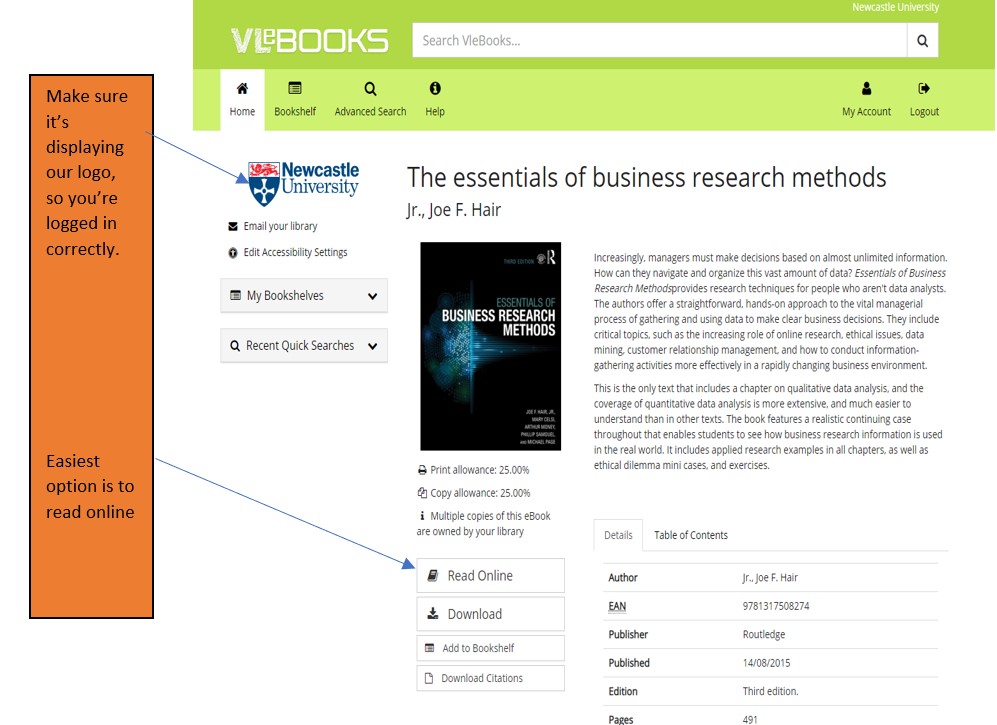
Simply navigate to Library Search and enter your keywords to look for a book title as usual. Library Search is the best way to access resources whether you’re on or off campus as it makes sure you’re logged in correctly and can access resources simply and quickly.
Watch this short video to begin searching for books and e-books.
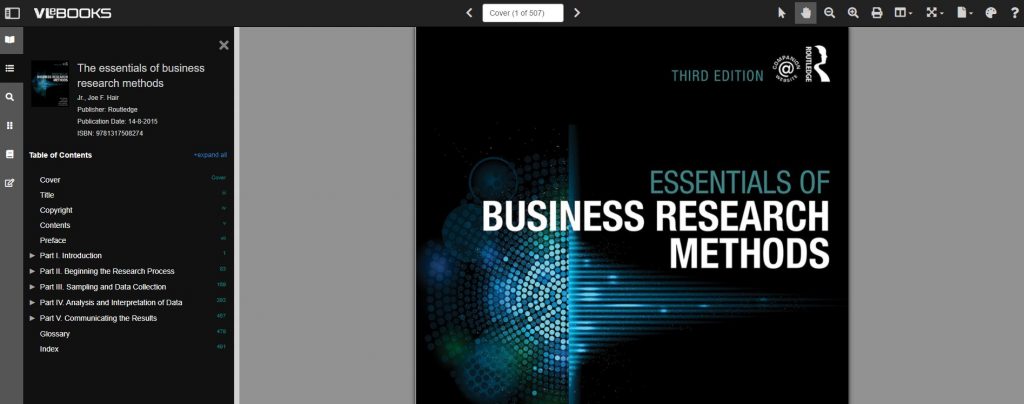
From your search results, choose an e-book which looks relevant e.g. Essentials of Business Research Methods by Hair, which we know is popular book for Business students doing dissertations. If you are off campus, you will need to sign in with your University ID and Password.
Once the e-book has loaded on the screen, hover over the functionality buttons to see what they do. For example; the search option will be useful if you’re looking for specific topics; use the Table of Contents to navigate straight to a chapter you’ve been told to read, or select the paint pallet to change the colour of the background to help with your reading.
Not all titles are available in eBook format for an institutional library to purchase, but if you’d prefer a title in electronic format we can certainly investigate. Just let us know by recommending a book.
A new dataset is now available within Digimap called the Pilot Collection. This provides temporary access to data that EDINA are trying out and want feedback from users. This means the data will be replaced with other data sets over time as new sets become available.
Digimap Pilot is free for staff and students at current subscribing higher and further education institutions and research councils. All you will need to do is to accept the end user licence agreement which is available when you log into Digimap with your Campus ID and password. As these datasets will change regularly then you’ll need to re-accept each new licence agreement as sets are replaced.
Digimap Pilot comprises two applications, one for creating maps online, the other for downloading data which enables further analysis and investigation in other packages:
Use Roam to view, annotate and print maps online.
Use Data Download to download data and load it into a GIS or CAD package for further manipulation
As of April 2020, Pilot currently offers access to the following data.
UKMap a modern, highly detailed, feature-rich mapping database of Greater London. Its unique, innovative design offers users a flexible choice of integrated map features within a single geographic information source. It comprises addresses, retail names, detailed shopping centre data, building heights, a wide range of points of interest, aerial photography, together with Digital Terrain and Surface Models.
This one dataset has different components for Greater London. This includes UKMapLondon which provides aerial imagery with a resolution of 10cm, UKMap Upper Floors which shows more granular information e.g. which shops are on different floors of shopping centres, UKMap Tree Canopy which indicates tree canopies.
UKBuildings a unique database created and regularly updated to help you understand the age, structure, characteristics and use, of commercial, public and residential buildings across the UK.
UKLand a maintained, national land information database providing a detailed consistent breakdown of the use of land across the UK. There are 30 different land classes available e.g. woodland, water features, transport and commerical.
An EDINA Satellite data collection initially consisting of:
Sentinel 2 derived cloud free optical mosaic for Great Britain, 2019.
Sentinel 2 derived Near Infrared mosaic for Great Britain, 2019.
These 2 sections are currently available until the 31/07/2020.
Within the Pilot Data Download section you’ll also find some useful product information such as where the data comes from, it’s availability and sizing and Copyright information.
If you’re using mapping data already you might want to use this in conjunction with GIS if you’re manipulating or working with the data. Or doing a comparison to other maps you might have found freely available e.g. Google Maps.
Hi! I’m Caitlin, a final year law student and law library
aide – and by now I’m used to the stress of exams and deadlines.
I tried the ‘poetry-pick me up’ after going into the common room for a revision break.
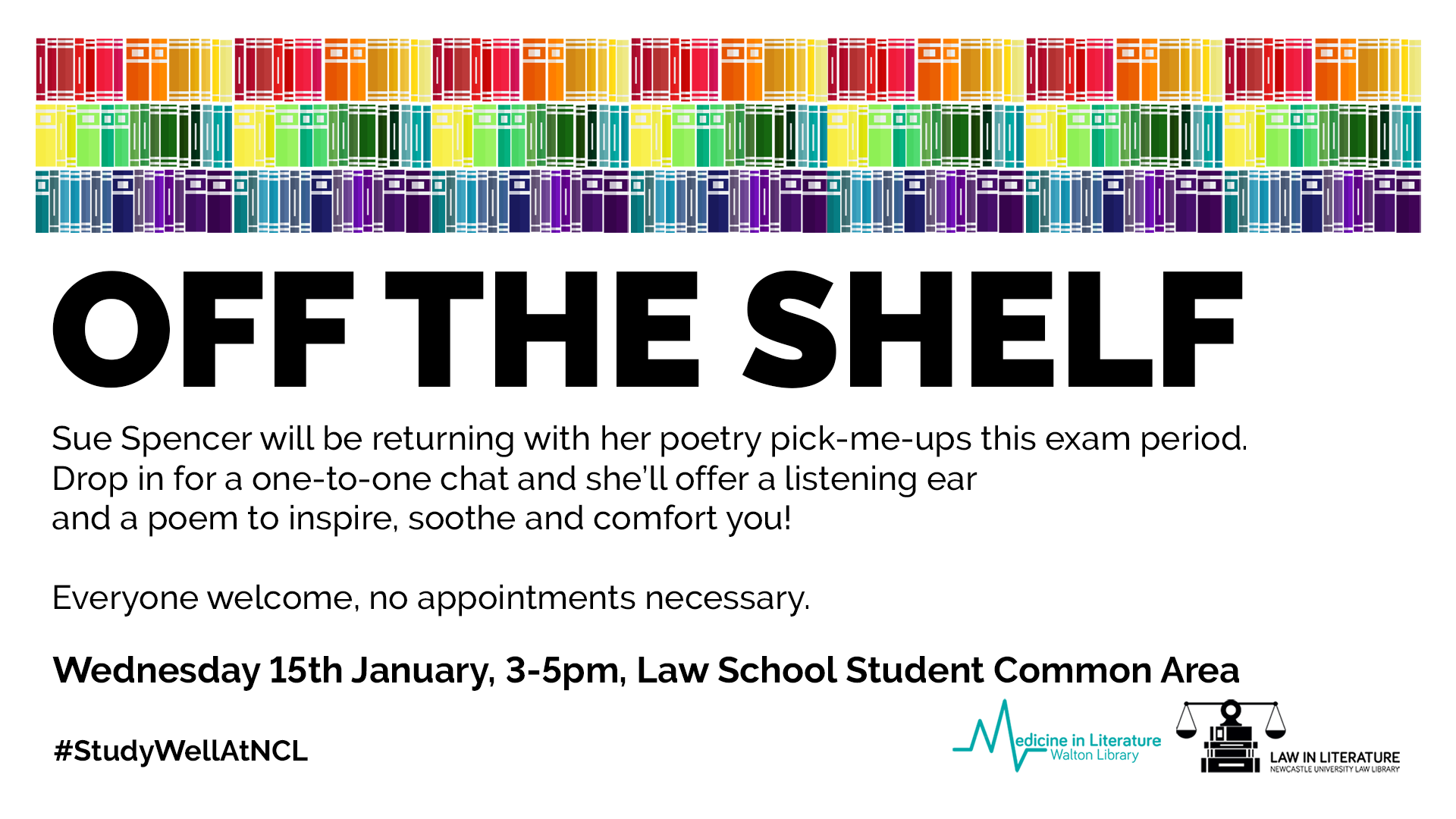
I stumbled across Sue (@kind_curious) in the Law School Student Common Room, where she asked, ‘do you want a poem?’. Not really knowing what to expect, I had to overcome a bit of social awkwardness! I was surprised by Sue’s passion and love of poetry, which was clear in the way she spoke about how she’d used poetry in the NHS before and it was what she enjoyed most.
I was asked questions about my current stress levels and how
I was feeling with exams, and how I dealt with stress. I told her that when I
get stressed I talk even more than usual, which for anyone who knows me sounds
like I’m going at a million miles an hour, and she suggested something that
would relax me.
I laughed as I saw no signs of chocolate or Netflix – my
usual go to relaxation strategies.
Instead she said I needed something like a lavender bubble
bath – again I saw no sign of a bubble bath in the Law School and I’d yet to
find one in the Dungeon.
She picked out two poems that would make me feel like the
relaxing in lavender: she suggested ‘Sonnet’ by Elizabeth Bishop and Shennagh
Pugh’s ‘What if This Road’.
What if this road reminded me of Robert Frost’s ‘A Road Not Taken’,
and was great for me as a an indecisive person. It was matched perfectly to the
questions that Sue had asked me, as I read it as a ‘roll with it’ approach to life, which is
definitely needed to cope with exams and deadline stress.
The second poem, Bishop’s ‘Sonnet’, had great visualisation
techniques, almost like a meditative poem – which was spot on to turn off the
stress and slow everything down!
The experience was a great switch off from deadline stress,
and a great use of the 10 minutes which I’d usually scroll through twitter or
Instagram. It was something different, and really quite unique and relaxing,
which I would definitely recommend to help have a break from any exam and
deadline stress!
The official blurb on EndNote is
that it is “…the industry standard software tool for publishing and managing
bibliographies, citations and references.”
Have you drifted off yet? Don’t – read on!
EndNote takes a little getting used to
and we recommend you familiarise yourself with it at the start of your research
process. But as Library Staff, we wouldn’t spend a
significant amount of time demonstrating and training our academic staff and
students on what EndNote is, and how to use it, if we didn’t think it was
valuable. It will save you a huge amount of
time in terms of writing up your assignments.
Essentially, you can use EndNote to
create and organise a personal library of resources relevant to your research.
You can import references from Library Search, and a huge range of databases such
as Scopus, Web of Science, IEEE Xplore and Business Source Complete. You can ask EndNote to locate
the full-text PDFs of the resources you are going to use in your research, and
you can annotate them as you wish too. Did you know you can instruct Google Scholar to
import references into EndNote? No? Try
it. Finally, if you already have materials stored in your home
folder (H:\) then you can attach them to a manually-created
reference within EndNote, bringing all your research together in one place.
In addition to organising your references (and this is the clever bit) you can then get EndNote to ‘talk’ to your word processing software, e.g. Microsoft Word, and insert the citations into your work for you in your chosen referencing style, e.g. Cite Them Right Harvard, Vancouver, APA or MLA. If you don’t want to do that, then EndNote will also allow you to create an independent bibliography of your references, saving you an awful lot of typing.
Using EndNote
Intrigued? You should be. Take a look at our EndNote Guide. It contains all the introductory information you need, step-by-step workbooks to train yourself on the use of EndNote (the Desktop and Online versions), videos, useful FAQs, and contacts for help, should you need it.
Finally, Newcastle University
provides support for EndNote but it is not compulsory to use. You may
prefer Mendeley, Zotero, RefWorks or another piece of bibliographic
management software. That’s fine, whatever makes your referencing lives easier. Go on, give them a try.
A common mistake made in referencing is grouping all sources
found online under the category and reference type of a website. Your aim
should be to reference the information you have in front of you rather than
where it was sourced. Simply grouping items found online as a website would be
the equivalent of referencing a book by the publisher details rather than the
author and title.
For example, a government publication found online would be referenced like this in Chicago:
United Kingdom. Department for Education. Cloud computing: how schools can move services to the cloud. London: The Stationary Office, 2016. Accessed: November 4, 2019. https://www.gov.uk/government/publications/cloud-computing-how-schools-can-move-services-to-the-cloud.
An electronic journal article might appear like this in APA:
Gillum, J. (2012). Dyscalculia: Issues for
practice in education psychology. Educational Psychology in
Practice, 28(3), 287-297. doi:10.1080/02667363.2012.684344
While a video posted on the Tate website would look something like this
in Harvard.
TateShots (2016) Grayson Perry: think like an artist. Available at: https://www.tate.org.uk/whats-on/tate-modern/talk/what-makes-artist-grayson-perry-conversation-sarah-thornton (Accessed: 11 November 2019).
Identifying the type of information you are using as well as the source, are essential skills of evaluation and developing a critical approach to information. In many cases you will be unconsciously using your judgment to assess the value of information for your purpose. So when you are using any source of information, ask yourself what it is you are looking at, what details are recorded about it and whether it measures up as a quality piece of information. You can find more information on evaluating information on the Academic Skills Kit.
There are lots of different referencing styles, but which one is right for you?
Once you start creating
citations and references, you need to consider referencing styles. There are hundreds of them out there
and each has a slightly different set of rules about how citations and
reference lists should appear in your text.
Most Newcastle University students use the Cite them Right Harvard style, but there is also Vancouver, IEEE, OSCOLA, Chicago, and many more. Your lecturers will expect you to use one specific style and all of your citations and references should conform to that style accurately and consistently; same punctuation, same capitalisation, same everything.
We have lots of help about using some of the popular referencing styles Academic Skills Kit. The Cite Them Right website is also a valuable online resource that will show you how to hit all of the right steps on your way to mastering an individual referencing style.
When walking in the snow we need the right footwear, and to keep warm, a scarf, hat, and gloves are also of great help. By doing so, we are adapting to the environment and using the right tools at the right time for the job at hand.
The same is true when adapting to academic writing where referencing is a key tool.
When you are writing a piece of work and you use someone else’s thoughts, words or ideas, you must reference them. But why do we talk about referencing so much at University, and why is it so important? Why should you bother spending time on ensuring that your references are consistent, accurate and correct?
It all comes down to why we reference in the first place:
To make your contribution clear by showing which words and ideas are yours, and which have come from your reading.
To acknowledge the work of others and to demonstrate how you have built on the knowledge that you’ve gained from your reading.
To ensure that the reader can follow up on your references for themselves.
To avoid being wrongly accused of plagiarism.
Watch our short video to find out a little more about why we should bother with referencing.