When walking in the snow we need the right footwear, and to keep warm, a scarf, hat, and gloves are also of great help. By doing so, we are adapting to the environment and using the right tools at the right time for the job at hand.
The same is true when adapting to academic writing where referencing is a key tool.
When you are writing a piece of work and you use someone else’s thoughts, words or ideas, you must reference them. But why do we talk about referencing so much at University, and why is it so important? Why should you bother spending time on ensuring that your references are consistent, accurate and correct?
It all comes down to why we reference in the first place:
To make your contribution clear by showing which words and ideas are yours, and which have come from your reading.
To acknowledge the work of others and to demonstrate how you have built on the knowledge that you’ve gained from your reading.
To ensure that the reader can follow up on your references for themselves.
To avoid being wrongly accused of plagiarism.
Watch our short video to find out a little more about why we should bother with referencing.
OECD iLibrary is the online library of the Organisation for Economic Cooperation and Development (OECD) it contains a vast collection of books, papers and statistics, some of which date back to the 1960s, it is the gateway to OECD’s analysis and data. OECD content covers over 100 countries.
Every year around 300 new titles are published, associated with the following themes:
Agriculture & Food,
Development,
Economics,
Education,
Employment,
Energy
Environment
Finance and Investment
Governance
Industry and Services
Nuclear Energy
Science and Technology
Social Issues / Migration / Health
Taxation
Trade
Transport
Urban, Rural and Regional Development
You can browse by theme, country, or choose the type of content you require (for example, books, papers, statistics). You can also carry out simple or advanced searches.
If you’re looking for Statistics and Indicators?
OECD iLibrary contains all of the publications and datasets released by International Energy Agency (IEA), Nuclear Energy Agency (NEA), OECD Development Centre, PISA (Programme for International Student Assessment), and International Transport Forum (ITF) since 1998 – present.
It presents all content so users can find and cite tables and databases as easily as articles or chapters in any available format: PDF, WEB, XLS, DATA, ePUB,READ.
For a quick introduction to OECD i Library, including how to search the database and how to use advanced features and find statistical information and indicators, take a look at the user guide.
You can find details on other sources of statistics on our Statistics Guide.
Looking for authoritative and comprehensive information on the oil and gas exploration and production (E&P) industry? Then have a browse of OnePetro! A unique library of technical documents and peer reviewed articles, it includes full text documents of many key conference proceedings in the field and provides access to a number of subject relevant journals.
For a quick introduction to OnePetro, including how to search the database and how to use advanced features, take a look at our helpful video guide (4:49 min):
A strong research project such as an essay, dissertation or thesis will always be supported by good quality information from a wide range of sources. There are a huge variety of resources available to you and being able to make appropriate choices when selecting materials to include in your project and explain why you have chosen them, is an important academic skill that demonstrates a good awareness of your subject and an ability to think critically about ideas and research.
Of course, not all information resources will be relevant to your particular research. You will have to think about the type of information you need then identify the type of resource that will provide that kind information.
For example:
Books will offer an in-depth overview of popular ideas, theories, and opinions in your subject area and are likely to be broader in scope than a journal article or conference paper.
While a conference paper will often discuss ‘work-in-progress’, and therefore can be an ideal way of finding out about up to date research and ideas.
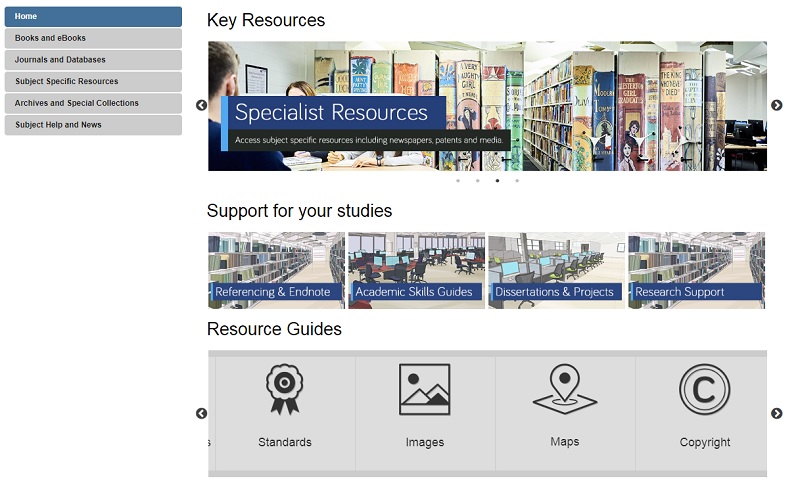
For more information on different resource types, including standards, patents, maps, newspapers and more, take a look at our range of Resource guides.
Your Subject Guide can also help you identify useful sources of information for your research as it contains a carefully curated list of resources that are tailored to your subject area. Here you’ll find useful lists of online reference books, eBook collections and recommended databases for finding relevant journal articles and conference papers. Also, under the Subject Specific Resources tab, you’ll discover a further host of specialised materials relevant to your subject such as audiovisual media, data-sets or professional organisation’s websites.
Depending on your research topic, you might also want to explore the Special Collections tab to see materials held in our Library archives that are relevant to your subject area specifically.
Searching should be easy, right? We do it all the time in our day to day lives and with Google so ingrained into our existence, we don’t give it much thought. We type some words into the search engine and most of the time we find what we are looking for. Nothing to it!
However, while this approach certainly works for checking out cinema times or booking flights, it lets us down where research is concerned. We have high expectations that information will be quick and easy to come by and that it will be neatly organised in one place, rather than having to search in multiple locations, using different techniques. We imagine that the time consuming part of our research will be the analysing, synthesizing and the writing of it and we often don’t even think about the searching side of things.
The reality though is quite different. Without investing in our searching techniques and the development of a search plan, we can often find ourselves overwhelmed by information and not being able to see the wood from the trees. Our stress levels rise and our frustrations explode. Surely finding information shouldn’t be this hard!
The good news is, is that there is help to be had. Our job as Liaison Librarians is to equip you with the skills you need to create that all-important search plan and to encourage you to pause and stop before you dive straight into finding information for your research. We have a fantastic range of online tools for you to do this, not least an interactive search plannerthat you can keep adding to throughout your search and which you can even email to yourself, your supervisor, or us as a Liaison team for feedback. The Academic Skills Kit has lots of advice on how to start a search, including how to break your concept down into manageable chunks and how to identify keywords and synonyms.
You can also check out this short video to get you started…….
Keep your eyes peeled for our next blog installment of how to find particular resources. See you then!
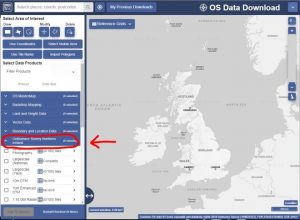
Northern Ireland Ordinance Survey data via Digimap is free on trial until 31st July 2019. Adding to our existing EDINA collection, the collection provides a range of raster and vector data at scales ranging from 1:2500 to 1:1 million. Aerial photographs are also included.
Since this is a trial service, you will be required to delete any licensed data you hold on 31st July unless your institution chooses to take a subscription from 1st August 2019 onwards. Please bear this in mind when planning your work.
You can access Digimap via Library Searchor our Maps library guide, log in with your university account and click on the Ordinance Survey tab to access the data. Use the data download option to get access. You will need to accept the license agreement the first time you use it.
Please explore and email us your feedback, or post it as a comment on this blog.
Will you be working on a dissertation or project this summer or next year? Worried that the Library might not have access to the specialist books and other resources which you need? Wondering how you can find out about resources relating to your research topic which are held in other libraries?
Wonder no more! There are three main ways you can find and access books and other resources held elsewhere:
1. Search
You can search the catalogues of over 100 UK and Irish academic libraries, national libraries and other major research libraries via COPAC. For a more in-depth and up to date search, you can also search individual academic library catalogues online. Need to look further afield? Search library catalogues internationally via WorldCat.
2. Visit
We have more information about how you can visit other libraries, locally and nationally, here. The SCONUL Access Scheme enables students to use other academic libraries around the country, but you need to register online first (and be sure to check the access arrangements for any library you are planning to visit, as they may alter during the year).
3. Obtain
If we haven’t got the book you want, you can ask us to consider buying or borrowing it, via our Books on Time service. If you need a copy of a journal article to which we don’t have access, please apply via our inter library loan service.
Librarians have been warning people about ‘Fake News’ for many, many, many, many years – how to find and select reliable, authoritative, quality resources is at the heart of any good library teaching session. In a way we librarians have to thank Mr Trump for making Fake News a popular term; he has made everyone aware that there are fake stories out there and that there has been for centuries (see our historical time-line of Fake News).
2019 is NU Library’s third year of promoting awareness of Fake News, and by looking at the large number of visits to our Fake News Guide over these three years (4,672 visits in total), and again thanks to Mr Trump, it’s not something that’s going away anytime soon. So we Librarians will continue our quest of highlighting all information that is fake for the greater good.
Until I went to Librarian’s Fake News conference last year, I hadn’t heard of the terms ‘Filter Bubble’ and ‘Echo Chambers’ in relation to Fake News. However, once explained hopefully it will make you more aware of what information/news stories you read via the likes of Google, Facebook and Twitter, and how they could potentially be fake. So here is the low-down on what these terms mean and how you can avoid falling into their traps; we’ve also offered the alternative view that they’re a load of old nonsense so you can decide for yourselves…
What is a ‘Filter Bubble’?
A Filter Bubble is when you are in a virtual bubble on social media – you only encounter information and opinions that agree with or reinforce your own beliefs. Your ‘personalised’ online experience is the result of algorithms that work away in the background and dictate what you see/read online. Google, Facebook, Pinterest, Netflix, YouTube and many more all do this.
These Filter Bubbles in turn create Echo Chambers…
What are ‘Echo Chambers’?
When information within a closed system online is only giving you (‘echoing’) back your opinion and beliefs and establishing confirmation bias (only accepting information that confirm your own opinion and beliefs).
What are the dangers?
As much as I enjoy Facebook fuelling my love of funny dog videos by suggesting similar videos and articles, being aware of why and how Facebook is doing this helps when it comes to more serious topics such as the news, social issues and politics.
Regarding Fake News, confirmation bias is particularly worrying as you will start believing fake news stories that confirms your opinions and beliefs. I know I have done this, which is really scary to realise.
Watch this short TedTalks video from Eli Pariser on the dangers of Filter Bubbles:
You could argue that this type of ‘personalisation’ is editing the web – only showing you one half of the story. So what can you do to pop the bubble?
What can you do to stop the bubbles and echoes?
There are a few simple things you can do to stop this and open yourselves up to a wider web:
Read news sites, websites and blogs that offer a wide range of perspectives, such as the BBC.
Use Incognito browsing, delete search histories and try and resist the temptation of logging into your accounts every time you go online.
Deleting or blocking browser cookies – these cookies hold the algorithms that determine what we see.
Turn off your curated feed in Facebook.
Click ‘Like’ on everything! – This will tell the AI that you are into everything – all politics, all news etc.
Don’t clink on links, especially politics and social issues – will stop fuelling the algorithms.
Tell everyone else to turn off their curated feed!
Is it all a myth?
Below are a few articles that claim Filter Bubbles and Echo Chambers are myths and that it’s not the technology at fault, but rather the user. I’ll let you decide:
Or maybe you like being in your own little bubble? The safety and comfort in knowing what information you are going to be presented with – nothing that offends or upsets your online world. I know I will carry on being fed humorous dog videos.
There are some interesting thoughts and opinions on the Social Network Bubble – the pros and cons – on this Radio 4 programme:
Farnam Street (2017) How filter bubbles distort reality: everything you need to know. Available at: https://fs.blog/2017/07/filter-bubbles/. (Accessed: 27 March 2019).
You already know that referencing is important – it not only gives credit to the original creator of a work you have used but also helps to highlight your skills as a researcher; showing that you have read around your topic, found relevant information, applied it to your arguments and used it to develop your own ideas.
However, when it comes to referencing, all of those punctuation rules, different styles and the vast array of document formats can seem overwhelming. Happily, we’ve got a great resource to help you work out your references in three easy steps!
Cite Them Right:
‘Cite Them Right’ is a fantastic referencing guide that provides clear instructions and examples for how to reference a wide range of documents including books, journals, websites and audio-visual materials. Available as both a physical textbook and an online tool, ‘Cite Them Right’ helps you to format your references correctly using Harvard, American Psychological Association (APA), Modern Humanities Research Association (MHRA), Modern Languages Association (MLA), Oxford Standard for the Citation of Legal Authorities (OSCOLA), Vancouver or Chicago referencing styles.
(Remember to always use the referencing style recommended by your school.)
Three steps to an accurate reference:
Search for the type of document you want to reference on Cite Them Right online using the search box at the top right of the screen or by browsing the drop down menus at the top of the page.
Select the referencing style you need from the drop down menu at the top of the page. This defaults to Harvard (author-date).
Follow the example references given, copying the format to create your own reference in the ‘You Try’ box.
Why not have a go and create a reference for this blog post!
If you need some more advice on how to reference, take a look at our video:
“What would you guess is the most common job?” Michael Lai, Outreach Lead at KGI, asked an audience of students at his Columbia Heights TEDTalk back in 2016. His audience members offer a few suggestions. “Engineer?” “Fast food workers?” After several failed attempts, Michael puts them out of their misery,
“3.5 billion truck drivers in the United’s States” he tells them. “Experts predict that in the next 12-15 years, most of the cars on America’s highways will be self-driving… so what’s going to happen to the most common job?”
The future of the job market – and it’s inherent uncertainty – has been receiving a lot of attention in the international press in recent years, with Universities UK analysis predicting “65% of children entering primary schools today will work in jobs and functions that don’t currently exist.” In previous generations, new graduates could expect to work with the same company for several years, steadily climbing the corporate ladder in a predictable, but reassuring linear way. In the 21st century however, the face of the job market is changing, and once you graduate, you may find yourself looking at a “portfolio career” over traditional career progression – something Facebook COO Sheryl Sandberg described as more akin to a career “jungle gym” than a career ladder.
But what does all this talk of truck-driving and emergent markets mean for you, the UK Graduate? Well, if the gig economy becomes the norm in the next 10 years, one of the key challenges for new graduates will be the perpetual need to upskill yourself, and market your own skill base to different employers. This puts the spotlight on what have traditionally been referred to as “soft” transferable skills that are required across many different roles and sectors – skills such as resilience, team-working and critical thinking. Here at the Library, we’d argue that information and digital literacy falls under this bracket (well of course we would, we’re librarians!). The ability to find and use information and make considered use of digital tools is an important capability in any graduate job. Don’t just take our word for it – we spoke to several students returning from placement who told us their information skills had helped them get ahead.
The good news though is that your degree programme offers you the chance to work on and demonstrate all of these skills. Employers will know that you may not have extensive work experience as a new graduate, but make sure you cherry-pick prime examples from your University work, part –time jobs and any voluntary experience to exemplify the skills employers are looking for (and remember, the Careers service can help you with interview preparation.) Make the most of the workshops and sessions open to during your time at University so you are in a great position to articulate these important skills. For more information on how the Library can help, check out our Employability Guide
References
TEDx Talks (2016) Four Key Skills to Lead the Future. Available at: https://www.youtube.com/watch?v=djHTcES2ATg
Universities UK (2018) Solving future skills challenges. 6th August 2018. Available at: https://www.universitiesuk.ac.uk/policy-and-analysis/reports/Documents/2018/solving-future-skills-challenges.pdf