
Inspera’s feedback release aims for transparency for all exam questions, however this had caused limitation for Module Teams wishing to releasing Essay comments as feedback, without revealing correct answers to automated marking. A new workaround is now available.
Enabling Essay comment feedback only:
- When marking an Inspera exam which includes Essay feedback comments that you wish to be visible to your individual students, comments must be saved as visible to candidate in Grade i.e.
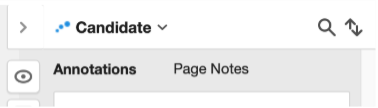
a. Feedback comments for individual student submissions are known on Inspera as ‘annotations’ and/or ‘page notes’. To see more about annotations or page notes go to Marking Exams in Inspera | Learning and Teaching @ Newcastle | Newcastle University and navigate to ‘How to mark manually marked questions using Inspera’.
- You must finalise marking to enable feedback release i.e. marks must be confirmed.
- Navigate to the Deliver tab for your exam.
a. You can do this by clicking Options and then ‘Open test in deliver’:
- Within Deliver, scroll down and click ‘Show/hide details’ next to ‘Options’.
- Tick Share comments with candidates (on the right hand side)
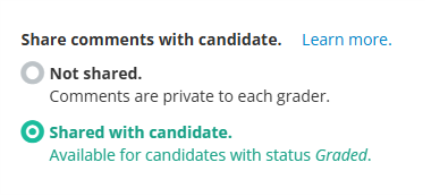
a. Please ensure you do not tick ‘Enable Candidate Report’
Possible limitations:
Using this method means:
- Students would be unable to see final marks on Inspera however this would still be shown on Canvas Gradebook.
- There’s no per question marks breakdown visible.
- Students see the question and their submitted answers only if an annotation or page note was left for them by a Marker.
- Leaving a page note for all candidates on a particular question becomes disabled when using this feedback option.
If you have any questions specifically about your feedback use case, please contact digital.exams@ncl.ac.uk .
For general information about all feedback release options please see our dedicated feedback release website.