
Over the summer, work took place to improve the security, functionality, and performance of Turnitin assignments in Canvas. This means there is a slight change of workflow when setting up a new Turnitin assignment.
You are no longer be required to select Turnitin as an “External Tool” from the Submission Type assignment settings. This step occurs on the assignment homepage instead, select Turnitin from the Assignment Settings (3 dots) button when creating a new assignment.
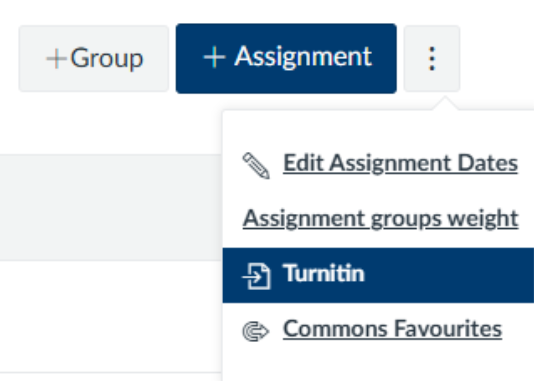
Guidance on the new steps to setting up a Turnitin assignment can be found on the Learning and Teaching website.
Please note that change will only affect how you create new Turnitin assignments; any pre-existing Turnitin assignments will still be available and any Turnitin assignments already set up for 2025/26 will not need to be changed.
If you wish to copy an assignment from a previous year, follow the guidance for Using the Turnitin Assignment Copy tool.
It is now possible to submit a Turnitin assignment on behalf of a student, via the Turnitin inbox. Simply select ‘Submit on behalf of student’, and a drop down menu appears of all students attached to the course in Canvas. Select the student you wish to submit for, confirm your selection by clicking continue, then follow the steps to choose a file and upload the submission.
If you have any queries, please contact ltds@newcastle.ac.uk