Library Search is a powerful tool that can help you find good quality, relevant information quickly. Using Library Search is pretty intuitive but there are some useful search tips that can help you improve and get the most out of your searches:
Keywords and Subject Terms
When you’re searching for information it’s important to use a range of related keywords to ensure you find everything relevant to your topic. For example, if you’re searching for information on ‘Climate Change’ you might also want to search for ‘Greenhouse Effect’ or ‘Global Warming’ too. Thinking of related keywords can sometimes be difficult but Library Search can help!
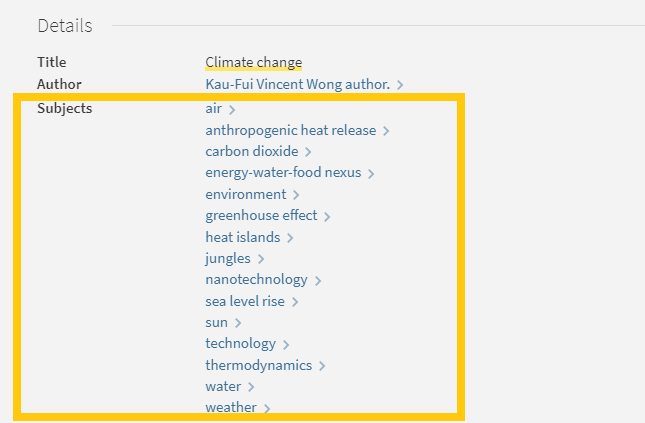
From your search results page, click on the title of a resource to open the resource record and scroll down to the ‘Details’ section. Here you will find a list of ‘Subjects’, also known as subject terms, used to describe the topics and themes this particular resource discusses. Take a look at this list and add any relevant words to your search string.
There are some other useful features in the resource record page that can help with your searches too:
Browse the virtual shelf
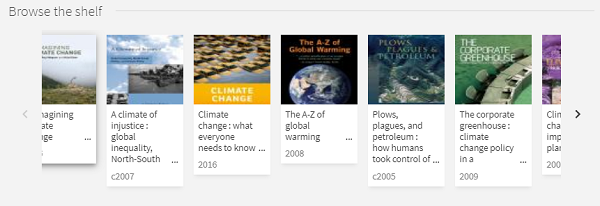
At the very bottom of the record you’ll find a virtual bookshelf, a visual list of the books that can be found next to this one if you were looking in the physical library. As the library is organised by subject some of these titles might be useful for your research too.
Read the abstract
A quick way to tell if a resource is going to be relevant and useful for your research is to read the abstract, a summary of the contents of the resource. On the resource record in Library Search, you’ll find this under the heading ‘Description’.
Advanced Search
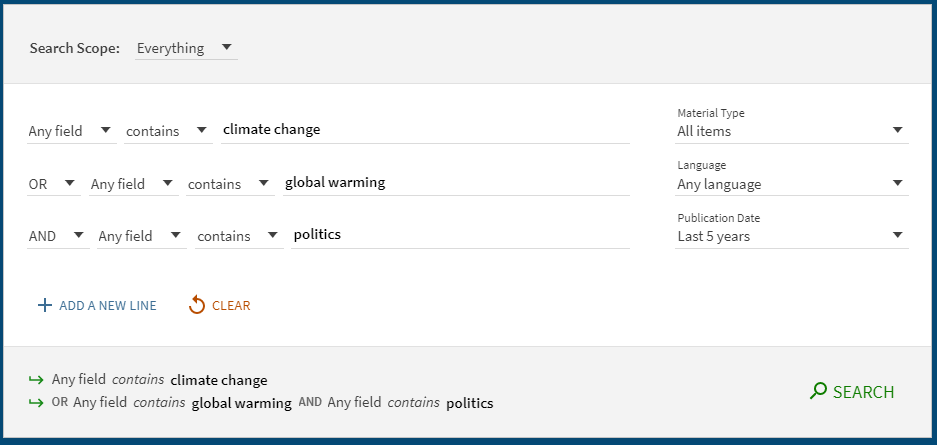
The Advanced Search function in Library search allows you to create a search that will produce more focused results. It does this by providing a range of search fields and drop down lists that help you build up your search.
Select from the options to:
Limit your search field to the title, author, subject, collection etc.
Apply BOOLEAN operators (AND, OR, NOT) to your keywords
Filter by specific material types, languages and dates to focus your search results to the most relevant resources.
Take a look at the Advanced Searching page on our Finding Information Guide for more on how to combine your keywords, create a search string and improve your search results.
You know Library Search. You use it every day when you’re at University. Why are you going to read a blog post on it? Well, we’re wondering if you’re using Library Search to its full potential. Not sure? Then read on.
Library Search is Newcastle University Library’s discovery tool – essentially it’s how you find resources on the library shelves and access those invaluable resources online. But what else can it do?
Log in. Using your usual Campus ID and password, you can open up the full functionality of Library Search by telling it who you are. It allows you to:
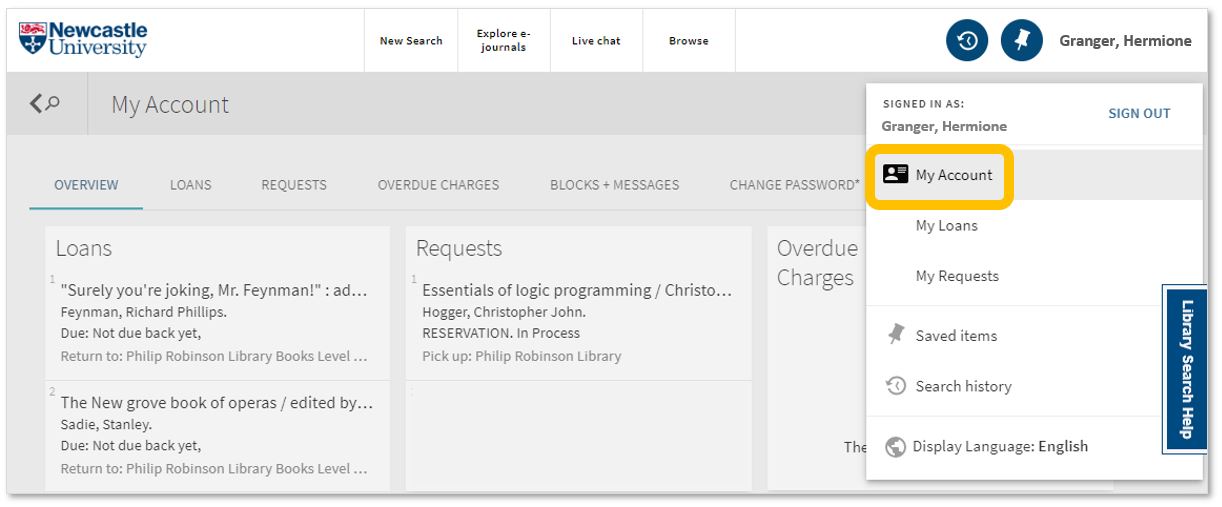
Log into your library account to see what books you have on loan (which you may be finished with and could return to any library site), those requests you’ve placed and any books you have on loan that may have been requested by someone else. The standard library stuff, but it’s important too.
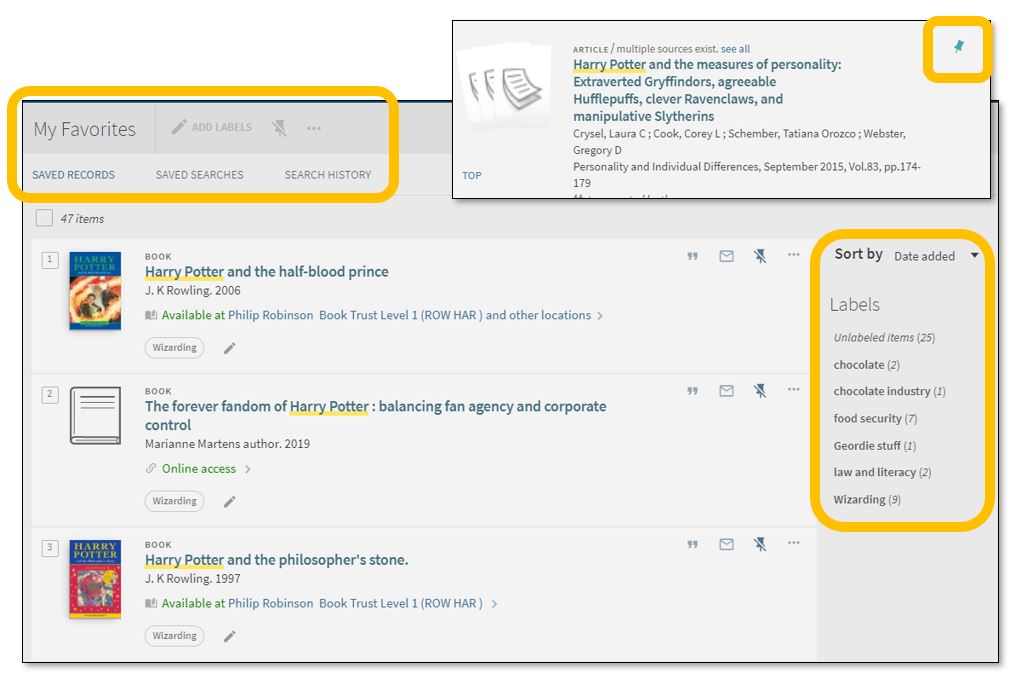
Save items you want to come back to (that’ll save you writing them down somewhere else). Find that favourite item and ‘pin’ it to your record. You can then access a list of your favourite books, journals or journal articles and label (or tag) them as to why you may need them, e.g. Herbology, Professor Snape’s essay, or Field Trip to Hogsmeade. That makes it easy to see what you need to use for each lecture, seminar or assessment.
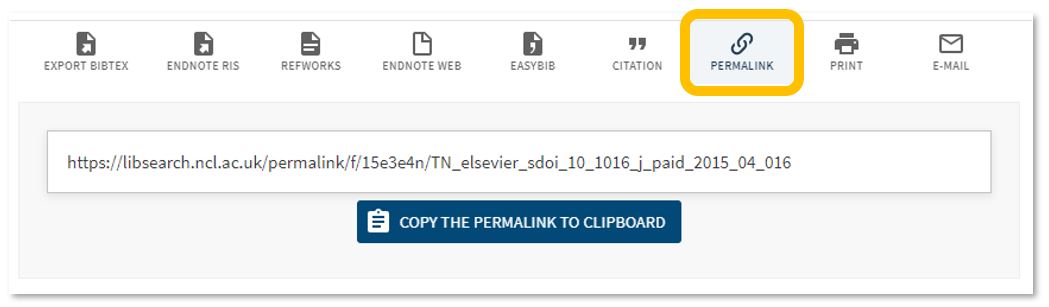
Permalink. You can share an item with someone if you want to – copy the permalink to the clipboard and send it to someone you know may be interested.
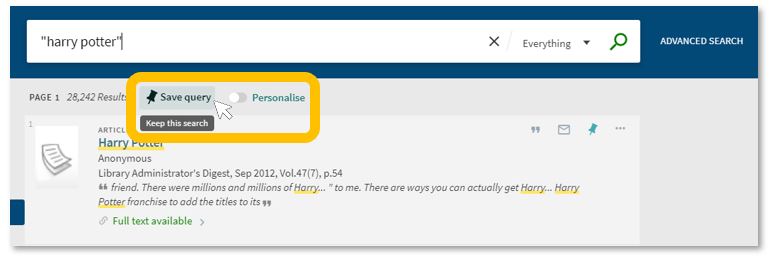
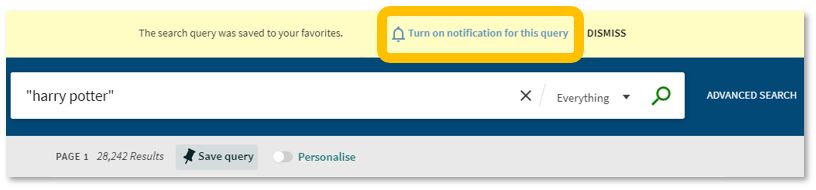
Save your search. If you need to repeat your search then save it within Library Search so you don’t need to remember the keywords and connectors (AND, OR, NOT) sequence. This is important if you are scoping a search and need to record or change your approach. You can also ‘Personalise’ your results to a particular discipline – give it a try!
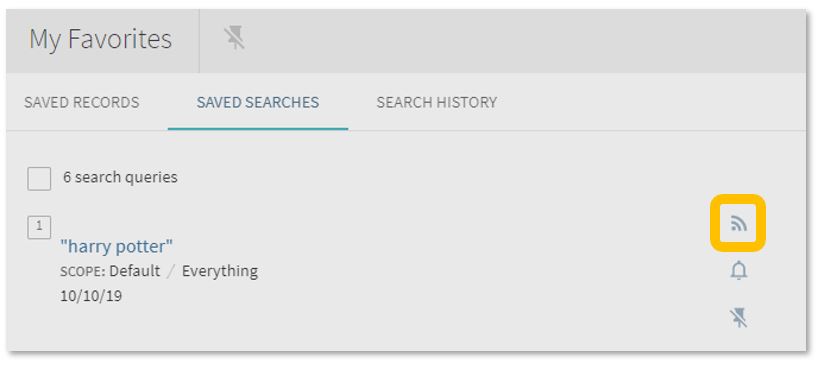
Set up a RSS Feed (yes, really!). The Rich Site Summary function allows you to be informed of changes to results in your saved searches. Handy, eh? Go to your Saved Searches and simply click the RSS icon.
Receive an email alert when there are new results for your saved search. This can save you time in your research as Library Search will inform you if there is a new publication available which matches your search terms. Switch it off when you move onto a new subject area by accessing your Favourites list and deselecting the alarm bell icon.
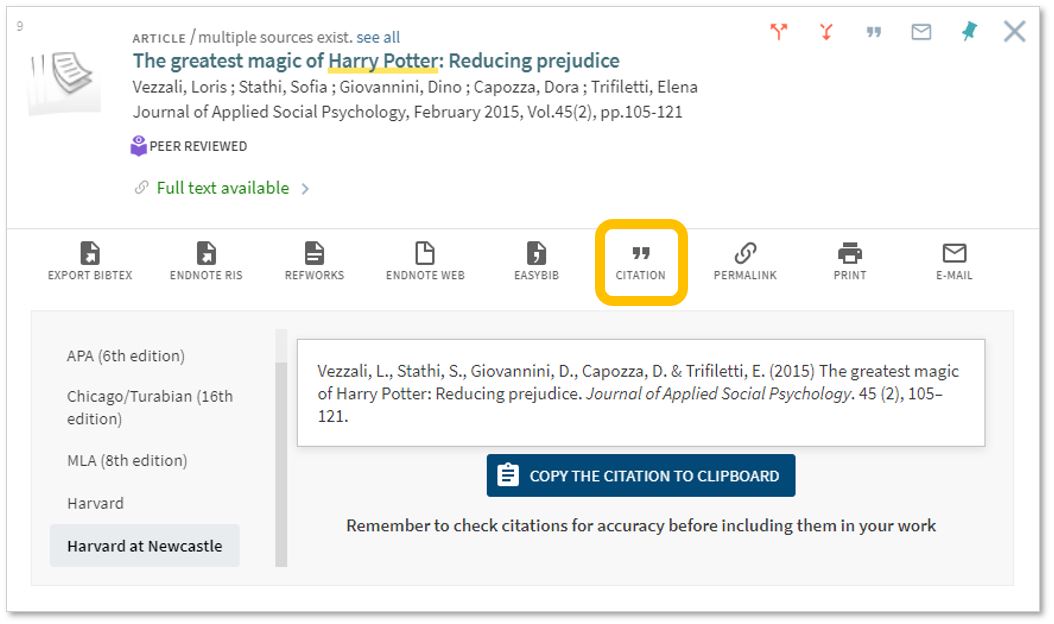
Finally, if you’re writing up your assignment and can’t remember the essential elements of a reference, then use Library Search for guidance. The Citation tool will allow you to view a suggested citation and to copy it to your clipboard for use in your work.*
*BUT (you knew that was coming, didn’t you) ensure you choose the correct style and check your citations for accuracy before including them in your work. It pays to know your required referencing style and not to rely on automated or generated references. If you want to learn more about referencing then see our Managing Information guide and Cite Them Right. Cite Them Right is a great resource which will remind you of the importance of referencing, how to reference and will give guidance on how to cite those more tricky materials such as conference papers, newspaper articles, social media posts and more. Finally, there’s a new tutorial with lots of interactive questions so you can test yourself too.
If you know of any tips or tricks in Library Search that aren’t mentioned here, then leave us a comment and share them!
If you’ll be studying for resits this August, there’s lots of help available from your Library during the summer vacation. Even though the Library buildings have yet to fully open, there’s still a lot of services ‘on hand’ to assist with your studies. Read on to find out how we can work together to ensure you have the best possible revision and resit experience.
What’s available
First and foremost, Library services are still operational during the lockdown summer vacation, they’re just functioning differently right now. You’re still able to organize an online one-to-one appointment with your Liaison librarian or request that the Library purchase an e-book to assist your revision.
If you’re in Newcastle, you may also like to use the Library’s new click & collect service. Request up to 10 books from the shelves, book a collection slot and then pick up your desired items from the Philip Robinson Library foyer. How good is that?
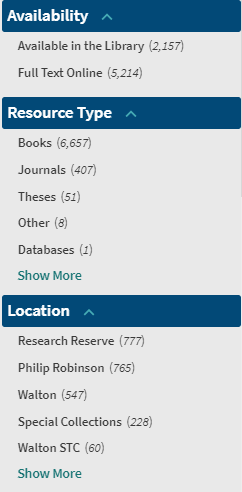
If you’re looking for online resources via Library Search, you might like to filter your search to show results that are ‘full text online’. This will limit your search to eBooks, journals, databases, e-theses and other electronic resources.
To find electronic resources, change your search to “Full Text Online” in the ‘Availability’ section of the filters bar.
You can also search for electronic articles by changing the search parameter from “Everything except articles” to “Everything” on the Library Search bar (see below).
Changing your search to “Everything” will bring up electronic articles for you to browse.
The Academic Skills Kit (ASK) is full of helpful advice, covering all aspects of study from how to manage your time effectively to reading and note-taking. There’s also guidance on exams and revision, including where to go for academic advice or personal support. ASK also has lots of resources covering online examinations. These are broken down into helpful categories: how to revise for an online exam, what to do before an online exam and exam technique.
We probably sound like a broken record by now but you’re
unlikely to revise successfully without establishing positive habits. These
include:
Working in an area of your home that’s best
suited to your needs. If possible, choose to work in an area that has plenty of
natural light and is well-ventilated.
Building a realistic revision planner with
plenty of breaks factored in.
Practising good self-care, such as getting
plenty of fresh air, staying hydrated and eating a balanced diet.
This time of year is normally one of the busiest for the Libraries on campus. Instead, the Libraries are currently physically closed and both revision and exams are taking place at homes across the country (and possibly further afield!). While this ‘new normal’ might seem overwhelming at first, in many ways, it’s business as usual. Read on to find out how we can all work together to ensure you have the best possible revision and exam experience.
Your subject-specific
guide also contains links to useful journals, databases and eBook
collections that are tailored for your course. You may also find it helpful to
browse through a list of newly-acquired
online resources that the Library have purchased to better enable your
studies from home.
There are a number of MCQ (multiple choice question) books available
to read online to complement your revision. They cover subjects including:
paediatrics, neurology and physiology.
Library Help remains available 24/7 to assist with your queries – please send them in via email or live chat. We are also regularly updating Library FAQs to bring you the most up-to-date information. (Hint: if you filter the FAQs to show ‘remote services temporary FAQ’, you’ll only be shown the newest Library FAQs.)
Following the announcement of lockdown, ASK have made some
new resources to assist with online examinations. These are broken down into
helpful categories: how
to revise for an online exam, what
to do before an online exam and exam
technique. While you will get details from your School about the specific
changes to your exam(s), these pages have really helpful advice on preparing
for and succeeding in online assessment.
Choose an area in your home to work in that’s best suited to your needs. This might be a bedroom, kitchen or office space. You may want to consider making some adjustments to your existing desk (or kitchen table!) to avoid causing an injury. If possible, choose to work in an area that has plenty of natural light and is well-ventilated.
Build yourself a realistic revision planner, with plenty of breaks factored in. You won’t be able to revise everything in one day so breaking down topics into manageable chunks is essential. Regular exercise, a balanced diet and a good night’s sleep are also key to revision success.
Remember to take regular study breaks to stay hydrated, get
fresh air and clear your mind. You’re unlikely to revise effectively without
regular breaks and time away from your work. There are a number of activities and resources
on the Library’s website for things you can do while taking a break. These
include seated desk yoga, colouring in sheets and mindfulness exercises.
New to the University and not sure where to start? Or simply need a handy list for you to refer back to when you’re studying Geography? Well look no further than this post! Here are some of our suggestions to help you find the information you need.
Whether you’re on or off campus, you can access the full collection of ebooks, electronic journals and professional magazines, newspapers, conferences and more, from Library Search.
Watch our short video showing how to search for eBooks.
To find academic journal articles from across our collection that match your topic keywords, use the everything search option and filter your results on the left to peer-reviewed journals.
Find out how to search for electronic journal articles in this short video.
You can contact the Liaison Team for one-to-one support or send your questions to Library Help, where there are staff logged into our live chat service, 24/7.
Between Library Search and your Subject Guide, you will be able to find excellent information to use in your academic essays, but there are many other resources you may want to try.
3. Proquest Collections
The Social Sciences Premium Collection and Natural Sciences Collection are both brilliant places to start if you would like to refine your results to either natural or social sciences, while still searching broadly across different information types. They are collections of databases, covering a range of information types including articles, reports, conference papers and theses, so you are able to find results that match your keywords from a variety of global sources.
Find out more about the Social Sciences Premium Collection, how to search it successfully and use the advanced features in the video guide below. It is a brilliant resource for sociology and excellent to use for any academic assignment.
Watch our introduction to the Social Sciences Premium Collection to explore basic and advanced searching.
Scopus is a large, multidisciplinary database, which indexes peer- reviewed journal articles, books, book chapters, conference proceedings and trade publications.
One of the main advantages of using Scopus is that it provides a lot of useful information about the articles it indexes. This includes full reference lists for articles and cited reference searching, so you can navigate forward and backward through the literature to uncover all the information relevant to your research.
You can also set up citation alerts so you can be informed of new, relevant material automatically. Other useful tools include citation overviews, author and affiliation searching, visual analysis of search results, a journal analyser, and author identifier tools (if you are interested in publishing work).Watch this video from Scopus about how to expand your search from a known article reference.Watch this video from Scopus about how to expand your search from a known article reference.
https://youtu.be/qCu-obYMFsE
Watch this video from Scopus about how to expand your search from a known article reference.
Government publications provide information in a variety of subjects. Statistics, White Papers, Parliamentary Bills and a whole range of Official Legislation published by the Government. The provide a good, reliable, source of accurate statistics, and can give support to your argument in essay topics.
OECD iLibrary is the online library of the Organisation for Economic Cooperation and Development (OECD) and gives you access to books, analyticalreports and statistics, covering a broad range of topics relevant for studies in sociology.
Statista is an extensive statistics platform covering over 1.5 million data sets. It includes reports, statistics and forecasts on a range of topics. So if you want to know compare homelessness statistics, explore education trends, attitudes to sustainability and the environment or how many people drink barista coffee every day, Statista is a brilliant place to start.
Statistics and reports can be exported in a range of formats including images and PowerPoint, giving you flexibility to include the visuals in your assignments. The statistics source is included, giving you the information that you need to cite it successfully.
Find out more about Statista with this brief introduction.
Newspapers are an excellent resource to explore, to provide a range of perspectives on a topic. You can find opinion pieces, social commentary and identify trends in public opinion.
We have a huge range of newspaper archives, historic newspapers and international sources such as Nexis that can mostly be access online and off campus. Our Newspapers resource guide collates all of our resources and will guide you through how where to look.
LexisLibrary is an excellent place to start. It provides access to UK national and regional newspapers, from the 1990s to today. It includes the copy text without the images or formatting and all of the details you need to create a citation are on the article page.
Once you have followed the Library Search link to access Lexis, make sure you click on News at the top of the page for full text access to all UK publications.
As so many articles are published every day, you will need to refine your searching using date ranges, combined keywords or by selecting specific newspapers or publication type (i.e. broadsheet or tabloid).
Remember to use your critical skills when using newspapers however, and watch out for Fake News. They are biased sources and are best used in balance with other sources. You can find our tips on our Evaluating Information skills guide.
11. Box of Broadcasts
Box of Broadcasts can be used to access TV and radio broadcasts from over 65 channels, including most of the UK’s freeview network, all BBC TV and radio content from 2007, and several foreign language channels. It’s a great resource to use to find documentaries or critical opinions.
You can view archived programmes, record new ones, create clips and playlists and see transcripts to help with citation and translation. You can also search for other user’s public playlists to help you in your own search.
Unfortunately, Box of Broadcasts is not available outside the UK.
The British Geological Survey website gives you access to geological datasets, including environmental monitoring data, digital databases, physical collections (borehole core, rocks, minerals and fossils), records and archives.
You can search using keywords or browse the Open Geoscience datasets. It is also worth browsing in the research section and participate in one of their citizen science projects.
GreenFILE is a fully searchable database on the EBSCOHost platform, offering research on all aspects of human impact on the environment. It includes peer-reviewed, academic articles, government and general-interest titles on topics including global warming, green building, pollution, sustainable agriculture, renewable energy, recycling, and more.
Some of the content is full text while with others, you will need to use the Find at Newcastle University option to check for access via Library Search.
New to the University or just wanting a handy list of places to search for Sociology information. Then here are some of our suggestions to help you find the information you need.
Whether you are on or off campus you can access the full collection of ebooks, electronic journals and professional magazines, newspapers, conferences and more, from Library Search.
Watch our short video showing how to search for eBooks.
To find academic journal articles from across our collection that match your topic keywords, use the everything search option and filter your results on the left to peer-reviewed journals.
Find out how to search for electronic journal articles in this short video.
You can contact the Liaison Team for one-to-one support or send your questions to Library Help, where there are staff logged into our live chat service, 24/7.
Between Library Search and your Subject Guide, you will be able to find excellent information to use in your academic essays, but there are many other resources you may want to try.
The Social Sciences Premium Collection is a brilliant place to start if you would like to refine your results to sociology and the social sciences, while still searching broadly across different information types. It is a collection of social sciences databases, covering a range of information types including articles, reports, conference papers and theses, so you are able to find results that match your keywords from a variety of global sources.
Find out more about the Social Sciences Premium Collection, how to search it successfully and use the advanced features in the video guide below. It is a brilliant resource for sociology and excellent to use for any academic assignment.
Watch our introduction to the Social Sciences Premium Collection to explore basic and advanced searching.
Scopus is a large, multidisciplinary database, which indexes peer- reviewed journal articles, books, book chapters, conference proceedings and trade publications.
One of the main advantages of using Scopus is that it provides a lot of useful information about the articles it indexes. This includes full reference lists for articles and cited reference searching, so you can navigate forward and backward through the literature to uncover all the information relevant to your research.
You can also set up citation alerts so you can be informed of new, relevant material automatically. Other useful tools include citation overviews, author and affiliation searching, visual analysis of search results, a journal analyser, and author identifier tools (if you are interested in publishing work).Watch this video from Scopus about how to expand your search from a known article reference.Watch this video from Scopus about how to expand your search from a known article reference.
https://youtu.be/qCu-obYMFsE
Watch this video from Scopus about how to expand your search from a known article reference.
Government publications provide information in a variety of subjects. Statistics, White Papers, Parliamentary Bills and a whole range of Official Legislation published by the Government. The provide a good, reliable, source of accurate statistics, and can give support to your argument in essay topics.
OECD iLibrary is the online library of the Organisation for Economic Cooperation and Development (OECD) and gives you access to books, analyticalreports and statistics, covering a broad range of topics relevant for studies in sociology.
Statista is an extensive statistics platform covering over 1.5 million data sets. It includes reports, statistics and forecasts on a range of topics. So if you want to know which social media platforms are most popular across the globe, compare homelessness statistics, explore education trends or how many people read every day, Statista is a brilliant place to start.
Statistics and reports can be exported in a range of formats including images and PowerPoint, giving you flexibility to include the visuals in your assignments. The statistics source is included, giving you the information that you need to cite it successfully.
Find out more about Statista with this brief introduction.
Newspapers are an excellent resource to explore, to provide a range of perspectives on a topic. You can find opinion pieces, social commentary and identify trends in public opinion.
We have a huge range of newspaper archives, historic newspapers and international sources such as Nexis that can mostly be access online and off campus. Our Newspapers resource guide collates all of our resources and will guide you through how where to look.
LexisLibrary is an excellent place to start. It provides access to UK national and regional newspapers, from the 1990s to today. It includes the copy text without the images or formatting and all of the details you need to create a citation are on the article page.
Once you have followed the Library Search link to access Lexis, make sure you click on News at the top of the page for full text access to all UK publications.
As so many articles are published every day, you will need to refine your searching using date ranges, combined keywords or by selecting specific newspapers or publication type (i.e. broadsheet or tabloid).
Remember to use your critical skills when using newspapers however, and watch out for Fake News. They are biased sources and are best used in balance with other sources. You can find our tips on our Evaluating Information skills guide.
10. Box of Broadcasts
Box of Broadcasts can be used to access TV and radio broadcasts from over 65 channels, including most of the UK’s freeview network, all BBC TV and radio content from 2007, and several foreign language channels. It’s a great resource to use to find documentaries or critical opinions.
You can view archived programmes, record new ones, create clips and playlists and see transcripts to help with citation and translation. You can also search for other user’s public playlists to help you in your own search.
Unfortunately, Box of Broadcasts is not available outside the UK.
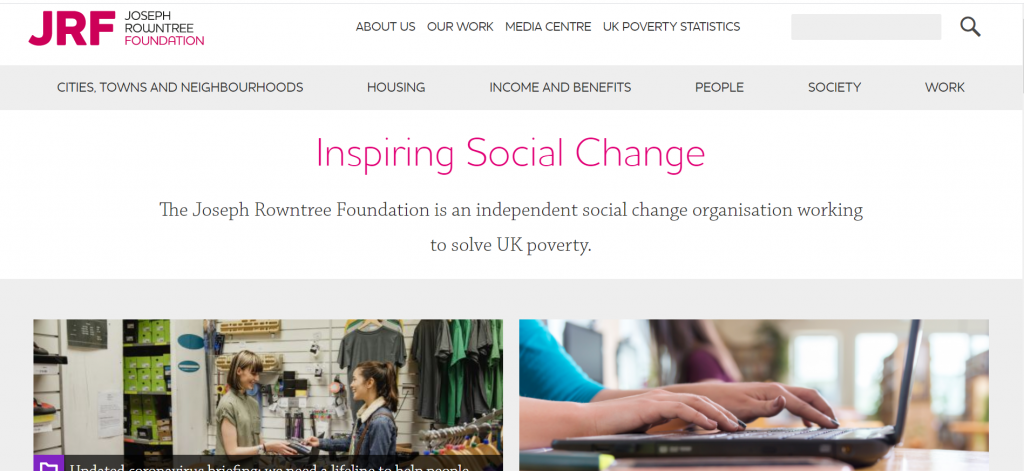
The Joseph Rowntree Foundation is a British social policy research and development charity, that funds UK-wide research and development programs. It aims to understand the root causes of social problems, and how social needs can be met in practice. The charity produces excellent topical research reports on cities towns and neighborhoods, housing, income and benefits, people, society and work.
The website is easy to search and browse by topic.
Written by the Social Science team at the British Library and guest contributors, it gives insight into their work, projects they are involved in as well as events, interesting resources and research methods related to the social sciences.
There is some great content on the blog and they run free, online short courses, with recent topics including things like propoganda and research methods for historical, society focused, research. This is definitely a blog worth bookmarking.
This a major resource for British social history from 1937-1967. It contains material generated by the Mass Observatihttps://libsearch.ncl.ac.uk/permalink/f/1jraif3/NCL_ALMA21112401630002411on social research organisation, including all the day surveys, diaries and subject directives from 1937-1967, a wide range of themed topic collections, together with other material such as images and essays.
The online exhibitions are an accessible way into the collections and highlight the wealth of information and documents available in the database.
To get started, browse by topic and you will quickly get a sense of the range of information that would be useful for your written assignments
As well as following your reading lists from your module leaders you will also need to find your own good quality resources. Here are some of our suggestions to help you find the information you need.
When working off campus, you can still access the full collection of ebooks, electronic journals and professional magazines, newspapers, conferences and more, from Library Search.
Additional ebook titles are being added to the collection every day while we are all working remotely. Search by author, title or keyword to find books to help you with your essay topic.
Our video will get you started with searching for eBooks.
To find academic journal articles from across our collection that match your topic keywords, use the everything search option and filter your results on the left to peer-reviewed journals.
Find out how to search for journal articles in this short video.
The Social Sciences Premium Collection is a brilliant place to start if you would like to refine your results to education and the social sciences, while still searching broadly across different information types. Find out more about the Social Sciences Premium Collection, how to search it successfully and use the advanced features in the video guide below. It is a brilliant resource for education.
You can contact the Liaison Team for one-to-one support or send your questions to Library Help, where there are staff logged into our live chat service, 24/7.
Between Library Search and your Subject Guide, you will be able to find excellent information to use in your academic essays, but there are many other resources you may want to try.
ERIC is the most widely used education database, that covers a broad spectrum of education literature including journal articles, books, conference papers and reports. It has global coverage although can be a little skewed towards American education.
It includes basic and advanced search options, and has a built in thesaurus that allows you to select subject headings for your search, that take into account the differences in how education levels or topics may be described internationally, e.g. elementary education versus primary education.
Find out how to do a basic search on the EBSCOhost platform, that hosts ERIC.
If you want to refine your search to UK education, use British Education Index instead. It is on the same platform as ERIC so is searched in the same way, but will refine your results to a British focus.
4. JSTOR
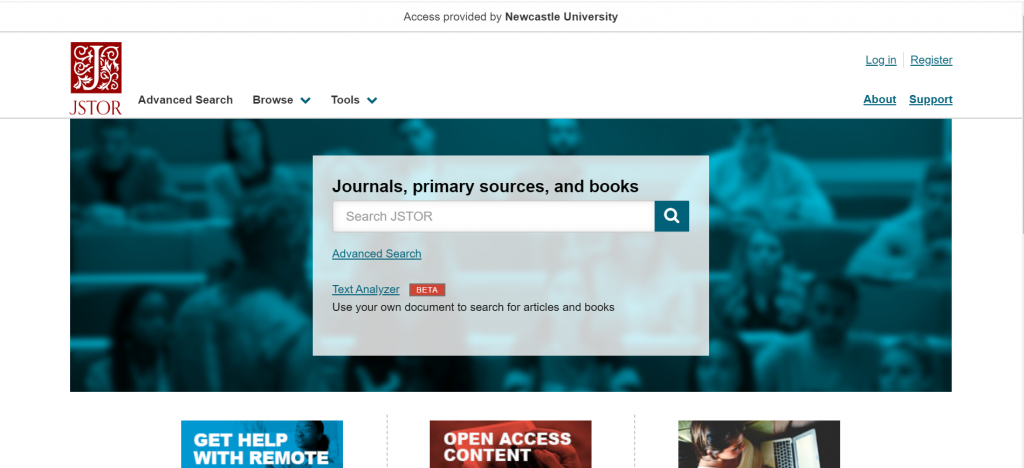
JSTOR is a full-text collection, giving you online access to scholarly journals, books and book chapters in the arts, humanities, and social sciences.
It has basic and advanced search options that allow you to search by topic keyword, author, subject area, title or publisher
Scopus is a large, multidisciplinary database, which indexes peer- reviewed journal articles, books, book chapters, conference proceedings and trade publications.
One of the main advantages of using Scopus is that it provides a lot of useful information about the articles it indexes. This includes full reference lists for articles and cited reference searching, so you can navigate forward and backward through the literature to uncover all the information relevant to your research.
You can also set up citation alerts so you can be informed of new, relevant material automatically. Other useful tools include citation overviews, author and affiliation searching, visual analysis of search results, a journal analyser, and author identifier tools (if you are interested in publishing work).Watch this video from Scopus about how to expand your search from a known article reference.
https://youtu.be/qCu-obYMFsE
Watch this video from Scopus about how to expand your search from a known article reference.
Government publications provide information in a variety of subjects. Statistics, White Papers, Parliamentary Bills and a whole range of Official Legislation published by the Government. The provide a good, reliable, source of accurate statistics, and can give support to your argument in essay topics. This includes OFSTED reports, Department for Education advice, policy and publications.
OECD iLibrary is the online library of the Organisation for Economic Cooperation and Development (OECD) and gives you access to books, analyticalreports and statistics, covering a broad range of topics relevant for studies in education.
OECD iLibrary is certainly worth searching to provide reputable supporting information for your academic work.
Statista is an extensive statistics platform covering over 1.5 million data sets. It includes reports, statistics and forecasts on a range of topics. So if you want to know which social media platforms are most popular across the globe, compare homelessness statistics, explore education trends or how many people read every day, Statista is a brilliant place to start.
Statistics and reports can be exported in a range of formats including images and PowerPoint, giving you flexibility to include the visuals in your assignments. The statistics source is included, giving you the information that you need to cite it successfully.
Find out more about Statista with this brief introduction.
Newspapers are an excellent resource to explore, to provide a range of perspectives on a topic. You can find opinion pieces, social commentary and identify trends in public opinion.
We have a huge range of newspaper archives, historic newspapers and international sources such as Nexis that can mostly be access online and off campus. Our Newspapers resource guide collates all of our resources and will guide you through how where to look.
LexisLibrary is an excellent place to start, including TES and The Guardian education. It provides access to UK national and regional newspapers, from the 1990s to today. It includes the copy text without the images or formatting and all of the details you need to create a citation are on the article page.
Once you have followed the Library Search link to access Lexis, make sure you click on News at the top of the page for full text access to all UK publications.
As so many articles are published every day, you will need to refine your searching using date ranges, combined keywords or by selecting specific newspapers or publication type (i.e. broadsheet or tabloid).
Remember to use your critical skills when using newspapers however, and watch out for Fake News. They are biased sources and are best used in balance with other sources. You can find our tips on our Evaluating Information skills guide.
Box of Broadcasts can be used to access TV and radio broadcasts from over 65 channels, including most of the UK’s freeview network, all BBC TV and radio content from 2007, and several foreign language channels. It’s a great resource to use to find documentaries or critical opinions.
You can view archived programmes, record new ones, create clips and playlists and see transcripts to help with citation and translation. You can also search for other user’s public playlists to help you in your own search.
You can get help at anytime during your studies by contacting your Social Science Liaison Team; Karen and Louise who are based in the Philip Robinson Library.
New to the University or just not sure where to start other than the Politics reading lists you’ve been told to follow? Then check out our list for where you might to look.
When working off campus, you can still access the full collection of ebooks, electronic journals and professional magazines, newspapers, conferences and more, from Library Search.
Additional ebook titles are being added to the collection every day while we are all working remotely. Search by author, title or keyword to find books to help you with your essay topic.
To find academic journal articles from across our collection that match your topic keywords, use the everything search option and filter your results on the left to peer-reviewed journals.
Watch our introduction to the main Library Search features.
The Social Sciences Premium Collection is a brilliant place to start if you would like to refine your results to politics and the social sciences, while still searching broadly across different information types.
Find out more about the Social Sciences Premium Collection, how to search it successfully and use the advanced features. It is a brilliant resource for politics.
You can contact the Liaison Team for one-to-one support or send your questions to Library Help, where there are staff logged into our live chat service, 24/7.
Between Library Search and your Subject Guide, you will be able to find excellent information to use in your academic essays, but there are many other resources you may want to try.
Scopus is a large, multidisciplinary database, which indexes peer reviewed journal articles, books, book chapters, conference proceedings and trade publications.
One of the main advantages of using Scopus is that it provides a lot of useful information about the articles it indexes. This includes full reference lists for articles and cited reference searching, so you can navigate forward and backward through the literature to uncover all the information relevant to your research.
You can also set up citation alerts so you can be informed of new, relevant material automatically. Other useful tools include citation overviews, author and affiliation searching, visual analysis of search results, a journal analyser, and author identifier tools (if you are interested in publishing work).
https://youtu.be/qCu-obYMFsE
Watch this video from Scopus about how to expand your search from a known article reference.
Government publications provide information in a variety of subjects. Statistics, White Papers, Parliamentary Bills and a whole range of Official Legislation published by the Government provide a good, reliable, source of accurate statistics, and can give support to your argument in essay topics.
OECD iLibrary is the online library of the Organisation for Economic Cooperation and Development (OECD) and gives you access to books, analyticalreports and statistics, covering a broad range of topics relevant for studies in politics.
Agriculture and food
Development
Economics
Education
Employment
Energy and nuclear energy
Environment
Finance and investment, taxation and trade
Industry and services
Science and technology
Social Issues / Migration / Health
Transport
Urban, Rural and Regional Development
OECD iLibrary is certainly worth searching to provide reputable supporting information for your academic work.
Statista is an extensive statistics platform covering over 1.5 million data sets. It includes reports, statistics and forecasts on a range of topics. So if you want to know which social media platforms are most popular across the globe, compare homelessness statistics, explore industry trends or how many people play video games, Statista is a brilliant place to start.
Statistics and reports can be exported in a range of formats including images and PowerPoint, giving you flexibility to include the visuals in your assignments. The statistics source is included, giving you the information that you need to cite it successfully.
Find out more about Statista with this brief introduction.
Newspapers are an excellent resource to explore, to provide a range of perspectives on a topic. You can find opinion pieces, social commentary and identify trends in public opinion.
We have a range of newspaper resources available from the Library, and LexisLibrary is an excellent place to start. It provides access to UK national and regional newspapers, from the 1990s to today. It includes the copy text without the images or formating and all of the details you need to create a citation are on the article page.
Once you have followed the Library Search link to access Lexis, make sure you click on News at the top of the page for full text access to all UK publications.
As so many articles are published every day, you will need to refine your searching using date ranges, combined keywords or by selecting specific newspapers or publication type (i.e. broadsheet or tabloid).
Remember to use your critical skills when using newspapers however, and watch out for Fake News. They are so biased sources and are best used in balance with other sources. You can find our tips on our Evaluating Information skills guide.
9. Newspaper archives and international news
We have a huge range of newspaper archives, historic newspapers and international sources such as Nexis that can mostly be access online and off campus. Our Newspapers resource guide collates all of our resources and will guide you through how where to look.
If you want to search across a range of newspapers, we suggest you start with Gale Primary Sources, as this gives access to nearly all our British newspaper archives, except for The Guardian and The Observer.
10. Box of Broadcasts
Box of Broadcastscan be used to access TV and radio broadcasts from over 65 channels, including most of the UK’s freeview network, all BBC TV and radio content from 2007, and several foreign language channels. It’s a great resource to use to find documentaries or critical opinions.
You can view archived programmes, record new ones, create clips and playlists and see transcripts to help with citation and translation. You can also search for other user’s public playlists to help you in your own search.
Unfortunately, Box of Broadcasts is not available outside the UK.
Hi I’m Caitlin, and as a final year law student I would say
I’m used to exams by now!
I’m going to give you my top 5 resources for exam revision techniques, and top 5 exam resources to get you all set up for May’s exams.
TOP 5 EXAM REVISION TIPS:
Focus on seminars – seminar questions are often set to prepare you for the exam, whether it’s a key case, precedent or the best way to tackle a problem question! It’s definitely worth spending that extra time preparing and doing seminars, so that you can go over these as an exam topic.
Make notes as you go along – you might not always have time but spend an extra hour or so after the lecture making revision notes, and highlighting the key cases/points of law. You’ll thank yourself when it comes to exam time.
Make essay plans – identify the key points of law, and look at past exam papers to see what could be asked.
Identify your weak spots early and go to your tutor/seminarist/lecturer to iron them out now.
Don’t rely on preparing topics – if the exam has 3 questions for you to answer, don’t just learn three topics! Always learn a few more topics than you have to answer.
TOP 5 REVISION RESOURCES:
Elawresources – good case summaries to break down the points of law in really basic terms.
Concentrate Revision Guides – these cost around £5-10 each but really break down key points of law.
BAILII – British and Irish Legal Information Institution.
Lecture revision sessions – most lecturers will put these on, but make the most of them by emailing/preparing in advance what topic/area you’d like to see covered.
Good luck in your exams, they’ll be over before you know it!