Want something different to read this Christmas? Why not take a look at our Medicine in Literature Collection.

Medical Humanities or Narrative Medicine is a popular academic discipline that explores the crossroads between medicine and the arts.

Our Medicine in Literature collection captures the complexities of what it means to be human through a wide range of literary genres.

These resources range from fiction, non-fiction including medical history, ethics and memoir, graphic novels, poetry and prose or medicine as metaphor, to films. Representations of illness, dis-ease, healing and health are interwoven themes that give voice to a diversity of perspectives and personal experiences of the human condition.

If you’re interested in exploring your subject field from a different viewpoint or simply want to broaden your reading this Christmas, dive right in! The physical stock is located in the Quiet Study area of the Walton Library or you can browse the collection from our Library Guide.

Please email any resource recommendations to lib-medlit@ncl.ac.uk.

See the Top 10 Medicine in Literature books borrowed from the collection this year.


Guest post: Creative Writing Society ‘Write-ins’

Sitting down to write for twelve hours might seem like an impossible task, but Newcastle University’s Creative Writing society didn’t back down. On November 3rd and 24th, the Philip Robinson Library was host to our two annual ‘Write-ins’.

The Write-ins are organised to coincide with National Novel Writing Month (or ‘NaNoWriMo’) in which participants are challenged to write 50,000 words in a single month. The challenge is just as daunting as it might sound — to achieve that goal, you would have to write 1,667 words a day on average!
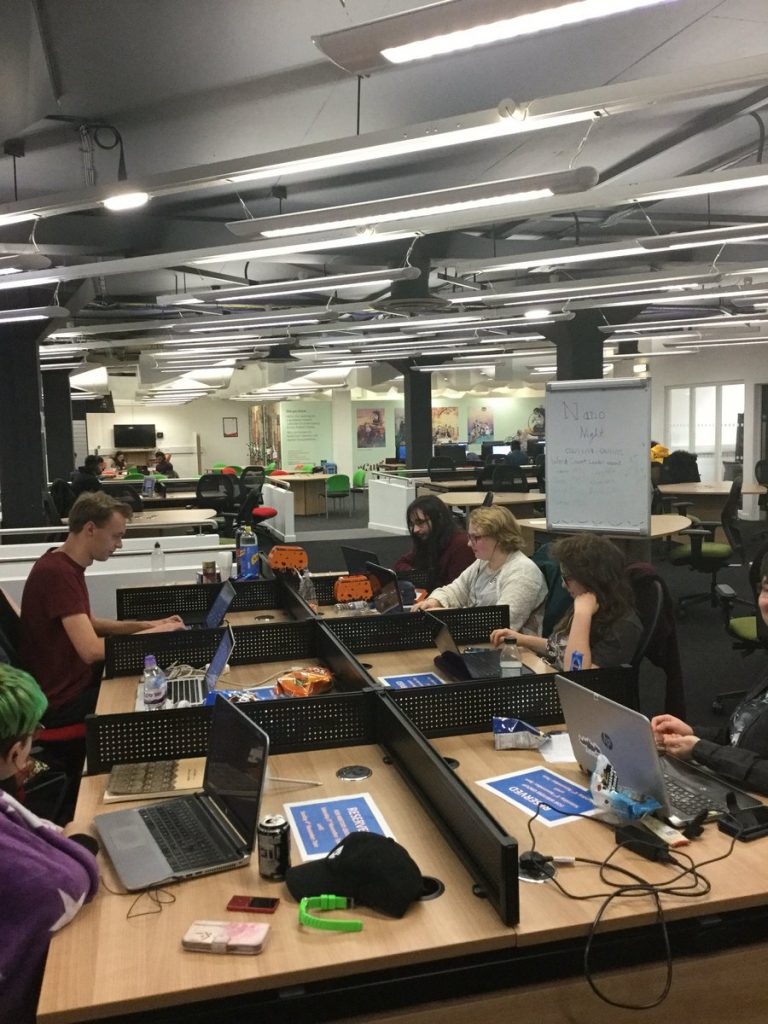
On the nights themselves, we were at the library from 7.00 a.m. until 7.00 p.m. Copious amounts of drinks and snacks were needed to support ourselves through the nights and make sure we had the energy to keep going. Library staff had been kind enough to decorate Your Space with posters and banners. We even had our own whiteboard that we used to keep track of everyone’s word counts.

By the end of the second night, one of our writers even managed to break the 50,000 word total! In total, we spent twenty four hours together, not just working on our own projects, but also sharing ideas and having a good time. The great company (and even greater snacks) made our task seem a little bit less difficult.

Throughout the night, we also took over the Library’s arts liaison team’s Twitter account (@ncllibarts) to share our exploits. You can find all the tweets from the night here (https://twitter.com/i/moments/1065265041694486529) with most of them getting progressively stranger as we grew more and more tired.
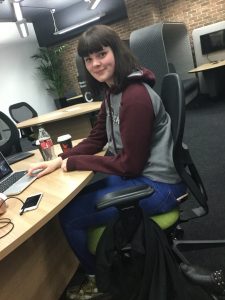
We’d just like to say a massive thank you to everyone involved in making this event happen, from members of committee to the library staff. The society can’t wait for our next annual Write-ins, even if we always need a lot of sleep the next day to catch up on the zzz’s!

Lucy Elliott, Newcastle University Creative Writing Society’s President

Managing your References: EndNote and OSCOLA

Recipe for referencing: Newcastle University Library

“Should I use EndNote as a way to manage my references?” is often a question we get asked. We wish that there was a simple answer to that question, but there isn’t! It all depends on how many references you have, how you like to work and if you are willing to make time to learn how to use EndNote properly. You see, while EndNote is tool that can make your academic life easier (for example, it can help you build a collection of references, insert references into your work and create bibliographies), it will only save you time, if you invest time NOW.

So if you’re using the OSCOLA referencing style and weighing up whether to use EndNote or not, then you might want to consider the following:

  • You need to have a good grasp of the OSCOLA fundamentals before you even start with EndNote. If you need a refresher on OSCOLA, then check out the OSCOLA referencing guide first before even looking at EndNote.
  • EndNote will not do EVERYTHING for you. You will still need to manually input and amend your references to ensure your footnotes and bibliography comply with OSCOLA.
  • Have you got the time to invest in EndNote before using it? We strongly recommend that you make a start using EndNote from the beginning, rather than in the middle or at the end, of your research.
  • How do you want to use EndNote? Some people decide to use it simply as a storage place for their references and PDFs and leave it at that. Others use it both as a storage place, as well as a tool to help them cite.

Still not sure? Watch the video below to see how to use OSCOLA style and the Cite While You Write feature in Word. Then take a look at the OSCOLA and EndNote guide and see if it’s something you’d like to start using.

Any questions? Have a look at our Frequently Asked Questions to see if it’s been asked before. If not, then do get in touch via Library Help


EndNote

What is EndNote?

The official blurb on EndNote is that it is “…the industry standard software tool for publishing and managing bibliographies, citations and references.”

Have you drifted off yet? Don’t – read on!

EndNote takes a little getting used to and we recommend you familiarise yourself with it at the start of your research process. But as Library Staff, we wouldn’t spend a significant amount of time demonstrating and training our academic staff and students on what EndNote is, and how to use it, if we didn’t think it was valuable. It will save you a huge amount of time in terms of writing up your assignments.

Essentially, you can use EndNote to create and organise a personal library of resources relevant to your research. You can import references from Library Search, and a huge range of databases such as Scopus, Web of Science, IEEE Xplore and Business Source Complete. You can ask EndNote to locate the full-text PDFs of the resources you are going to use in your research, and you can annotate them as you wish too. Did you know you can instruct Google Scholar to import references into EndNote? No? Try it. Finally, if you already have materials stored in your home folder (H:\) then you can attach them to a manually-created reference within EndNote, bringing all your research together in one place.

In addition to organising your references (and this is the clever bit) you can then get EndNote to ‘talk’ to your word processing software, e.g. Microsoft Word, and insert the citations into your work for you in your chosen referencing style, e.g. Harvard at Newcastle, Vancouver, APA or MLA. If you don’t want to do that, then EndNote will also allow you to create an independent bibliography of your references, saving you an awful lot of typing.

Using EndNote

Intrigued? You should be. Take a look at our EndNote Guide. It contains all the introductory information you need, step-by-step workbooks to train yourself on the use of EndNote (the Desktop and Online versions), videos, useful FAQs, and contacts for help, should you need it.

Finally, Newcastle University provides support for EndNote but it is not compulsory to use. You may prefer Mendeley, Zotero, RefWorks or another piece of bibliographic management software. That’s fine, whatever makes your referencing lives easier. Go on, give them a try.

When is a website not a website?

A common mistake made in referencing is grouping all sources found online under the category and reference type of a website. Your aim should be to reference the information you have in front of you rather than where it was sourced. Simply grouping items found online as a website would be the equivalent of referencing a book by the publisher details rather than the author and title.

For example, a government publication found online would be referenced like this in Chicago.

United Kingdom. Department for Education. Cloud computing: how schools can move services to the cloud. London: The Stationary Office, 2016. Accessed: February 01, 2018. https://www.gov.uk/government/publications/cloud-computing-how-schools-can-move-services-to-the-cloud. 

An electronic journal article might appear like this in APA.

Gillum, J. (2012). Dyscalculia: Issues for practice in education psychology.  Educational Psychology in Practice, 28(3), 287-297. doi:10.1080/02667363.2012.684344

While a video posted on the Tate website would look something like this in Harvard.

TateShots (2016) Grayson Perry: think like an artist. Available at: http://www.tate.org.uk/context-comment/video/grayson-perry-think-artist-tateshots (Accessed: 27 November 2018). 

Identifying the type of information you are using as well as the source, are essential skills of evaluation and developing a critical approach to information. In many cases, you will be unconsciously using your judgment to assess the value of information for your purpose. So when you are using any source of information, ask yourself what it is you are looking at, what details are recorded about it, and whether it measures up as a quality piece of information.

New resource in focus: Literary Print Culture

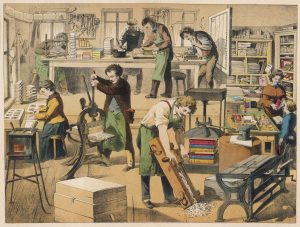
A bookbinder’s workshop, with the finished products in a domestic scene over on the right. Date: 1875

Continuing our series of blog posts exploring our brand new resources in more depth…

We have recently bought access to Literary Print Culture: the Stationers’ Company Archive. This is one of the most important resources for understanding the workings of the early book trade, the printing and publishing community, the establishment of legal requirements for copyright provisions, and the history of bookbinding. Explore extremely rare documents dating from the 16th to 21st century in this invaluable resource of research material.

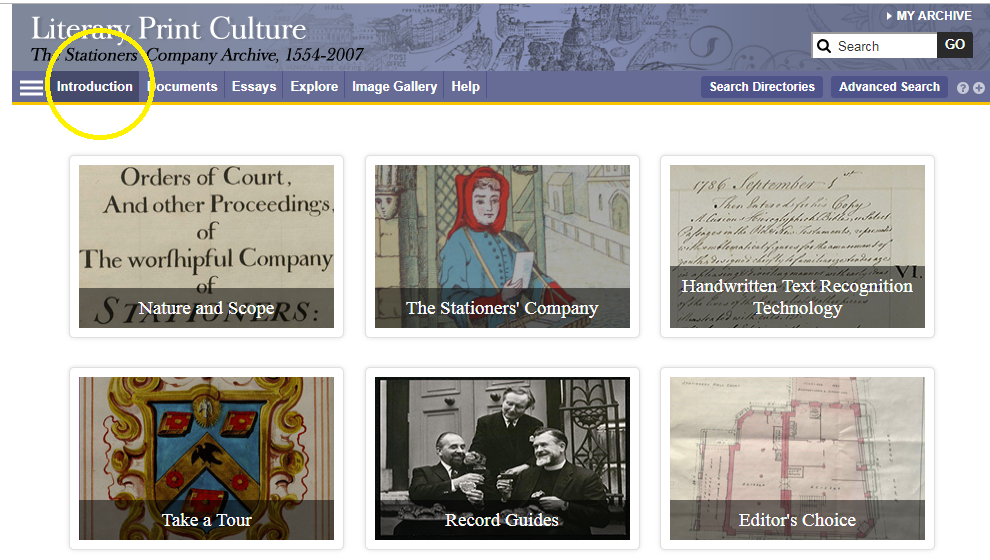
This archive contains a huge range of primary sources. Before you dive in, we’d recommend clicking Introduction, in which you can learn more about its scope and features.

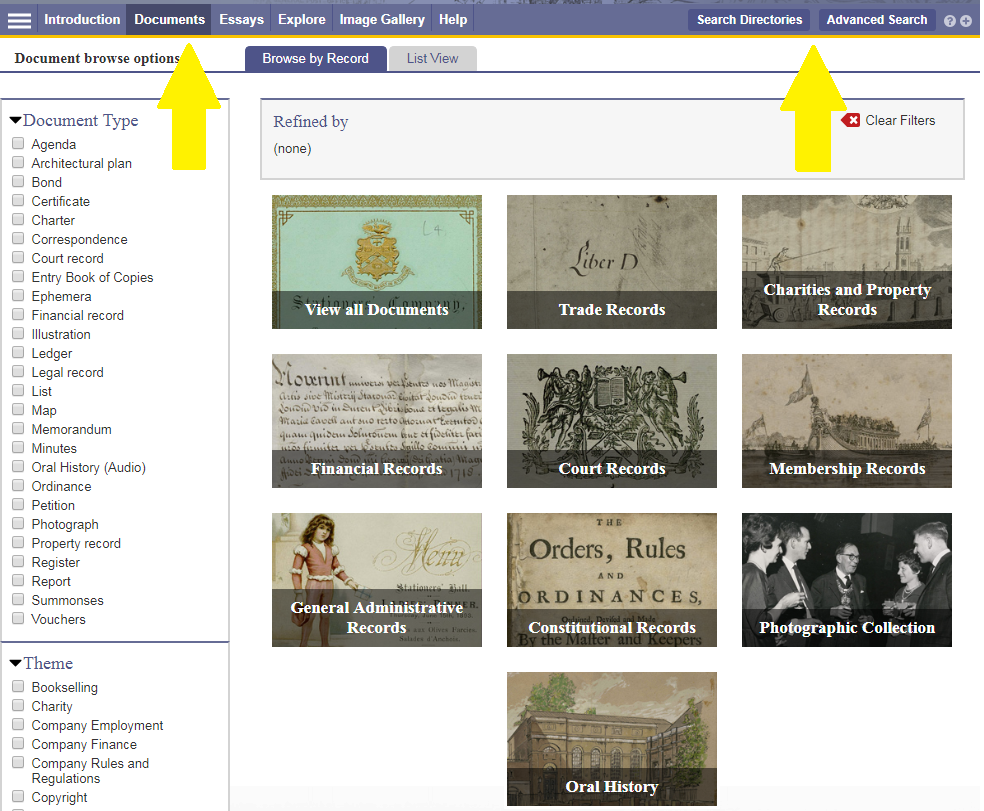
The primary sources include many different record types, relating to finance, membership, court, trade and charity. More recent sources include photographs and oral histories. These sources are supplemented by contextual essays and other commentary to give you ideas for interpreting and exploiting the archive.

You can browse or search the archive contents by clicking Documents (to browse) or one of the two search buttons. You can filter your search in various ways, e.g. by document type, year or theme.
For some of the documents in the archive, you can now use handwritten text recognition to enable you to search the handwritten items effectively. Split screen viewing enables you to view a document and its index simultaneously.

Have you used Literary Print Culture? Please feel free to post your comments and experiences by clicking Leave a comment below.

Drama Online: what’s new?

The Library has subscribed to Drama Online for a few years.  This resource contains the text of over 2,000 international plays, from ancient to contemporary, together with contextual resources. It’s likely to be of interest to anyone studying literature, languages (ancient to modern), film studies and media.

We’ve recently upgraded our subscription to include the Nick Hern Books collection (over 400 plays) together with the 2017/18 core update (117 plays).

All the plays are individually catalogued and searchable via Library Search, or you can search/browse them all in various ways on the Drama Online site.
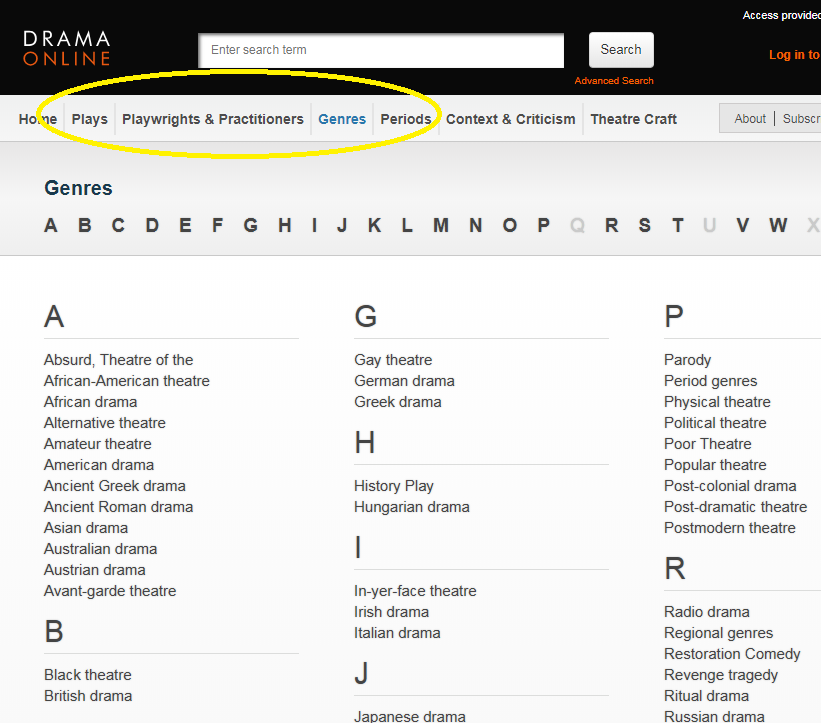
For example, using the options at the top of the screen, you can browse by title, author, genre and time period, or if you click Find Plays on the home page, you can add in other search filters, such as number of roles or scenes. Select Context and Criticism for access to a wide range of e-books about drama.

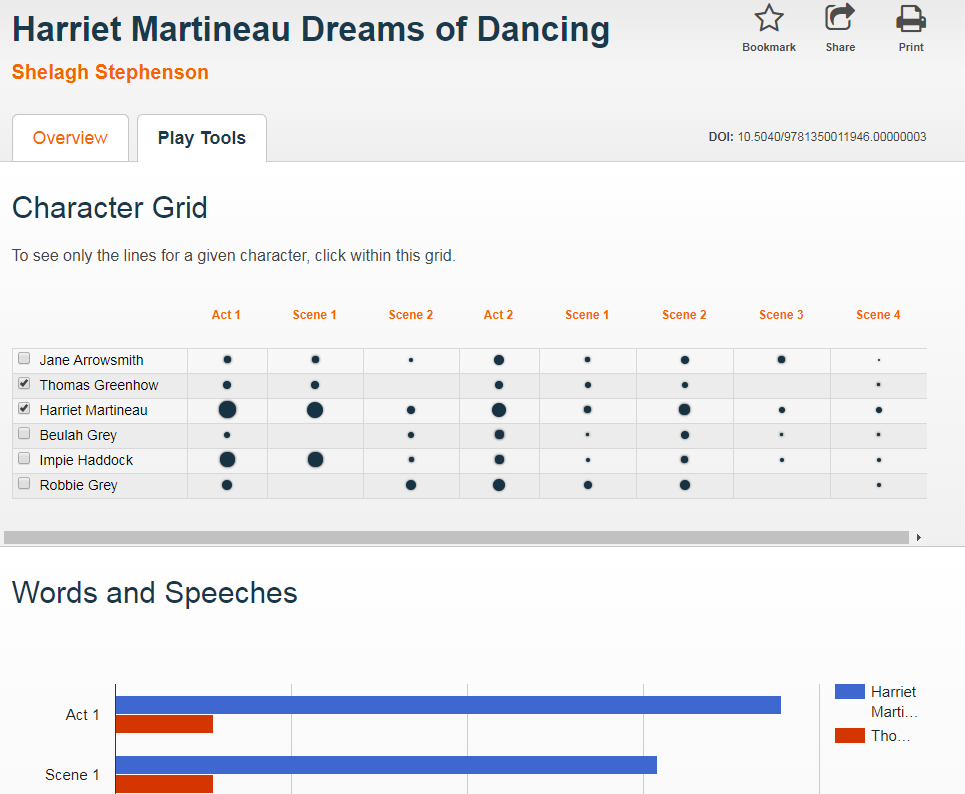
When viewing a play text, click Play Tools to analyse the speaking parts and appearances of different characters throughout the play.

Finally, follow @dramaonlinelib for news and features about this fantastic resource!


Cambridge Histories Online: what’s new?

We subscribe to Cambridge Histories Online, the internationally renowned book series which first started in 1902.  We have access to over 360 volumes online, covering many different subject areas in depth, including history, music, language and literature.

We have recently bought access to several new volumes (in some cases, multiple volumes) which cover the following topics:

Ireland

Moral Philosophy

Intellectual History of Byzantium

Judaism

Communism

Modernism

Slavery

All the Cambridge Histories are individually catalogued and searchable via Library Search, or if you prefer, you can browse them all together on the Cambridge Histories platform.


New resource in focus: Aerial and Lidar Digimap

Digimap is an online map and data delivery service, comprising various collections, including Ordnance Survey and Historic. We have recently acquired access to two more modules: Aerial and Lidar Digimap.

Aerial Digimap 

This provides access to some of the highest quality aerial photography available for Great Britain, created and licensed by Getmapping plc. You can use a range of interactive tools, allowing interrogation and analysis of the data online and offline. You can also:

  • add annotations (text, point, lines and areas)
  • identify image capture date by clicking on the map
  • generate PDF, PNG or JPG files for printing
  • save maps to go back to or print later

Lidar Digimap

This offers detailed Lidar data from the Environment Agency and presents a model of the earth’s surface.

Uses of Lidar data are highly varied, from use in the creation of visual effects for virtual reality and film projects, to archaeology, forestry management, flood and pollution modelling.

You’ll need to agree to the new licence before using these new modules: please see our separate blogpost for more details. If you need help with Digimap, there are extensive help pages online for each component.

To google or not to google?…That is the question

Can you remember life before Google? It is such a huge part of our lives that even those of us who can remember a time before it (hmmm, yes I am that old!) can’t imagine life without it now. It is a great place to find the latest cinema listings or who won last night’s football match, but what about finding information for your latest assignment or research?

There is a time and a place to use Google, but you need to be aware of its limitations. Google, after all, is a business. It earns the majority of its money from advertising, and it will not reveal how it ranks its search results (every wonder how Wikipedia always appears at the top of every search you do?). A search that we do today and repeat tomorrow for a piece of research could give us hugely different results, with no explanation of why. We are also often bombarded with millions of search results and the reality of our searching habits mean that we rarely look beyond the first or second page.  Admittedly, advanced search features on Google and the use of Google Scholar can really help us to become a smarter and effective Google users, but is it enough for our own research? Are we finding everything that is out there?

We need to think about our information needs before we work out where it will be best for us to search. Imagine, for a moment, that we are want to buy a particular local cheese, which we love. Would we go to a general shop or would we go to a specialist deli? We are probably going to need to go to a deli. It is just the same when searching for information. Google may be great for some background information or a starting point of a project, but it may simply not give us the high quality, niche information that we need to give us top marks for an assignment. So what are the other options?

Aimee Cook, a Liaison Librarian here at Newcastle University, explains more.

So next time you think about googling something for an assignment, stop and check out Library Search and your subject guide first for the books, eBooks and specialist databases that are available to you. If you are going to use Google, make use of the advanced search features and get to grips with Google Scholar. Happy searching!

Photo by Emily Morter on Unsplash