ASME Digital Collection

Are you studying or teaching mechanical engineering and looking for digital resources? If so, the American Society of Mechanical Engineers (ASME) Digital Collection may be just what you need.

Freely and easily accessible via Library Search, the ASME Digital Collection provides unparalleled depth, breadth, and quality of peer-reviewed content. This includes access to ASME’s Journals from 1959 – present; ASME’s Conference Proceedings from 2000 – present (with select proceedings back to 1955); and ASME’s ebooks from 1993 – present (with select titles back to 1944).

With powerful search and advanced filtering tools you can use keywords, topics, citations and date ranges to retrieve content simultaneously from different digital resources. This gives you the chance to apply Boolean operators to clearly refine your searches and therefore access more results that are directly relevant to your research.

ASME Digital Collection integrates well with other digital platforms and it can link to Crossref, Google Scholar, and Web of Science to discover citing articles. There are also tools for exporting citations to your preferred reference management software and you can share your links via email and social media. Just like a lot of digital databases it’s easy to set up email alerts to notify you about saved searches and newly published content.

So all that’s left to do is to search for ASME Digital Collection on Library Search, login as a Newcastle University user with Shibboleth, and browse the resources. You’re bound to find something useful!

Resource in focus: ACM Digital Library

ACM Digital Library is a full-text, online collection of all publications by the Association of Computing Machinary, including journals, conference proceedings, technical magazines, newsletters and books. Publications run from 1936 to present day, with 2,807,672 publications and 576,689 of these available for download.

Top topics include:

  • Artificial Intelligence, Machine Learning, Computer Vision, Natural language processing.
  • Networks and Communications.
  • Society and the Computing Profession
  • Human Computer Interaction.
  • Data science.
  • Applied computing.
  • Security and Privacy.
  • Hardware, Power and Energy.
  • …plus much more.

Though the topics are primarily computing, it would definetly be a collection worth having a look at if you are in Electrical Engineering or studying/researching an interdiciplinary topic which contained elements of computer science.

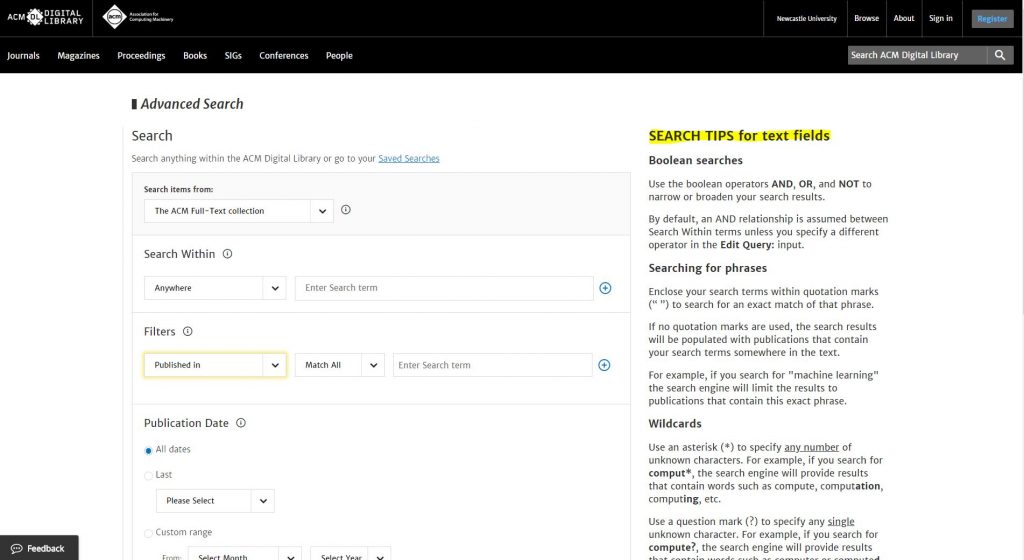
ACM have just recently updated it’s interface and search function (thanks goodness!), making it much easier to search and discover a range of invaluable resources.

You can now browse by topic or type (book, journal etc.), search by simple keyword or use its advanced search:

Loving their ‘Search tips’ on the right hand side in Advanced Search – wish all databases had this. Would help us all so much!

So, go and explore ACM – a definite ‘must’ for all Computing students. You can either find the ACM eJournal collection in your Computing Subject Guide (under Journals and Databases/eJournal Collections) or you can search for ‘ACM Digital Library’ in Library Search. Remember, if you find anything that doesn’t have full text, first check Google Scholar, then if still no luck you can request an interlibrary loan. If you need further help with any Computing or Engineering resources, please feel free to make an appointment with your Librarian.

Waltzing with EndNote

What is EndNote?

The official blurb on EndNote is that it is “…the industry standard software tool for publishing and managing bibliographies, citations and references.”

Have you drifted off yet? Don’t – read on!

EndNote takes a little getting used to and we recommend you familiarise yourself with it at the start of your research process. But as Library Staff, we wouldn’t spend a significant amount of time demonstrating and training our academic staff and students on what EndNote is, and how to use it, if we didn’t think it was valuable. It will save you a huge amount of time in terms of writing up your assignments.

Essentially, you can use EndNote to create and organise a personal library of resources relevant to your research. You can import references from Library Search, and a huge range of databases such as ScopusWeb of ScienceIEEE Xplore and Business Source Complete. You can ask EndNote to locate the full-text PDFs of the resources you are going to use in your research, and you can annotate them as you wish too. Did you know you can instruct Google Scholar to import references into EndNote? No? Try it. Finally, if you already have materials stored in your home folder (H:\) then you can attach them to a manually-created reference within EndNote, bringing all your research together in one place.

In addition to organising your references (and this is the clever bit) you can then get EndNote to ‘talk’ to your word processing software, e.g. Microsoft
Word
, and insert the citations into your work for you in your chosen referencing style, e.g. Cite Them Right Harvard, Vancouver, APA or MLA. If you don’t want to do that, then EndNote will also allow you to create an independent bibliography of your references, saving you an awful lot of typing.

Using EndNote

Intrigued? You should be. Take a look at our EndNote Guide. It contains all the introductory information you need, step-by-step workbooks to train yourself on the use of EndNote (the Desktop and Online versions), videos, useful FAQs, and contacts for help, should you need it.

Finally, Newcastle University provides support for EndNote but it is not compulsory to use. You may prefer MendeleyZoteroRefWorks or another piece of bibliographic management software. That’s fine, whatever makes your referencing lives easier. Go on, give them a try.

Strictly Referencing: When is a website not a website?

A common mistake made in referencing is grouping all sources found online under the category and reference type of a website. Your aim should be to reference the information you have in front of you rather than where it was sourced. Simply grouping items found online as a website would be the equivalent of referencing a book by the publisher details rather than the author and title.

For example, a government publication found online would be referenced like this in Chicago:

United Kingdom. Department for Education. Cloud computing: how schools can move services to the cloud. London: The Stationary Office, 2016. Accessed: November 4, 2019. https://www.gov.uk/government/publications/cloud-computing-how-schools-can-move-services-to-the-cloud. 

An electronic journal article might appear like this in APA:

Gillum, J. (2012). Dyscalculia: Issues for practice in education psychology.  Educational Psychology in Practice, 28(3), 287-297. doi:10.1080/02667363.2012.684344

While a video posted on the Tate website would look something like this in Harvard.

TateShots (2016) Grayson Perry: think like an artist. Available at: https://www.tate.org.uk/whats-on/tate-modern/talk/what-makes-artist-grayson-perry-conversation-sarah-thornton (Accessed: 11 November 2019). 

Identifying the type of information you are using as well as the source, are essential skills of evaluation and developing a critical approach to information. In many cases you will be unconsciously using your judgment to assess the value of information for your purpose. So when you are using any source of information, ask yourself what it is you are looking at, what details are recorded about it and whether it measures up as a quality piece of information. You can find more information on evaluating information on the Academic Skills Kit.

Hip-hop your way around the Harvard style

Harvard at Newcastle is the most frequently used referencing style and if your school does not have a preferred style, it is the one that we would recommend. This is because there is the most comprehensive guidance available for Harvard and it is a style that can manage referencing all types of information. Whether you are referencing a book, news article, Instagram or market research, the Harvard at Newcastle style has got you covered.

There are many variations of Harvard but the one used at Newcastle can be found in Cite Them Right. Harvard uses an in-text citation (Millican, 2018, p.12) inserted in the text, coupled with a reference list at the end of the document, which provides the key. Cite Them Right  is available as a published book to borrow from the library and Cite Them Right Online provides the same comprehensive guidance in a searchable interface that can be accessed anywhere online. It includes guidance about how to reference just about every type of information you can think of, including the more tricky online sources such as social media.

You will find the Harvard at Newcastle style in EndNote on campus PCs and through the RAS, and are able to download the style from our EndNote guide if you are using it locally on your own device. We’ve also included some useful tips and advice about getting to grips with Harvard on the Academic Skills Kit.

It’s all a matter of style

There are lots of different referencing styles, but which one is right for you?

Once you start creating citations and references, you need to consider referencing styles. There are hundreds of them out there and each has a slightly different set of rules about how citations and reference lists should appear in your text.

Most Newcastle University students use the Cite them Right Harvard style, but there is also Vancouver, IEEE, OSCOLA, Chicago, and many more. Your lecturers will expect you to use one specific style and all of your citations and references should conform to that style accurately and consistently; same punctuation, same capitalisation, same everything. 

We have lots of help about using some of the popular referencing styles Academic Skills Kit. The Cite Them Right website is also a valuable online resource that will show you how to hit all of the right steps on your way to mastering an individual referencing style.

Referencing – why is it snow important?

Photo by Aaron Burden on Unsplash

When walking in the snow we need the right footwear, and to keep warm, a scarf, hat, and gloves are also of great help. By doing so, we are adapting to the environment and using the right tools at the right time for the job at hand.

The same is true when adapting to academic writing where referencing is a key tool.

When you are writing a piece of work and you use someone else’s thoughts, words or ideas, you must reference them. But why do we talk about referencing so much at University, and why is it so important? Why should you bother spending time on ensuring that your references are consistent, accurate and correct?

It all comes down to why we reference in the first place:

  • To make your contribution clear by showing which words and ideas are yours, and which have come from your reading.
  • To acknowledge the work of others and to demonstrate how you have built on the knowledge that you’ve gained from your reading.
  • To ensure that the reader can follow up on your references for themselves.
  • To avoid being wrongly accused of plagiarism.

Watch our short video to find out a little more about why we should bother with referencing.

Find out more on the Academic Skills Kit.

Spotlight on OECD iLibrary

OECD iLibrary is the online library of the Organisation for Economic Cooperation and Development (OECD) it contains a vast collection of books, papers and statistics, some of which date back to the 1960s, it is the gateway to OECD’s analysis and data. OECD content covers over 100 countries.

Every year around 300 new titles are published, associated with the following themes:

  • Agriculture & Food,
  • Development,
  • Economics,
  • Education,
  • Employment,
  • Energy
  • Environment
  • Finance and Investment
  • Governance
  • Industry and Services
  • Nuclear Energy
  • Science and Technology
  • Social Issues / Migration / Health
  • Taxation
  • Trade
  • Transport
  • Urban, Rural and Regional Development

You can browse by theme, country, or choose the type of content you require (for example, books, papers, statistics). You can also carry out simple or advanced searches.

If you’re looking for Statistics and Indicators?

OECD iLibrary contains all of the publications and datasets released by International Energy Agency (IEA), Nuclear Energy Agency (NEA), OECD Development Centre, PISA (Programme for International Student Assessment), and International Transport Forum (ITF) since 1998 – present.

It presents all content so users can find and cite tables and databases as easily as articles or chapters in any available format: PDF, WEB, XLS, DATA, ePUB,READ.

For a quick introduction to OECD i Library, including how to search the database and how to use advanced features and find statistical information and indicators, take a look at the user guide.

You can  find details on other sources of statistics on our Statistics Guide.


Brush up on your search skills

A pot of paint brushes

Searching should be easy, right? We do it all the time in our day to day lives and with Google so ingrained into our existence, we don’t give it much thought. We type some words into the search engine and most of the time we find what we are looking for. Nothing to it!

However, while this approach certainly works for checking out cinema times or booking flights, it lets us down where research is concerned. We have high expectations that information will be quick and easy to come by and that it will be neatly organised in one place, rather than having to search in multiple locations, using different techniques. We imagine that the time consuming part of our research will be the analysing, synthesizing and the writing of it and we often don’t even think about the searching side of things.

The reality though is quite different. Without investing in our searching techniques and the development of a search plan, we can often find ourselves overwhelmed by information and not being able to see the wood from the trees. Our stress levels rise and our frustrations explode. Surely finding information shouldn’t be this hard!

The good news is, is that there is help to be had. Our job as Liaison Librarians is to equip you with the skills you need to create that all-important search plan and to encourage you to pause and stop before you dive straight into finding information for your research. We have a fantastic range of online tools for you to do this, not least an interactive search planner that you can keep adding to throughout your search and which you can even email to yourself, your supervisor, or us as a Liaison team for feedback. The Academic Skills Kit has lots of advice on how to start a search, including how to break your concept down into manageable chunks and how to identify keywords and synonyms.

You can also check out this short video to get you started…….

Keep your eyes peeled for our next blog installment of how to find particular resources. See you then!

Photo by Debby Hudson on Unsplash

Future proofing your employability

“What would you guess is the most common job?” Michael Lai, Outreach Lead at KGI, asked an audience of students at his Columbia Heights TEDTalk back in 2016. His audience members offer a few suggestions. “Engineer?” “Fast food workers?”  After several failed attempts, Michael puts them out of their misery,

“3.5 billion truck drivers in the United’s States” he tells them. “Experts predict that in the next 12-15 years, most of the cars on America’s highways will be self-driving… so what’s going to happen to the most common job?”

The future of the job market – and it’s inherent uncertainty – has been receiving a lot of attention in the international press in recent years, with Universities UK analysis predicting “65% of children entering primary schools today will work in jobs and functions that don’t currently exist.”  In previous generations, new graduates could expect to work with the same company for several years, steadily climbing the corporate ladder in a predictable, but reassuring linear way. In the 21st century however, the face of the job market is changing, and once you graduate, you may find yourself looking at a “portfolio career” over traditional career progression – something Facebook COO Sheryl Sandberg described as more akin to a career “jungle gym” than a career ladder.

But what does all this talk of truck-driving and emergent markets mean for you, the UK Graduate? Well, if the gig economy becomes the norm in the next 10 years, one of the key challenges for new graduates will be the perpetual need to upskill yourself, and market your own skill base to different employers. This puts the spotlight on what have traditionally been referred to as “soft” transferable skills that are required across many different roles and sectors – skills such as resilience, team-working and critical thinking. Here at the Library, we’d argue that information and digital literacy falls under this bracket (well of course we would, we’re librarians!). The ability to find and use information and make considered use of digital tools is an important capability in any graduate job. Don’t just take our word for it – we spoke to several students returning from placement who told us their information skills had helped them get ahead.

The good news though is that your degree programme offers you the chance to work on and demonstrate all of these skills. Employers will know that you may not have extensive work experience as a new graduate, but make sure you cherry-pick prime examples from your University work, part –time jobs and any voluntary experience to exemplify the skills employers are looking for (and remember, the Careers service can help you with interview preparation.) Make the most of the workshops and sessions open to during your time at University so you are in a great position to articulate these important skills. For more information on how the Library can help, check out our Employability Guide

References

  1. TEDx Talks (2016) Four Key Skills to Lead the Future. Available at: https://www.youtube.com/watch?v=djHTcES2ATg
  2. Universities UK (2018) Solving future skills challenges. 6th August 2018. Available at: https://www.universitiesuk.ac.uk/policy-and-analysis/reports/Documents/2018/solving-future-skills-challenges.pdf
  3. Sandberg, S as quoted by Lebowitz, S and Campbell, D (2019) “Goldman Sachs CEO David Solomon shares his number one piece of advice for millennials who want to get ahead in their careers.” Business insider, Jan 13th 2019. Available at:  https://www.businessinsider.com/career-advice-millennials-goldman-sachs-ceo-david-solomon-2019-1?r=US&IR=T