Tips for creating your study space

If you’re away from Newcastle over the Winter break you may be studying in unfamiliar or unusual spaces, which can make it more challenging to concentrate or find your motivation. Procrastination may be a struggle and creating a space, both physical and online, in which to be your most productive is something that many of us find challenging. It may not always be possible, but creating a managed space to study in will help. So what are our tips for creating the perfect study space at home?

1. Select your space

If possible, designate a space as your study environment. It may be your room in a shared house, the kitchen table, office, dining room or a spot in the hallway. Wherever you choose, claim it and make it yours in order to reduce distractions from those you live with and to create a studying mindset.

It can be invaluable to have a ‘work space’ which is separate from the rest of your life and spaces in which you relax. Even if this is simply a cheap desk in your bedroom, having a ‘study spot’ which is dedicated to your academic work will help you create structure and routine, and feel in the studying zone. It also makes for less embarrassment when you turn your camera on in Zoom or Teams.

2. Make it comfortable

While it may be tempting to study from your bed (which we’ve all done!), sitting upright will help you stay alert. Not to mention the benefits for your shoulders, back and neck. Start with a desk or table if you can, as it will allow you to make an organised space and leave your hands free to take notes.

It’s also worth thinking about how you can make the space more comfortable by opening a window for fresh air every so often, and the level of natural light you can introduce. Perhaps think about studying earlier in the day so that the natural brightness helps you stay alert and boosts your mood.

3. Tidy space, tidy mind

A cluttered study space can make it more difficult to focus and introduce unwanted distractions. By filing away your notes and de-cluttering your space at the end of a day, you will be able to start the next day fresh and find the learning materials you need.

This goes for your online spaces too. Think about how and where you keep your assignments, notes and any materials you download from Canvas, to ensure you are able to access the materials as you prepare assignments or revise for exams. Set up folders in One Drive that relate to each module or project you are working on and be sure to keep track of any collaborative work, such as projects in Teams. Managing the information you collect as you study and keeping it organised in some way is an essential study skill. Visit the Managing Information Guide for more tips.

4. Gather some stationery

It’s a simple tip, but keep a pen and paper nearby so that you can make quick notes. This might be jotting down an idea or something to remind yourself about at a later date. Many of you will take your notes digitally and may have a tablet you use within your programme, but having a notebook and pen to hand is a valuable backup. If you prefer handwritten notes, make sure you have a good organisational system so that you are able to retrieve the information you need.

You’ll find lots of useful tips around notetaking on the ASK website.

5. Listen to some music

Some of you may find studying in silence works best for you, while others may need a little background noise to block out distractions. Select a soundtrack for your study that helps you concentrate, with a mixture of mood boosting tracks and songs that are a little more mellow and calming. You’ll find lots of readymade study playlists on streaming services, or you could start with our Library Spotify playlists.

6. Switch off your devices

Many of us will recognise our mobile phone as a significant source of distraction and cause of many unproductive minutes. Switch off your mobile phone, log out of social media accounts on your study device and turn off the TV. This will help you create designated study time as well as space. It will also be a step towards introducing breaks in your study routine.

7. Take breaks

Taking regular breaks and walking away from your study space will help you return feeling refreshed. Why not download the iNCLude App? It has been designed to help you take small steps to improve and maintain your wellbeing, by creating positive habits and helping you focus on more than just your academic studies.

One valuable bonus tip from the WDC about taking breaks:

When you break, take a moment to leave a ‘note to future self’ about where you got to or what you were intending to do next.

Student studying with laptop and notebook.

8. Be organised

Learning remotely is challenging when you have to manage your own time and motivation. Being organised and creating your own plan or timetable can help.

When you begin your study session make sure you have everything you need to hand so that you don’t interrupt your flow. You might want to leave your laptop charger nearby!

Visit the Academic Skills Kit for more study and academic skills advice

Find UK and international news with Nexis Uni

If you’re looking for UK or international news from the last thirty years or so to today, then make sure you explore Nexis. The Nexis database has recently moved to a new platform (Nexis Uni): we think you’ll find it is easier to search than the old version, and it has some really useful features.

If you’re used to ‘old’ Nexis, don’t worry: the content on Nexis Uni is exactly the same, and you can still use the ‘expert’ search features if you want to.

What does it cover?

Nexis Uni enables you to search over 17,000 news, business and legal sources. This includes most UK national and regional newspapers, together with international sources, including newspapers, newswires and news magazines in multiple languages. Coverage of news titles often dates back to the 1990s and includes today’s news. Coverage is text only, and doesn’t include images, layout, adverts etc.

Nexis Uni also gives access to specialist business information, including dossiers on major UK and international companies, together with specialist legal information.

How to search news on Nexis Uni?

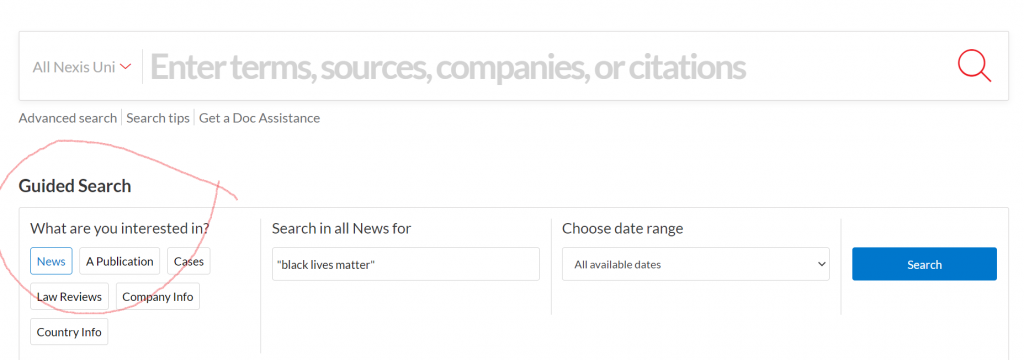
There are various ways to limit your search to newspapers/news sources, but the simplest is to select the News button from the Guided Search section:

Guided Search

Type in your search term (use ” ” if searching for a phrase), select your date range, and click Search.

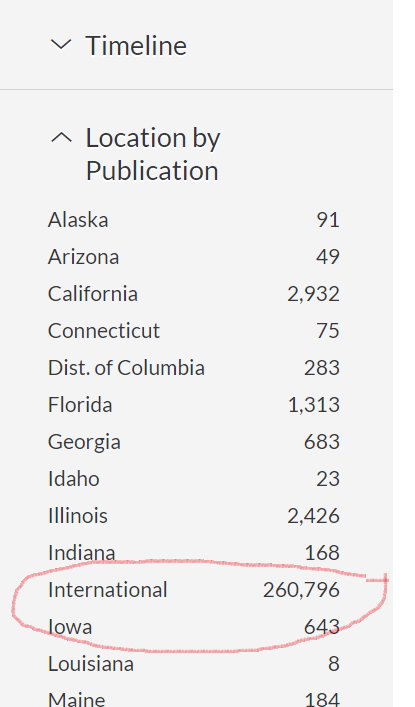
Limit by location of publication

Once your results are displayed, you can then further limit your search by date, publication type, location, language and more.

If you want to search news from a particular country, such as the UK, select Location by Publication >International> and then choose your continent and country.

If you would like to try more complex searching (e.g. searching in a particular section of the newspaper, or combining terms together in various ways), then click on Advanced search from the home page.

There is more detailed guidance about searching in the Nexis help centre.

Searching/browsing a particular newspaper

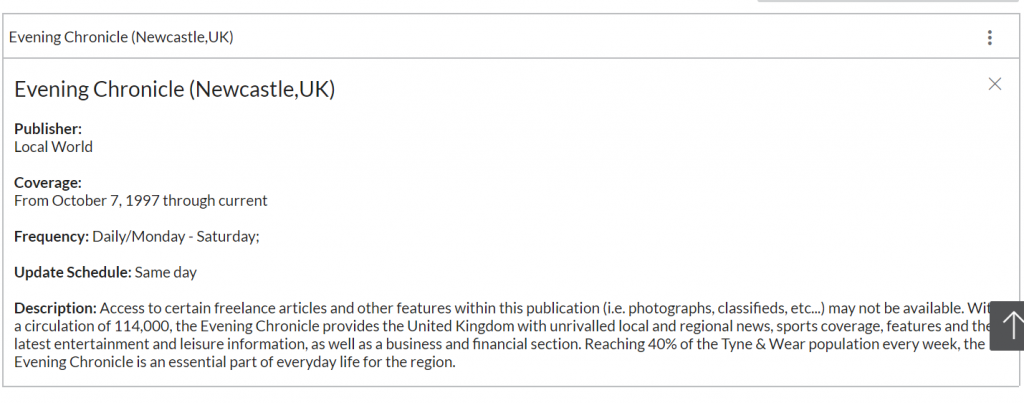
If you want to find a particular newspaper, choose Menu>All Sources, and then type the newspaper’s name in the Search within sources box. Click the three dot menu to get more information about coverage of the newspaper in Nexis Uni (NB ignore the phrase which says Archived source: no longer updated).

You can also use this route to add one or more newspapers as search filters, if you just want to search across certain titles only: to do this, type the newspaper title in the top search box entitled All Nexis Uni.

Personalisation features

If you’re using Nexis Uni regularly, we’d recommend you create a Nexis account, which enables you to set up alerts (click the bell icon at the top of your results listing), save searches, annotate and bookmark items, and share these with others. You can read more about alerts here.

Alert button

Please note: if you had previously set up alerts or saved searches on ‘old’ Nexis, they won’t migrate to Nexis Uni, so you’ll need to set them up again.

Where can I get more help?

Click the large question mark icon at the bottom right of the screen to get to the Nexis Help Centre >Support Resources, which includes videos and short guides.

Should I use Lexis or Nexis for UK news searching?

The ‘news’ section on the Lexis legal database enables you to search UK national and regional (but not international) newspapers. Nexis Uni is produced by the same company, and should have the same UK news coverage as Lexis, though Nexis Uni also includes a wider range of news sources such as broadcast news and news wires. We also think you’ll find the Nexis search and personalisation options are better, and easier to use, so we’d recommend Nexis. However, you might prefer to stick with Lexis if you use it regularly for legal information.

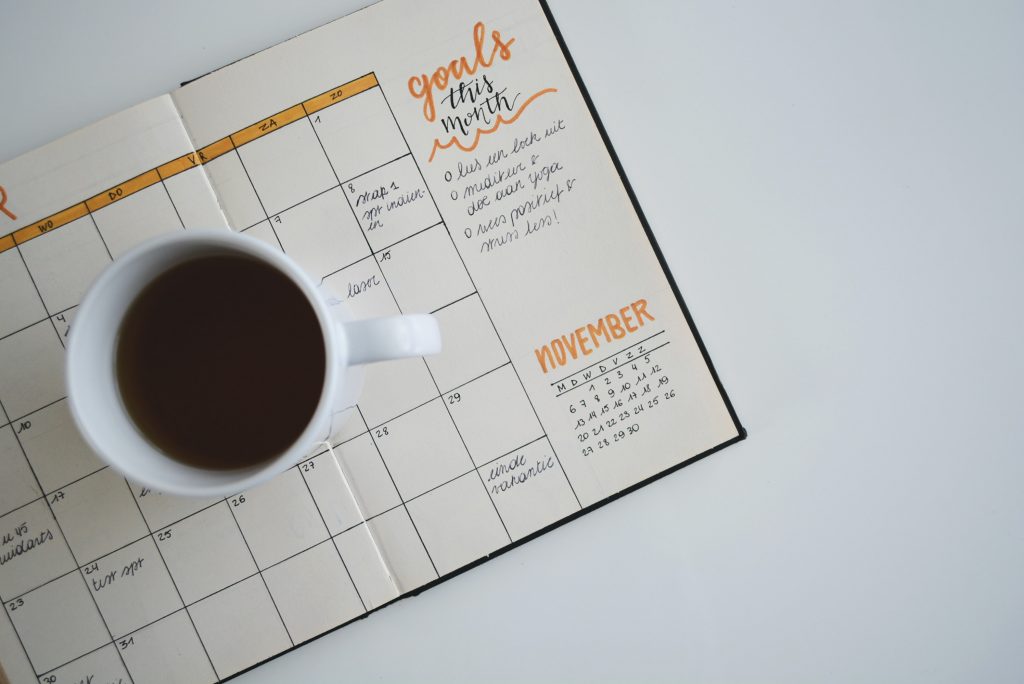
How to make an action plan for your studies and achieve your goals

Everyone has goals, be that for lifestyle, health, work or study. These goals give you focus, generate new habits and keep you moving forward in life. However, life is tough, particularly at the moment, so the thought of setting goals can sometimes feel overwhelming. This post will take you through how creating an action plan will help you clarify your goal journey; exploring what your goal is and why you’re setting it, what it will take to achieve, and how you will motivate yourself to reach your destination.

The examples we will focus on will be for study goals, however you can apply this method of goal setting to any aspect of your life.

1. Start with reflection

Before embarking on your shiny new goals, take some time to reflect on your previous goals. Which goals have you successfully achieved? Why were they a success? Is there anything you would do differently this time? Is there a common theme in the goals that you didn’t achieve, such as a lack of purpose?

Ask yourself ‘why’ you are setting this new goal, doing so will help you stay focused and give you meaning and purpose for this potentially challenging journey that you are embarking on.

2. Make them SMART

Your goals need to be SMART:

  • Specific – a specific and focused goal to allow for effective planning
  • Measurable – how will you measure the success of your goal? 
  • Achievable  – a goal that you will realistically accomplish within a time frame
  • Relevant  – a goal that is important and benefits you
  • Time bound – a goal that has a realistic deadline

What is your goal and how can you make it SMART?

EXAMPLE: Your goal is to hand in your dissertation early this summer. This goal, as it is, may feel daunting and unachievable, so how can we make it SMART?

  • Specific – You want to hand in your dissertation two weeks early because you are going on holiday.
  • Measurable – You will set measurable targets daily/weekly, such as X amount of words written by X.
  • Achievable – You have 10 weeks to complete your goal, so you feel it is very attainable if you plan your time carefully (if you only had 2 weeks, you might want to reconsider your goal).
  • Relevant – This goal is very relevant as you need to do well in your dissertation so you can pass your degree, but you also need to complete it early so you can go on your booked holiday.
  • Time bound – You have a clear ideal deadline of two weeks before hand-in.

Use our Goal Setting Template to get you started on your SMART goal:

3. Put your goal into action

An action plan is a flexible checklist or document for the steps or tasks that you need to complete in order to successfully achieve the goal(s) you have set yourself.

This could be written in a notebook, diary or using the Action Plan Template we have created that you can print off and use. It’s important that you get out your pen and actually write your goals down on paper. Research has shown that this will engage the left-hand, logical, side of the brain – basically telling your brain that you mean business!

Use our Action Plan Template to put your SMART goal(s) into action:

4. Plan for obstacles

There are always going to be challenges and events that may disrupt your goal, but instead of letting that obstacle derail you, plan for it.

Look at your study goal and identify what the obstacle(s) will be.

EXAMPLE: You want to submit your dissertation in early, but there’s a big family birthday coming up and a Uni field trip planned. So, get your action plan out and make sure these events are accounted for and plan your studies around them.

5. Check it off

There is nothing more satisfying in life (well apart from popping bubble wrap) than crossing or checking items off a to-do list – it’s that sense of accomplishment, feeling like you are finally getting there, which in turn reduces stress. So remember to break down your goal into small attainable actions and checklists, and for big projects, such as a dissertation or research project, you might have multiple checklists on the go. Just think of the satisfaction you will feel when it’s all done!

6. Reward yourself

This a very personal aspect of goal setting, but an important one.

To boost your motivation we recommend that you choose a reward for all your successful hard work, but select something that’s in relation to the size of the goal – maybe a piece of cake for getting a First Class degree is a bit out of proportion! Add this reward to your action plan and remind yourself of your incentive on a regular basis. It will keep you motivated when you feel like giving up.

EXAMPLE: If you hand-in your dissertation early you will treat yourself to a night out with your friends before you go on holiday.

7. A bit more reflection

You made this goal for a reason – it’s something that you really, REALLY want to achieve, so if your plan isn’t working, change it! Take some time to reflect on what’s working or not working in your action plan, be that daily, weekly, or monthly. Consider – How are you progressing? What changes can you make to bring you closer to your goals? It hard to keep on track when you feel like you aren’t getting anywhere, so are there any quick wins to give you a sense of accomplishment?

EXAMPLE: It’s late at night, you’re tired and struggling to write your dissertation conclusion. Your self-given deadline is in a days time and you are starting to doubt that your goal is achievable – maybe you need to postpone the holiday?

What you need to do is pivot your method – this isn’t working, so what can you change to still achieve your goal? Maybe leave the conclusion for the morning when you feel more awake, but spend the next hour focusing on your reference list so you can tick that off your action plan instead.

Final thoughts

Your SMART goals can be about anything and should be quite simple to plan. There’s lots of help online on using SMART goals, but working your way through the acronym for your particular goal is an excellent start. Don’t forget to use our Goal Setting Template and our Action Plan Template to help keep your goals manageable and reduce that feeling of overwhelm with your studies.

P.S. I had to set myself a SMART goal for writing this blog post and my reward was a very tasty lunch ❤

Fake News: the dangers of conspiracy theories

I actually enjoy a good conspiracy theory, and they often make for great film or TV tropes. Do you remember the end clip of Indiana Jones and the Raiders of the Lost Ark where the American government are storing the Ark of the Covenant in a huge warehouse? Do you think this is true? Might governments be hiding top secret things from us in massive, unknown warehouses? I like to jest that I believe this is real.

However, it wasn’t until recently that I realised how dangerous really believing in conspiracy theories can be. Watching the storming of Capital Hill in Washington DC back in January this year, opened my eyes to how conspiracy theories could take hold and potentially endanger lives.

Like fake news, conspiracy theories have been around for a very, very, very long time. Here’s some that you might recognise:

Most recently, you may have spotted some of the dangerous conspiracy theories rising up around the Covid-19 pandemic.

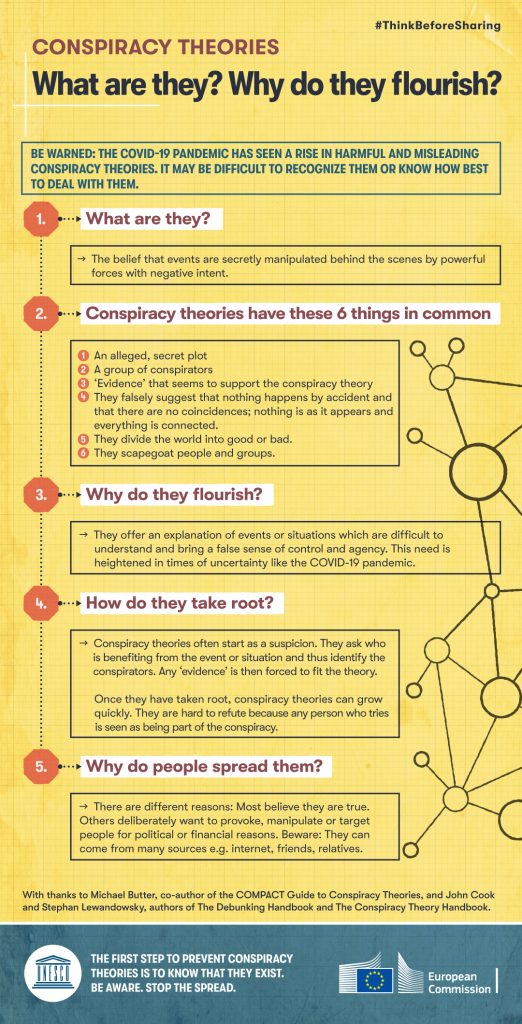
Do you believe in conspiracy theories? Do you know anyone that really believes in them? Have you ever found it hard to talk to them about what they believe? In light of the conspiracy theories surrounding Covid-19, The European Commission have created 10 useful infographics to help people be aware of conspiracy theories, how they spread, the dangers of them, how to talk to people who do believe in them, and (like fake news), how you should think twice before sharing them online:

I found it particularly interesting to learn that it is basic human nature to question reality in periods of uncertainty/change/major incidents (such as the pandemic, 9/11, shootings of presidents etc.), hence this is often when conspiracy theories take off.

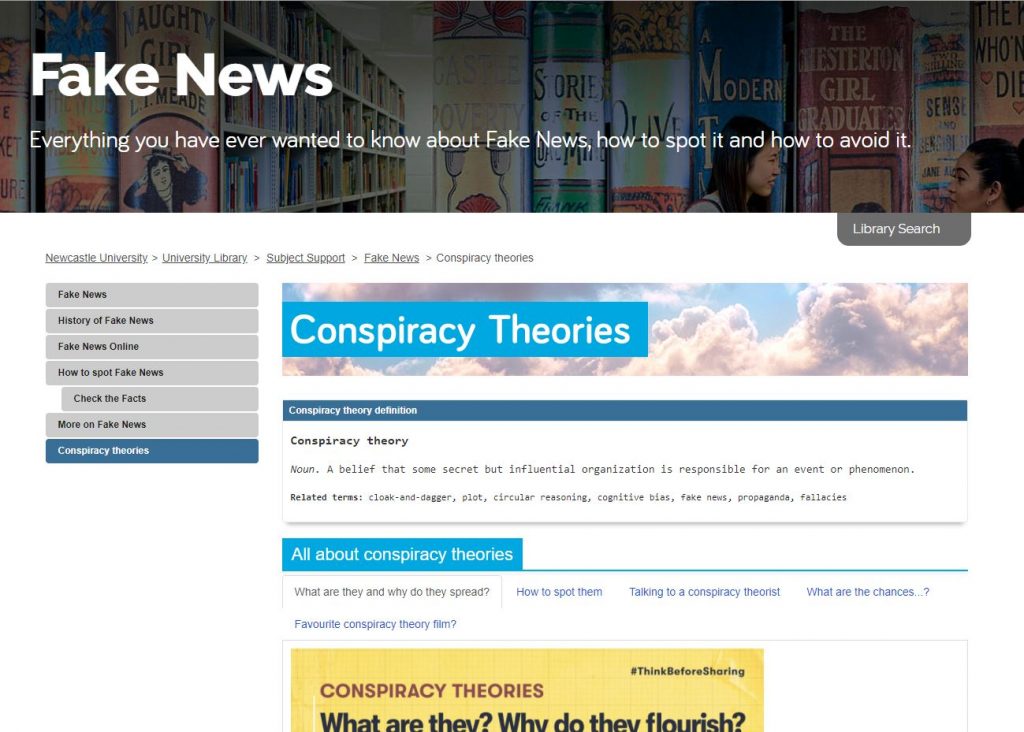
You’ll find these infographics on our Fake New Guide , along with other new content including links to some excellent videos and articles. Be sure to take our poll to share your favourite conspiracy theory movie too!

As a University student, it’s important for you to be aware of conspiracy theories; to know of the dangers they pose, to check your own beliefs and to be careful of what you share online. Use these resources to learn more and always remember, the truth is out there…

PubMed: Becoming familiar with controlled vocabularies


Are your literature searches run mainly in keyword-based platforms such as Google Scholar, Scopus or Web of Science?

Have you been told that you need to diversify your search, or maybe use a new database such as PubMed? Did someone mention that MeSH terms could improve your search?

If you do not know what those terms mean or where to start, you are in the right place. The following video will explain to you what controlled vocabularies are and why they are a powerful tool for retrieving relevant papers.

Now, let’s put theory into practice and demonstrate how to use Medical Subject Headings (MeSH) in PubMed. The video below will do just that.

Let’s have a look at what other controlled vocabulary databases you can use in medical sciences or if your Social Sciences student whose work crosses over with medical sciences. You can find all the databases mentioned below and others in Library Search:

Since the previous videos focus on PubMed, you might wonder what other databases you should be using. If you are unsure how to find the most relevant databases for your course, you can watch a video that will show you how to identify them.

Is Medline the database for you, but you need some help with the basics? Watch our:

Finally, please remember that this is general advice and it might not cover your particular area of interest. If you have any specific questions, please do not hesitate to contact us on Library Help, where you can email us or speak to us through the Live Chat feature.

Ovid Medline: Becoming familiar with controlled vocabularies

Are your literature searches run mainly in keyword-based platforms such as Google Scholar, Scopus or Web of Science?

Have you been told that you need to diversify your search, or maybe use a new database such as Medline, Embase or PsycInfo through the Ovid searching platform? Did someone mention that Medline’s MeSH terms could improve your search?

If you do not know what those terms mean or where to start, you are in the right place.

The following video will explain to you what controlled vocabularies are, why they are a powerful tool for retrieving relevant papers and it will demonstrate how to use Medical Subject Headings (MeSH) in Medline via Ovid.

Since the previous video focuses on Medline, you might wonder what other databases you should be using. If you are unsure how to find the most relevant databases for your course, you can watch a video that will show you how to identify them.

Is Medline the database for you, but you need some help with the basics? Watch our “Getting started with Ovid Medline” video for the basics. For a more detailed explanation on how to combine searches, watch the Combining Searches in Medline and other Ovid Databases.

Finally, please remember that this is general advice and it might not cover your particular area of interest. If you have any specific questions, please do not hesitate to contact us on Library Help, where you can email us or speak to us through the Live Chat feature.

Elsevier’s Clinicalkey Student

Getting Started

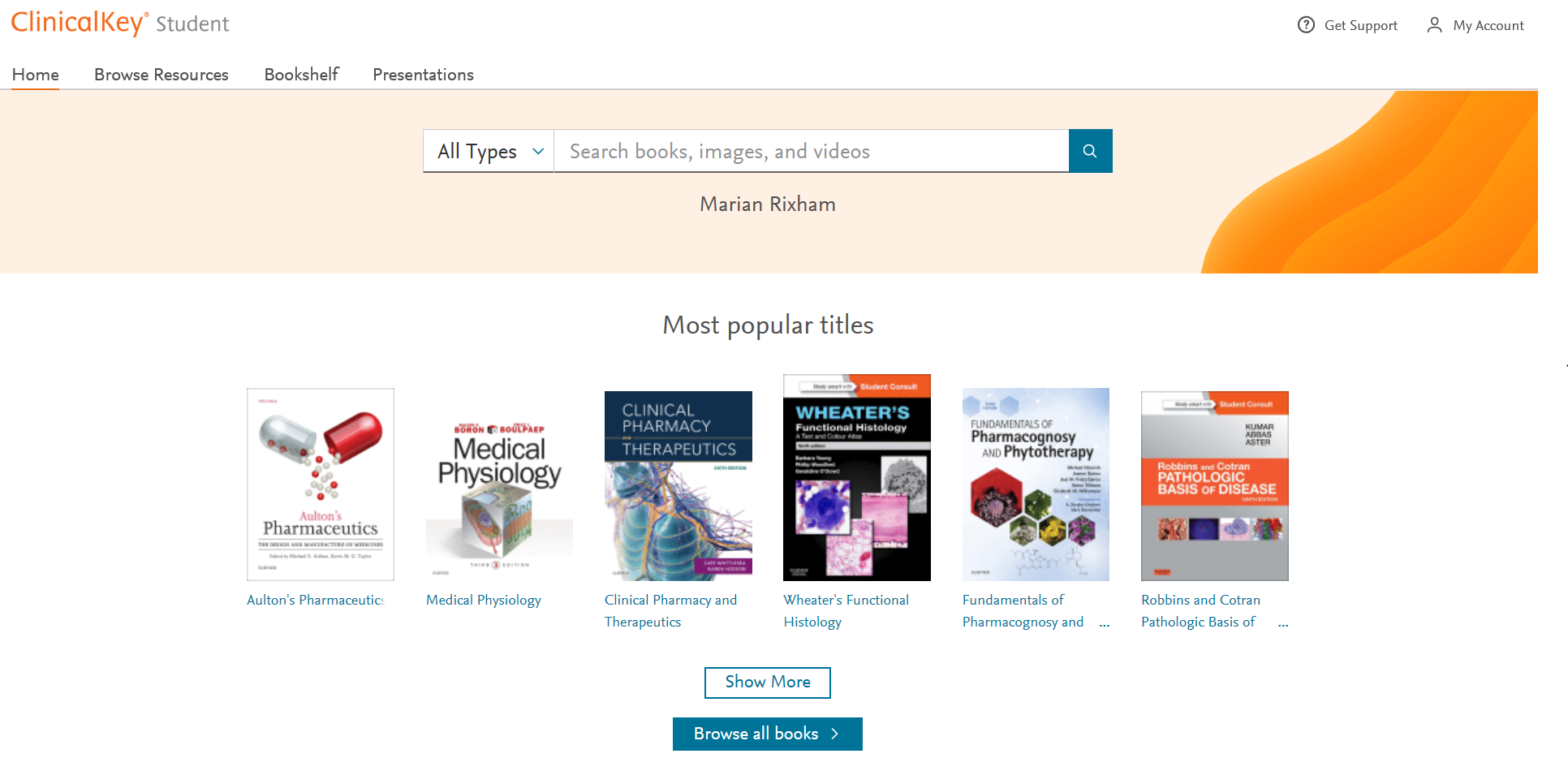
Elsevier’s Clinicalkey Student gives you electronic access to some of the most popular recommended clinical textbooks plus lots of other really useful resources including images and video. Subjects covered include medicine, dentistry and pharmacy. It allows you to add a book to your own Bookshelf, highlight text, add notes, create flashcard, make presentations and more. All of which is described below with videos to watch.

All of the eBooks available from Elsevier’s Clinicalkey can be found individually by searching for them on Library Search. To search or browse the collection go to Library Search and search for Clinicalkey.

To Login

To find out how to login and search for a book follow the instruction below or watch this video to get started.

  • Click on Log in via your institution on the right hand side
  • In the Institution search box type Newcastle University
  • Login using your University Username and Password

You are now ready to search for content either:

  • a book by title, author or keyword
  • a subject keyword for any content e.g. book, chapter, video available

Using the Bookshelf

To find out how to use the Bookshelf follow the instruction below or watch this video to get started.

To add a book to the Bookshelf you need to be within the content of a chapter. Search for the book by title, author or keyword

  • Click View book TOC
  • Click on the chapter you want
  • Click Add to Bookshelf on right hand side
  • If you want to see the book on your bookshelf, click Launch Bookshelf
  • If you click on the Home option this will show you all the books you have added to your Bookshelf
  • Once you have added to your Bookshelf you can go straight to it from the homepage by clicking on Bookshelf

For more details on using the Bookshelf watch this video.

Highlighting and Saving Text

When you are within the text of a chapter you can highlight any part to save it as a note for later. See instructions below and for more detail watch this video on Highlighting and Saving text.

  • Highlight the text you want to save
  • Select either green or yellow to highlight the colour
  • Give the note a name to show what it is

To look at all your notes click on the Notepad option on the left of the screen.

Creating Flashcards

When you are within the text of a book you can highlight any part to create a Flashcard. See instructions below and for more detail watch this video on Creating Flashcards.

  • Highlight the text you want for the front of the flashcard
  • Choose an existing Deck or a New Deck and Create it
  • Highlight and select Copy to get the text for the back of the card – Paste this text into the card
  • Save the card
  • You can create as many decks as you want and as many cards you want in each deck
  • By clicking on the Play button in the top right hand corner of the deck you can run through the cards to test your knowledge

Creating Presentations

You can share the latest evidence-based information with colleagues by exporting images with their citation and copyright information into a PowerPoint presentation.

See instructions below and for more detail watch this video on Creating Presentations

  • Search or Browse for an image
  • Click the Add to Presentation link at the bottom of the image
  • Select an Existing Presentation from the drop down menu
  • Click Add

OR

  • Click Create a New Presentation
  • Give it a name in the Presentation Name box
  • Click Add

Download the presentation and save as a .ppt file. You can then add your own slides and text to complete your presentation.

Using the Clinicalkey APPs

There are two types of Bookshelf apps:

  • Mobile App (iOS or Android): You can download the mobile app directly in the iOS or Android app store. To find the app, search for the name of the app (Bookshelf ClinicalKey Student).
  • Desktop App (Windows 10+): The app name appears as ClinicalKey Student Bookshelf. During the download process, you will be prompted to install the app and agree to the terms and conditions. This will create a menu icon and add a shortcut on your Windows 10 desktop.
  • Desktop Apps (Mac OS): Download the Mac version and follow the steps on the screen to complete the download and install the app.

Authentication requirements depend on the app you are using: mobile or desktop.

  • Mobile App (iOS or Android): The first time you use the Bookshelf mobile app, you must be in your authenticated medical school’s network when you sign up or sign in. For only this first-time usage, you have to be authenticated by your medical school’s network. After this unique confirmation that your account belongs to a medical school that provides ClinicalKey Student, the app will remember this authentication, and you can use the app online (in any network) or offline.
  • Desktop App (Windows 10+): You do not need to be on an IP-authenticated network to access the desktop app. Use your ClinicalKey Student username and password to log in to the desktop app.

Podcasts to warm your ears

Photo by Pavel Anoshin on Unsplash

I’m not a massive podcast listener, but the ones I do listen to are entertaining, comforting and familiar. The wonderful thing about podcasts is that no matter what you are interested in, I bet there is a podcast out there on it – there is definitely something for everyone. You can also download and listen to them anywhere and anytime on your phone (and most of them are free) – I like to download them and listen whilst walking the dog or play them through the radio on long drives. How do you listen to yours?

So, this Winter holiday, download some new podcasts and get out in the fresh air to awaken all of your senses – you may even learn something along the way!

Here are some Christmassy inspired podcast episodes to get you in the mood:

  • 99% Invisible – For those who love design and architecture, myself and my fellow Librarians can highly recommend this podcast series. 99% Invisible is about all the thought that goes into the things we don’t think about — the unnoticed architecture and design that shape our world. Here’s a couple of Christmassy themed episodes for you to enjoy:
  • The Truth: Santa’s NineThe Truth create their own original short stories that are sometimes dark, sometimes funny, and always intriguing. Each episode is only 20-30 minutes long. This episode tells the tale of two best friends that take part in a Christmas Eve heist only to discover their boss isn’t who they thought he would be.
  • Scienceish: Christmas Special – Haven’t listened to this series before, but looks right up my street! Rick Edwards (presenter) and Dr. Michael Brooks (Editor of the New Scientist), delve into the science behind popular culture. Enjoy last year’s Christmas special from Scienceish where Rick and Michael conclude Season 2 by revisiting their favourite questions – fringe theories, spider goats, and simulated universes.
  • The Infinite Monkey CageChristmas Special: The Science of Magic – The Infinite Monkey Cage is a BBC Radio 4 comedy and popular science series, hosted by physicist Brian Cox and comedian Robin Ince. Enjoy last year’s Christmas special that looks at the science behind some of our best loved magic tricks and illusions.

Other top podcasts series to discover for any time of year:

  • Spark from CBC Radio – This has been one of my favourite podcasts for a few years now. The host Nora Young explores how technology, innovation and design affects our lives.
  • Happy Place – Fearne Cotton’s Happy Place podcast series builds on the success of the top 10 bestseller HAPPY where Fearne draws on her own experiences and shares advice from experts on how to work through feeling blue to finding joy each and every day. I need this right now!
  • Desert Island Discs – Another one of my go-to podcast series. Yes you can listen to many a famous celebrity on this, but what I really enjoy is learning about many interesting figures in sciences, arts, education, politics etc. Those who you will have never heard of before, but who have had very interesting lives and done some amazing things in the World.
  • Made of Human – Comedian Sofie Hagen chats to comedians, authors, actors, musicians, activists, medical professionals, podcasters, influencers and artists about how to do life. (Spoiler alert: no one really knows)
  • Table Manners with Jessie Ware – Jessie Ware hosts a podcast about food, family, and the beautiful art of having a chat, direct from her very own dinner table. With a little bit of help from her chef extraordinaire mum Lennie, each week guests from the worlds of music, culture and politics drop by for a bite and a bit of a natter. Oversharing guaranteed.

What’s your favourite podcast?

Winter Craft-along Online: Part 3

Our final Winter craft blog sees us making pom-poms with a fork and how to make tree ornaments with twigs. We are also showcasing some wonderful crafts that our Library team have been working on recently.

Fork pom poms

This is all new to me… pom poms… using a fork!? What crafting wizardry is this? This video clearly shows you how you can make super quick pom poms, and all you need is wool, a fork and scissors. Like magic!

So what can you make with your pom poms? Well, whatever you like really.

How about use white wool and make two pom poms, tie together and make a snowman? Use brown wool and make into reindeers or multicoloured wool and make pom pom garlands for your tree. Have a look on Pinterest for more inspiration.

Twig stars

Time to go out and get some fresh air for this one. All you need is small twigs, strong tape or glue (hot glue gun is perfect, but only if you have one), and twine/string. These stars can be used as decorations or, as seen in the video, as parcel toppers. Gorgeous!

Crafty librarians

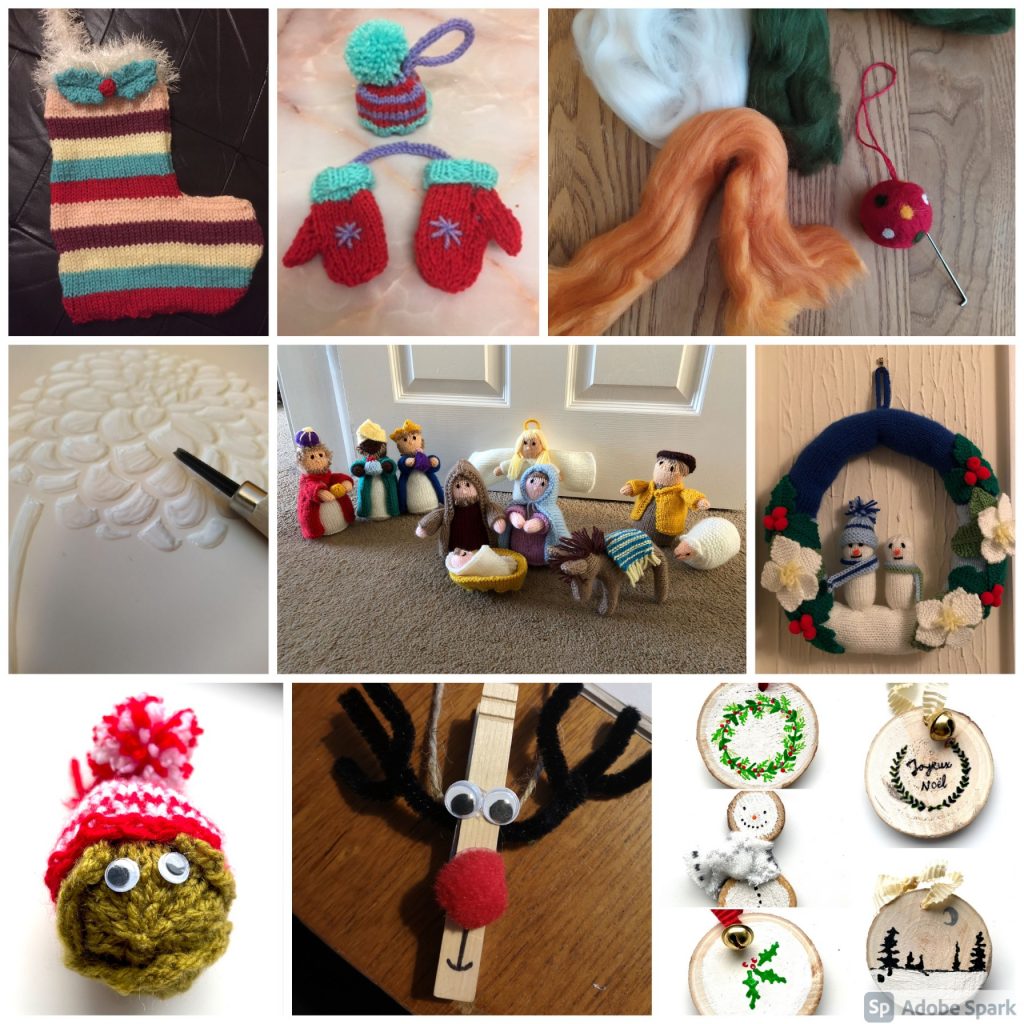
There are so many talented members of staff in our Library, so I wanted to share with you a mere tasting of the crafts that are being created this year:

Share the Joy

We would love to see your crafts, so why don’t you share a photo and tag us in Twitter, Instagram or Facebook, and use the hashtag #NULWinterCrafts2020.

I hope you have enjoyed our Winter Craft-along online blogs – Part 1 and Part 2 – and have found a pocket of time in your busy days to make something Wintery and Christmassy. I also hope it has inspired you to go out and discover other arts and crafts that you could make… because, remember, crafting is not just for Christmas 🙂

Winter Craft-along Online: Part 2

Winter Craft-along Online banner

As promised, here is our next instalment of Winter crafts – so glue guns at the ready for some more crafting antics.

As in our previous blog, we are embracing all things sustainable, and challenging you to make your crafts using materials found around the house. This time you will need an old jam jar, a pair of socks and some fruit!

Glass jar lanterns

For this one you will need an old, clean glass jar and some cheap PVA glue (the video says to use Mod Podge, but cheap PVA glue works just as good), tissue paper to decorate your jar and a tea light (real or battery operated). The video shows Christmas trees and snowflakes, but let your imagination run crazy – you could do a snowman, father Christmas, a snowy scene or a nativity. Really easy, but looks so effective, and who doesn’t love tea light lanterns when the nights are dark and cold.

No-sew snowmen

This is where your old (clean!) sock can be turned into a jolly snowman. For this you will need one white sock, some elastic bands or Loom bands, uncooked rice, 4-5 buttons (I bet you have some random buttons kicking about the house?), PVA glue, a bit of scrap ribbon or some wool for his scarf and then some more wool if you would like to make him a pom-pom for his hat. I am definitely going to have a go at making this – so easy, but looks so good.

Dried fruit garlands

I’ve been meaning to have a go at making these for ages, not only do they look good, but I bet it makes your house smell amazing! For this one you will need some citrus fruit – this can be oranges, limes, lemons, or even grapefruit – maybe you have some sitting in your fruit bowl that have seen better days and could be given a new lease of life? You can also use cloves and press them into the slices before you pop them in the oven, to make them smell so good. In the video is says the temperature in Fahrenheit – all of the blog and instructions I have read it just says to set your oven at the lowest temperature available on your oven. Cook low and slow and make sure you turn them over half-way through. You will also need string or twine to string them up. I have seen them on Christmas wreaths and as Christmas tree decoration – have a play and see what you can make with them.

Share the Joy

We would love to see your crafts, so why don’t you share a photo and tag us in Twitter, Instagram or Facebook, and use the hashtag #NULWinterCrafts2020.

Look out for our final blog with a couple more crafts for you to try and inspiration from our Library staff.