In our previous blog we explored how looking for information in the right place can help save you time and effort. However, sometimes, the right place to look can depend on what type of information you’re looking for.
While you’re probably familiar with books and you may have been introduced to journal articles, these are just two of the types of academic information available to you. Depending on your research question or essay title you might also find it useful to explore, for example, conference proceedings, maps, company information or newspapers.
Each type of information has its particular use; books provide an in-depth overview of a topic; journal articles are more specialised and focus in-depth on a particular area of a topic, and newspapers give you a useful perspective on events. While Library Search can help you find a large range of information types, some types of information are only available in special databases or archives. Before you start your search, it’s therefore important that you decide what types of information you will need to complete your assignment most effectively. You can find out more about different information types on our Finding Information Guide and in the video below:
When you know which types of information you need for your assignment or project take a look at our Resource Guides, which provide useful links and guides to appropriate sources.
Referencing is the acknowledgement of the sources that you use in your work. You must reference all sources that you use in your assignments, projects or dissertations, and includes quotes, ideas, facts, images, videos, audio, websites, statistics, diagrams and data.
Over the next two weeks we will be producing a series of blogs focusing on how to reference successfully in your work. We will cover…
explain why referencing is important
advice on how to produce consistent and reliable referencing
help on how to manage your information to make your life easier and assignments less stressful
point you in the direction of where to find advice and help
So come in from the cold and warm up with some referencing help and keep your eyes peeled for our upcoming blogs.
When you’re looking for information to help you write your
essays, assignments or projects it can be tempting to turn to the source of
information you use every day – Google.
While Google can be useful in some ways (such as finding company
websites or journal author’s profiles), it wasn’t exclusively designed to help
you find good quality, academic information that is reliable and relevant. This means you’ll likely have to spend more
of your time wading through huge amounts of information and fact-checking
resources for accuracy.
Thankfully, Google isn’t your only option – there are a number of different places to look that have been created with the aim of providing you with the information that you need, such as your reading lists, Library Search, and key Subject Databases.
Take a look at this video to find out more about how these
sources can help you:
For more help on finding information, take a look at the Academic Skills Kit.
With the high volume of information available to you online when you begin your research, it can be difficult to know which of the sources you find to actually use in your assignments or essays. Ultimately, you’ll want to choose the information that is of good quality and that can help you to answer your research questions most effectively. This means you need to make some critical decisions about the information you have found. Even if the materials you find are from reliable sources, such as Library Search or a Subject Database like Scopus you’ll need to consider how the information you’ve found compares to other information and if it is suitable for your purposes.
To help you make effective critical decisions you’ll need to think about these key areas:
Currency – is the information up-to-date?
Relevance – does it help you answer your research question?
Authority – who wrote it? How qualified are the authors?
Accuracy – how did the authors of the information reach their conclusions? What evidence and data have they used?
Purpose – Why was it written?
The video below looks at these in more detail:
See the Academic Skills Kit for more advice on selecting suitable information for your assignments and for more on the ins and outs of critical thinking take a look at this great blog from the Writing Development Centre: Shopping Around for a Critical Opinion
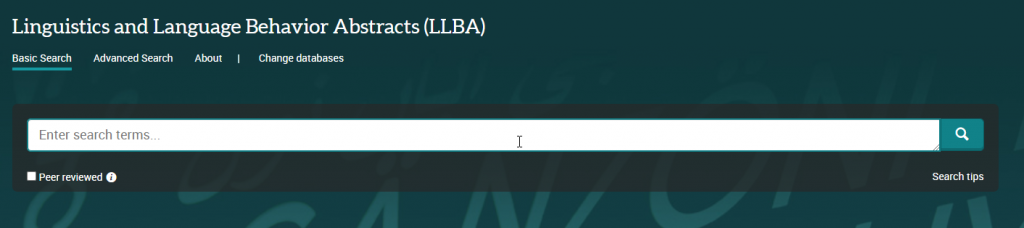
Linguistics and Language Behavior Abstracts (LLBA) indexes and provides abstracts of journal articles, books, book chapters and dissertations on linguistics and language sciences including topics such as:
Anthropological linguistics
Applied linguistics
Descriptive linguistics
Discourse analysis
Language – pathological and normal
Learning disabilities
Nonverbal communication
Phonetics
Phonology
Psycholinguistics
It’s an excellent resource for those interested in the nature and use of language.
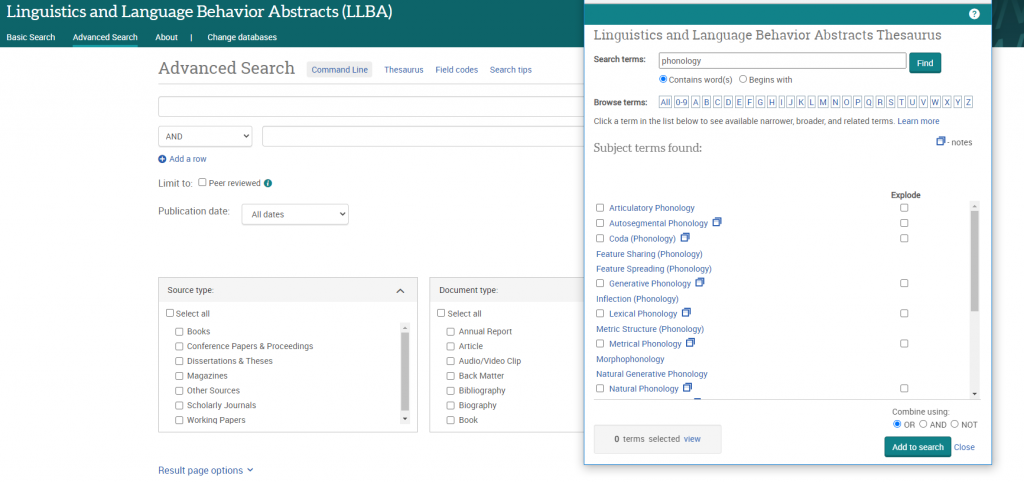
The database provides both basic and advanced search options and you can limit your results by information (source) type, publication date, subject, language and more. You can also limit to peer reviewed items only. While some full text items are available, LLBA item records generally provide only bibliographic information and an abstract, so look out for the ‘Find@Newcastle’ button in your results page, which will help you check for a full text copy of an item in Library Search.
LLBA has the advantage of including a specialised linguistics thesaurus, which you can use in advanced search to refine and focus your search. The thesaurus provides a searchable list of all the subject terms used in the database and highlights links between broader, narrower and related terms, helping you to select all of the keywords relevant to your topic.
ProQuest provide a helpful and detailed guide to LLBA which includes search tips for basic and advanced search as well as some sample searches you can work through to familiarise yourself with the database.
In the past few weeks you have probably been presented with module handbooks for everything you’re studying, with a list of references to things you are being told to read. Sometimes these will all be in the same referencing style and formatted in a way that you can understand easily what type of information it is. But sometimes, it might be more tricky to work out what exactly it is you are looking for. You can find yourself searching for a journal article, only to discover that it’s a book chapter, and you’ll never find it in a journal database.
If you are feeling a bit confused by your reading list, don’t worry. It’s a common problem and decoding references does get easier as you become more familiar with the referencing conventions of your subject.
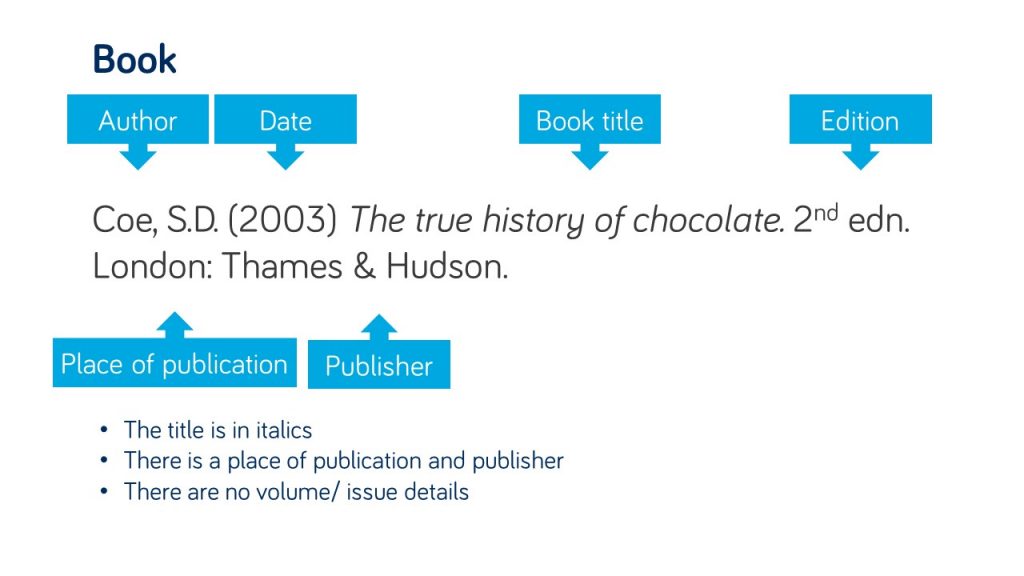
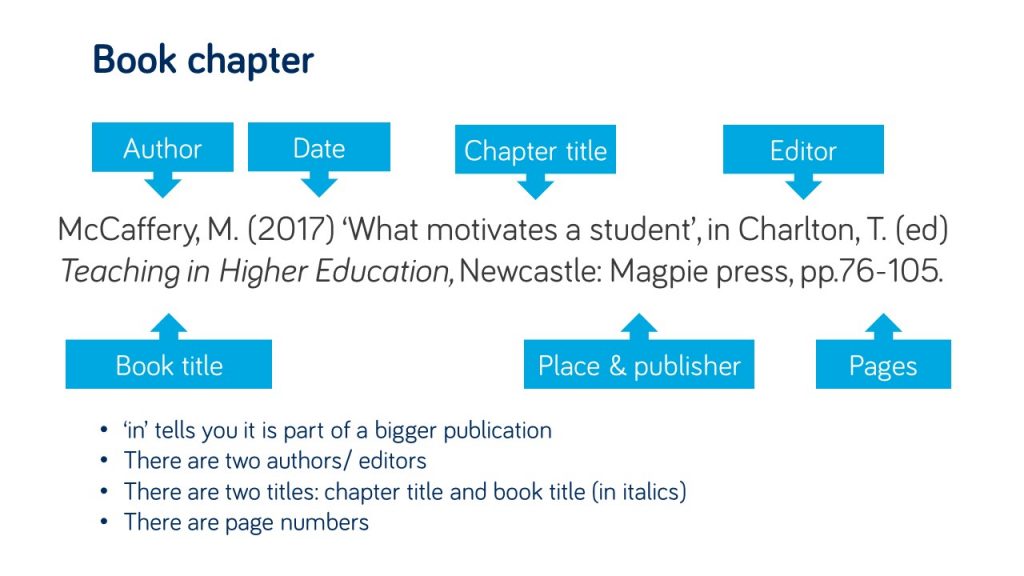
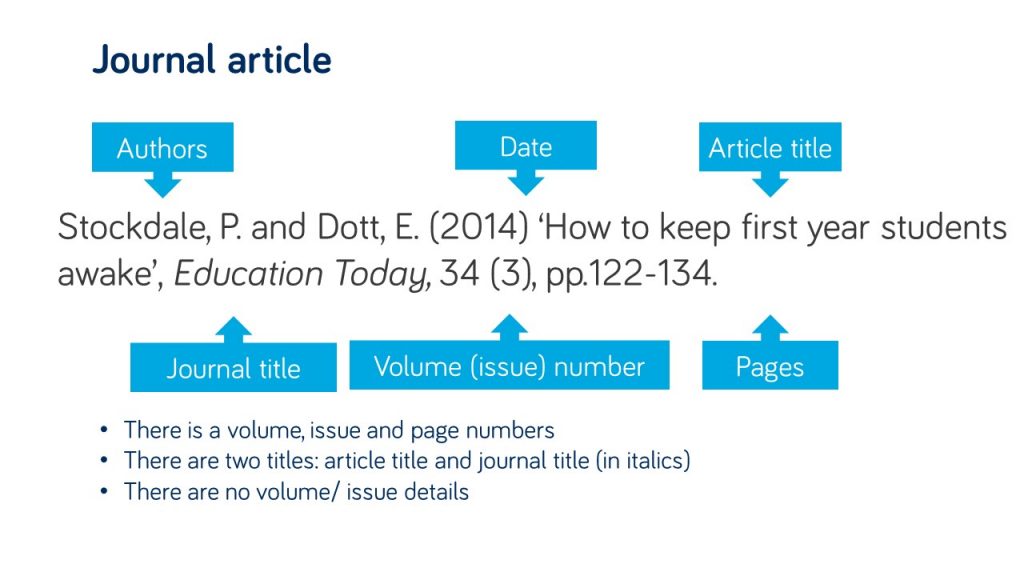
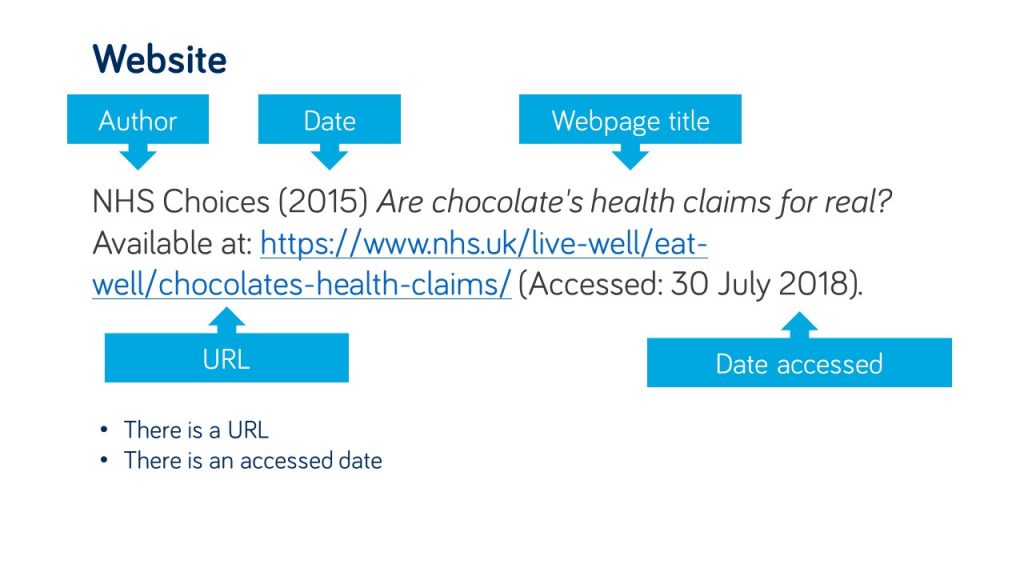
There are some easy things to look out for in your references that will help you identify what type of information it is, and the key details, such as the author and title, that you would need to use in order to find it successfully. Take a look at the examples in the gallery to see what to watch out for.
Your reading list is also linked from your module course on Canvas. Individual items on your reading list will link through to Library Search, showing you print book availability and linking to e-book and e-journal full text wherever possible. This means you wont need to do a separate search.
One of my good friends is the middle child of three siblings – born between two siblings with strong identities of “the eldest” and “the youngest”- and feels that she gets “forgotten about” or “neglected” by her parents (but of course she never is).
You could compare second year at University to feeling like the second child – not as exciting and ‘new’ as the youngest new-born (first year) nor as distinguished and knowledgeable as the eldest (final year at University) – but definitely never to be forgotten about.
Research conducted by Liverpool John Moores University found that second year students can suffer from ‘underperformance and withdrawal’ (Thompson et al., 2013) and that ‘around a third of undergraduates experienced a slow down in their academic progress during second year’ (Milsom, 2015). So don’t worry if you are feeling a bit overwhelmed and disengaged as you enter your second year of studies, you are definitely not alone.
So how can you get out of your slump?
The research by Liverpool John Moores University highlight the importance of recognising the challenges faced by second year students and identify support that can help you rise to meet them (Thompson et al., 2013).
The Library have definitely not forgotten about our much loved second years, and we’ve been thinking about how we can help – here are our top three ways that the Library and our resources can support you during your second year and how you can hopefully kick-start your engagement with the Library and your studies…
1. Find inspiration
As a second year, you may often feel disengaged, so take some time to remember what you love about you subject; explore your reading lists and Subject Guide(s) to find some wider reading on your favourite topics in your subject area – this may help you build your subject knowledge, help you think about what you want to focus on in third year and remind you why you chose this subject in the start.
The reading lists for your modules is an excellent places to start any refresh. Watch this short video (2:44min) on how to find and use your reading lists:
Another place to re-engage with your subject is our Subject Guides. These guides are created by our ingenious Librarians (*ahem) and are collections of subject specific resources to help you discover reliable and authoritative information for your studies. Remember, if your studies are interdisciplinary, you might have to use multiple guides to ensure find relevant resources.
2. Refresh and build on your skills
Second year is a great time to take some time to refresh or build on your information and academic skills, so you are prepared for your studies becoming more challenging and intense as the year progresses and then transitioning into third year.
Boost your motivation this year by setting yourself small and achievable goals. These could be to improve a mark from last year, to read more widely or to refresh a skill that would be useful for employment. Our Skills Checker is an excellent tool to help you identify an area of information skills to work on.
Once you have identified the areas to work on, check out the Academic Skills Kite for help and has advice on developing your academic skills. It is your guide to where you can go for support on all aspects of your academic life. With online resources to help you with your academic and study skills, covering topics such as academic integrity and referencing, exams and revisions, learning online and academic writing, you will find the support you need to study successfully.
Also discover our Resource and Subject Guides for help on finding, evaluating and managing information and useful guides on subject such as how to use EndNote, how to create an academic poster or how to identify fake news.
Our Employability Guide is another superb guide to show how developing your information and digital literacy skills can help prepare you for your future careers, and don’t forget, Newcastle University’s award-winning Careers Service provide expert advice regarding your future plans.
3. Ask for help
The Library is always here to help, so contact us by email, chat, phone or by social media 24/7 to ask any question regarding the Library services and resources.
The Library Liaison team and the Academic Skill Team are also available to meet (via Teams) for a one-to-one appointment to help you on any aspect of Library and academic skills that you need help with. You can book an appointment via Library Help.
I hope we have reassured you that you lovely second years are definitely not forgotten and that we are here to help you on your academic journey every step of the way (*oh so cheesy). These are difficult times but with a bit of grit and determination we have confidence that you will succeed in every way.
Referencing is an important part of academic writing –
you’ll usually find it included in the marking criteria for your assignments
and projects, with marks being awarded for correctly formatted citations and
reference lists.
Why is referencing important?
It acknowledges the ideas and contributions of
others that you have drawn upon in your work, ensuring that you avoid
plagiarism
It highlights the range of reading you’ve done
for your assignment and makes your own contribution clear, showing how you’ve
taken ideas from others and built upon them
It enables the person reading your work to
follow up on your references so they can learn more about the ideas you’ve
discussed in your work or check any facts and figures.
How does referencing work?
Are there any tools that can help?
Yes! There are lots of referencing tools that can help you manage and format your citations and references correctly. Here are some examples:
A very useful online tool that lists all the information you need to include in a reference and provides examples of how a reference will look as an in-text citation and in a reference list. See our ‘Level Up Your Referencing: Cite Them Right’ blog for more information.
Citation Buttons
Keep an eye out for this symbol on Library
Search and Google Scholar. Clicking the
button will provide the option for you to copy a reference in a particular
style and paste it directly into your reference list. You might need to tidy it up a little bit but
it will save you time over writing them manually.
Reference building tools help you
to create a bibliography using the correct referencing style. You can input information manually or use
import functions to pull information through from other webpages or documents. As with the citation button above, reference
building tools can save you time but you may still need to check the references
are accurate.
Reference Management Software: e.g. EndNote
If you’re writing a detailed essay, dissertation or thesis, you may like to use a reference management tool such as EndNote, Mendeley or Zotero to help keep all of your references organised. This software allows you to manually add references or import them from Library Search, Google Scholar or Subject Databases; sort references into groups; attach pdf documents or add notes. You can then use the reference management software while you write to add in-text citations and format your reference list.
The University has a subscription for EndNote which is available in all University clusters and can be downloaded to your own personal device. You’ll find information about how to get started with EndNote on our EndNote Guide.
Remember: whatever tool you use, it’s always a good idea to get to know the conventions of the referencing style your school or lecturer would like you to use so that you can spot mistakes or missing information.
You can find out more about referencing and plagiarism by following this tutorial from Cite Them Right (You’ll need to log in to the institutional log in with your University username and password.)
The Library has recently added several new collections to its Drama Online portfolio. Drama Online provides access to over 2,300 playtexts and books, and we have now bought access to the following film collections, featuring leading actors such as Gillian Anderson, Simon Russell Beale, Adrian Lester, Mark Rylance, Stephen Fry, Tamsin Greig, Roger Allam and many more.
Globe on Screen 1: 21 plays recorded live on the Globe stage in London.
In addition, we have also bought the 2020 updates of the Core Collection and Nick Hern Books, adding another 90 playtexts to our collection.
All the films and playtexts are individually catalogued and searchable via Library Search, or you can search/browse them all in various ways on the Drama Online site.
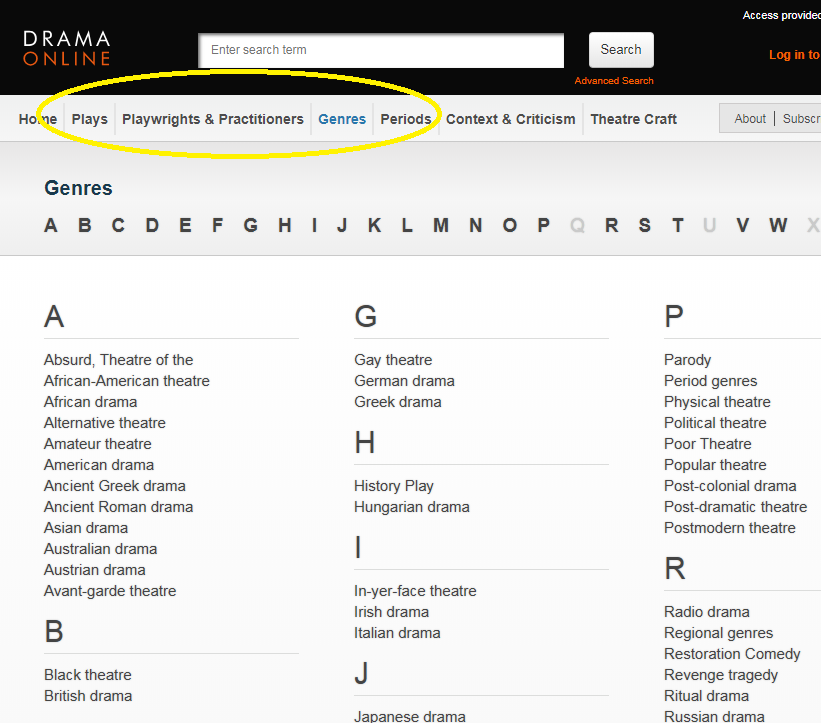
For example, using the options at the top of the screen, you can browse by title, author, genre and time period, or if you click Find Plays on the home page, you can add in other search filters, such as number of roles or scenes. Select Context and Criticism for access to a wide range of e-books about drama.
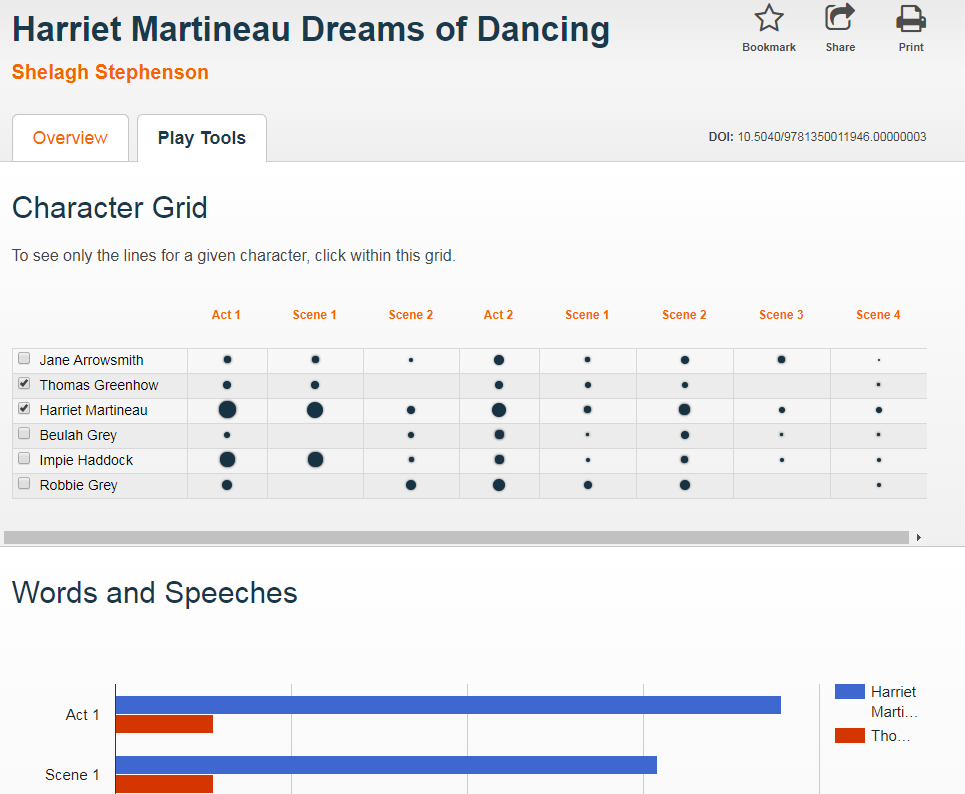
When viewing a playtext, click Play Tools to analyse the speaking parts and appearances of different characters throughout the play.
We hope you enjoy exploring the exciting new content!
The Library has invested in thousands of new ebooks since March, to help widen our collections and enable access for students, wherever you are based.
As well as purchasing individual titles, we have also bought several specialist collections of particular interest to arts and humanities, including the following:
Bloomsbury collections in Education, Film and Media, Law, Linguistics and Literary Studies (535 titles in total)
All the new titles are individually catalogued on Library Search, or you can browse the books available to us on the publisher’s platform (make sure you are logged in with your Newcastle University username and password).