NUTELA 3Ps: Collaborate and Conquer with Office 365 Groups

Do you need to organise and work with a team on a project? Office 365 Groups is a collaborative tool, enabling you to work collectively when writing documents, creating spreadsheets, working on project plans and scheduling meetings.

The benefits of using Groups in Office 365

Members of a created group will have access to a shared:

  • Inbox for group conversations.
  • Calendar that all members can see and contribute to.
  • 1TB Files Library in OneDrive to store, share, and collaborate on documents, workbooks, presentations, or just about any kind of file.
  • OneNote notebook to gather ideas, collaborate and store research/meeting notes.

Accessing Groups in Office 365

  1. Sign in to your Office 365 account with your username in the format universityID@newcastle.ac.uk and your university password. E.g. nmc84@newcastle.ac.uk or b1013456@newcastle.ac.uk
  2. In the list on the left you should see an expandable section called ‘Groups’ with options to ‘Discover’ or ‘Create’ Groups.

Using Groups in Office 365

Create a group in: Outlook on the web | Outlook 2016

Join a group in: Outlook on the web | Outlook 2016

Have a group conversation in: Outlook on the web | Outlook 2016

Schedule a meeting on a group calendar in: Outlook on the web | Outlook 2016

Share group files in: Outlook on the web | Outlook 2016

Things to consider

Time Sensitive Group Projects:Consider creating a  Microsoft Team for your group. This further enhances group collaboration by offering instant messaging on desktop and mobile in addition to the ability to schedule video meetings and screen sharing.

Audience:  Groups/teams can be made public or private and you can invite members outside of the University to a group or team.

Group/Team Name:  Searchable to all staff and students within the University so please take care when naming your group.

Spring Cleaning: Leave the Office as you found it by deleting your inactive groups.

Make it Private and add a Description:  Add a description to your private group as this will help prevent unwanted joining requests from staff and students.

Group Members Visibility:  Staff and students can see who is a member of a group, even if it is private.

Additional Resources

Office 365 at Newcastle University

Introducing Office 365 Groups

Learn more about Office 365 Groups

Training: Unite your team with Groups

Frequently-asked questions (FAQs) and further ‘How-To’ documentation
Assessment & Feedback Event – 1st Nov – all welcome

Assessment and feedback continue to be a source of student dissatisfaction across the sector. In particular student surveys highlight concerns about the alignment of feedback to marking criteria and inconsistencies in both the application of criteria and quality of feedback received.

The HaSS Faculty will be holding a workshop, to discuss these issues in the context of student transitions, on:

Wednesday 1st November 2017
1300-1600 (lunch will be provided)
Lindisfarne Room, Hadrian Building

Though hosted by HaSS, anyone interested in this event from any faculty is welcome to attend – please feel free to disseminate details of this event to your colleagues.

The session will explore the following questions:

  • How can we better understand assessment and feedback in the context of student transitions?
  • What are the assumptions inherent in our assessment criteria and feedback?
  • Can electronic assessment and feedback tools enhance students’ academic literacy?
  • Can we develop a ‘student as partners’ approach in assessment and feedback?

It will be particularly relevant for Degree Programme Directors and Module Leaders, whose input will help identify some key priorities for further action.

It will include presentations from Rowan South (Education Officer, Newcastle Union Students Union), Graeme Redshaw-Boxwell (Learning and Teaching Development Service) and Sarah Graham (Combined Honours).

To attend, please complete the booking form.

If you have any queries in the run up to the event, please contact susan.mclean@ncl.ac.uk.

Bootlegger, EventMovement and Open Lab

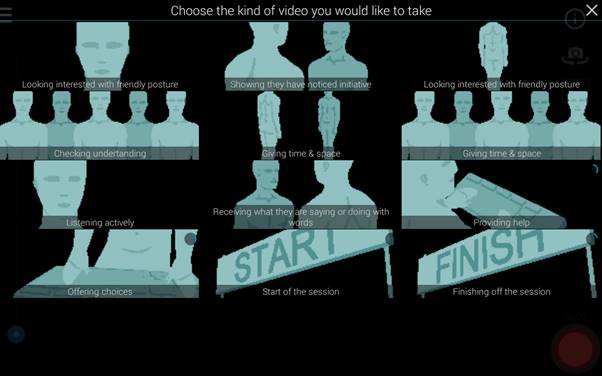
In our recent Pizza Pop and Practice event, Dr Ahmed Kharrufa and Dr Tom Bartindale from OpenLab let us loose on an app that Tom has been developing over the last few years called Bootlegger.

Bootlegger makes it easy to help people make videos together using mobile applications.  One person creates a “Shoot” and invites others “the crew” to contribute.  The Shoot contains a template with the set of shots required in the video.  The crew sign into Bootlegger, join the shoot and then choose the shot to take from the template.

We used a template that Ahmed had offered to his students –  one designed to help them capture feedback on Ahmed’s teaching.  (A uniquely student centred view!)

Our film crew of 21 experimented and happily collected over 47 clips. Each person could then view all the clips in the shoot and curate a video by adding clips to a timeline.

Bootlegger made the process really easy and engaging.

You can find out more information about Bootlegger here:

Ahmed also introduced us to how the Event Movement site https://eventmovement.co.uk/ site could be used to enable students to co-design teaching sessions.

Ideas in Event Movement move through stages Promote -> Get involved -> Plan it.  Students were invited to contribute ideas for a teaching session, they could vote on the proposed topics and once the topic of the event was selected could get involved in co-designing the session – proposing and voting on different ideas.  Ahmed’s slides from the session give further details.

To hear about future NUTELA events sign up to our mailing list.


Workshop: Exploring career development via teaching and learning

Workshop: Exploring career development via teaching and learning

3rd July 2017 – The Core

This one-day workshop is for all academic staff interested in developing their career on the basis of teaching.

This interactive day will involve: identifying activities that may lead to reward and recognition, reflections from successful colleagues both internally and externally, and developing action plans.

It will be a space to discuss approaches to building your career, gaining internal, or external, validation of excellence and to consider your individual development path.

See the programme of the day: programme_final

Places are limited. To attend please complete the booking form.

Learning and Teaching Conference 2017: Reimagining Teaching Excellence

In 2017 the Newcastle University annual Learning and Teaching Conference  took place on 27 March 2017.

Conference theme: Reimagining Teaching Excellence

Newcastle’s commitment to excellent teaching is at the heart of our University mission, and is crucial to our aim of providing an educational experience that challenges and supports our students to fulfil their potential.  At a time when external agencies are seeking to define this for us, it is more important than ever that we have a clear understanding of what we as an academic community understand by learninhe phrase ‘teaching excellence’.

Teaching excellence was therefore the focus of the 2017 Conference and the programme for the day provided an opportunity to:

  • hear an external view point on teaching excellence from keynote speaker Paul Blackmore – Professor of Higher Education at The Policy Institute, King’s College London
  • hear about what our staff and students view as teaching excellence
  • see examples of teaching practice and innovation from across the institution
  • contribute to how the University will pursue excellence in learning and teaching in the future through a session on the development of our new University Learning, Teaching and Student Experience Strategy.


Resources From The Day

Introduction Presentation from Professor Suzanne Cholerton

PowerPoint slides and ReCap recording

Keynote – Professor Paul Blackmore – Professor of Higher Education at The Policy Institute at King’s College London

PowerPoint slides and ReCap recording

Teaching Excellence at Newcastle

Newcastle Educators Group – Dr Vanessa Armstrong (Biomedical Sciences), Dr Sara Marsham (Marine Science & Technology) and Dr JC Penet (Modern Languages)

PowerPoint slides and ReCap recording

Teaching Excellence Awards (TEAs)

Chris Duddy (Education Officer, NUSU), David Jones (Assistant Development Officer, HaSS Faculty) and Joe Barton (Representation Support Worker, NUSU)

PowerPoint slides, ReCap recording and TEAs Report 2016

Development of Learning, Teaching and Student Experience Strategy

Facilitated by Craig Smith from Flint Spark Consulting.

PowerPoint slides and ReCap recording (audio only)

Herschel Learning Lab – experiences of use

ReCap recording

Mrs Ulrike Thomas – Research Associate, Education Communication and Language Sciences) PowerPoint slides
Dr Ellen Tullo – Lecturer, Biomedical Sciences PowerPoint slides
Professor TT Arvind – Professor of Law, Newcastle Law School PowerPoint slides
Dr James Stanfield – Lecturer, Education Communication and Language Sciences Website
Miss Katie Wray – Lecturer, SAgE Faculty Office PowerPoint slides

Posters

View the list of poster presentations at the 2017 Learning and Teaching Conference, and view the posters online.

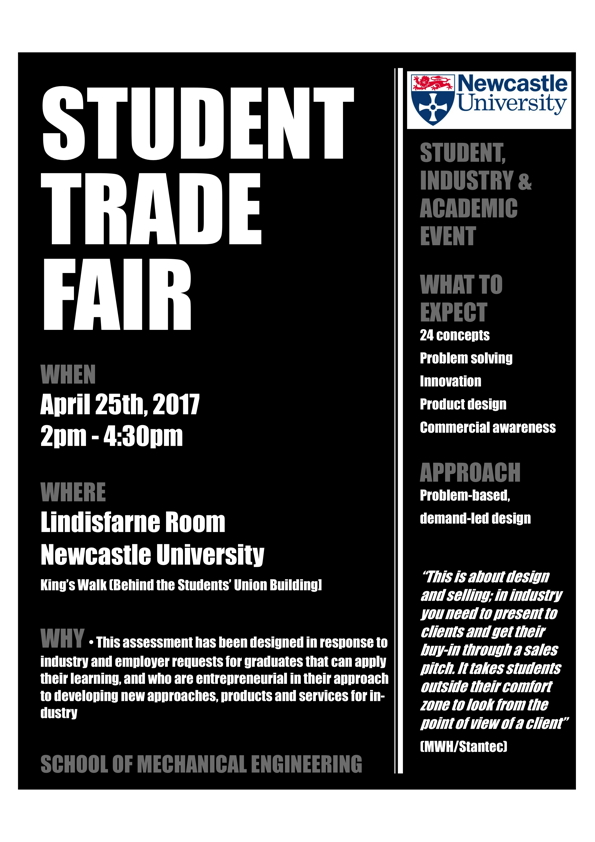
Student trade fair: come along to this a student, industry and academic event

Advertising for a mechanical engineering student trade fair.
Come along to the Lindisfarne Room on 25 April 2017

Anyone is welcome to come along to this exciting student trade fair.

  • Designed in response to industry and employer requests for graduates that can apply their learning, and who are entrepreneurial in their approach to developing new approaches, products and services for industry.
  • A chance for students to showcase their problem solving, innovation, product design and commercial awareness skills through problem-based, demand-led design.

This is about design and selling; in industry you need to present to clients and get their buy-in through a sales pitch. It takes students outside their comfort zone to look from the point of view of a client
(MWH/Stantec)

Mechanical Engineering  Trade Fair
25 April 2017
2pm to 4.30pm
Lindisfarne Room
Kings Road Centre

There is another Trade Fair for Computing Science on 2 May:
Computing Science Trade Fair
2 May 2017
2pm to 4.30pm
Lindisfarne Room
Kings Road Centre

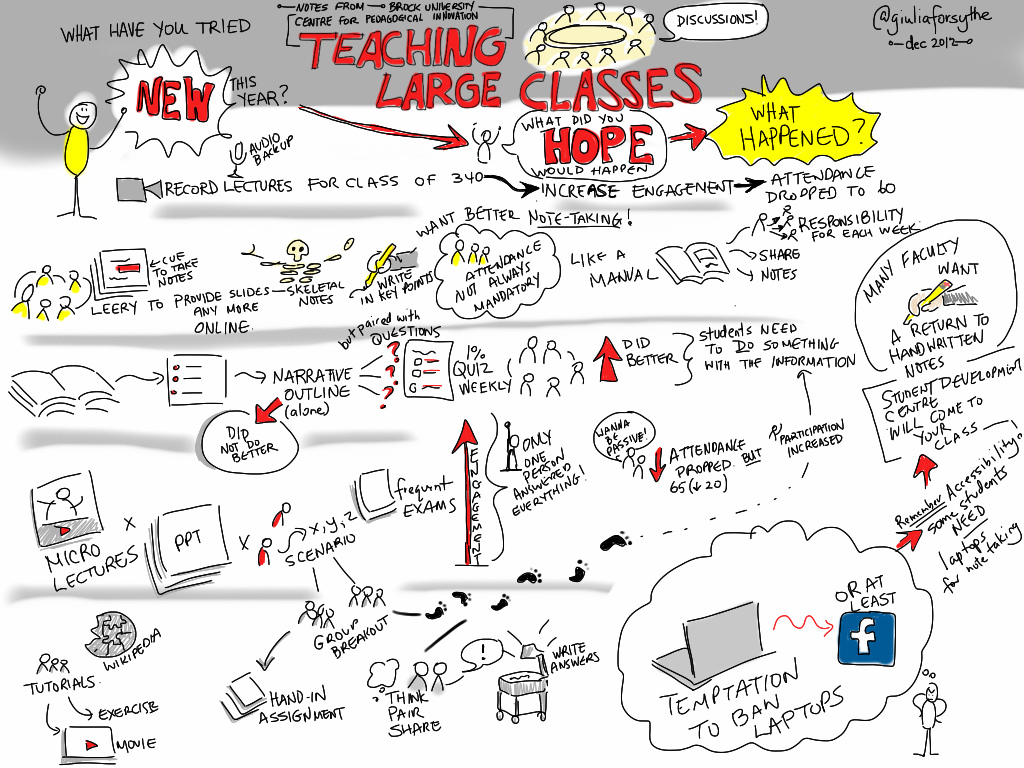
Feeling Connected: Working with large groups

  • teaching_large_classes
    Teaching Large Classes Giulia Forsythe CC-BY-SA https://www.flickr.com/photos/gforsythe/8261536706

    How can you engage large student cohorts in the classroom/lecture theatre?

  • And how could you maintain those connections when the lecture is over?
  • How do you make meaningful connections with all your students?

Aimed at academic and professional services staff these practical workshops draw on examples of effective practice from within the University and from outside. Ranging from using technology effectively, and utilising basic acting techniques, to creating accessible materials for everyone, we share ideas and tips you can take away and try with your large groups tomorrow.

You can attend all three, or choose the ones that best meet your needs

Creating connections: Managing large groups in the lecture theatre

Tuesday 9th May 12.00-14.00, G.07 Daysh Building

In this workshop we share tips and tricks for how we can effectively manage large groups in the lecture theatre, You’ll be able to try out some techniques for yourself in this interactive session, with case studies from colleagues from across the University and some practical exercises ranging from maintaining audience attention and using lecture theatre technology to how to stop your voice giving out as term progresses.

Staying connected: Facilitating large groups outside of the lecture theatre

Tuesday 19th September 12.00-14.00, Herschel Learning Lab, Herschel Building

The recent NUSU report on the Teaching Excellence Awards contained some gems of information from students, one of which was that they really value the activities before and after a lecture. But how do you build meaningful activities and maintain attention outside of the lecture theatre? This workshop looks at ‘the lecture sandwich’ where we share tips and get some hands on experience  of using Blackboard, ReCap discussion boards etc to help build collaborative learning before and after the lecture. We also look at boundary setting and expectation management with email and in discussion boards.

Connecting everyone

Date tbc (pending timetabling)

Drawing on inclusive learning principles this cluster based hands on workshop focuses on learning for all and reaching everyone on your large group. We share tips on using multiple communication channels, and how using module handbooks, reading lists, well structured documents effectively can help get to hard to reach students.

Further information and bookings

For more information and to book: www.ncl.ac.uk/ltds/about/training/feelingconnected/

You can choose to come to all three or just pick the ones that best suit your needs. And bring a sandwich with you, if you like.