Finding Information: Troubleshooting your search results

Photograph of tools, including a hammer, spanner and measuring tape, laid out on a table

You’ve ran your information search and looked at your results with a critical eye only to find that they’re not quite working for you – what can you do now?

In this blog we’ll be looking at the top three problems encountered when searching for information and how to improve your search to get the results you need:

Finding too much

If your search has brought back thousands of results and you’re getting overwhelmed with the options:

Search a more specialised resource

Using a subject-specific database will help narrow the focus of your search to your particular areas of interest.  Take a look at your Subject Guide to find databases and eBook collections tailored to your subject area.

Apply limits

Make use of the ‘refine’ options usually found on the left-hand side of Library Search or your subject database.  Limit your results by date, subject area or information type.  Remember, you may need to justify your limits to your supervisor so think carefully about your choices. 

Combine search terms with ‘AND’

AND is a Boolean operator, a term you can use to have more control over your search. If you want to find information that must contain two different keywords (or phrases), place a capitalised AND operator between them. Your search engine or subject database will only find information that features both, narrowing your results. The more search terms you combine with AND, the narrower your search will be.

Finding too little

If your search has brought back a handful of useful articles but you need a wider range of results:

Combine terms with ‘OR’

OR is another Boolean operator that helps you to control your search more effectively.  Use OR with your search terms that have synonyms or related terms. Your search engine or subject database will find information that features either word or phrase, significantly broadening your results.

Try controlled vocabulary

If you’re not getting enough results, it may be that your search terms or keywords aren’t quite working for you.  Controlled vocabulary are a standardised list of words and phrases used on some databases to ensure that searches retrieve all relevant results, even when authors use different terms. Examples of databases that use this technique include ERIC, PsycInfo, CAB abstracts, Compendex and Medline. If these apply to you and your discipline, you’ll find out how to use them on your Subject Guide.

360 Searching

If you’ve found some useful articles, one simple way to find more relevant material is to take a look at the references used by the authors.  This will lead you to find older material that was published before your original article which may also be useful.  Library Search and some subject databases including Google Scholar and Scopus also allow you to see who has cited the articles you have found in their work (look for the ‘cited by link’).  This is called citation searching and allows you to find more up-to-date analysis of your topic.  By looking back at the references and forward at the citations, you get a 360 degree view of the research.

Finding nothing useful?

If your search has brought back results that aren’t relevant to your research question or you are finding it difficult to find the right search terms or databases to use, you might find it helpful to book a one-to-one appointment with your Liaison Librarian.

You can also find more help and advice on the Academic Skills Kit.
Resource in Focus: Emerald Emerging Markets Case Studies

Emerald Emerging Markets Case studies logo

Overview

Emerald Emerging Markets Case Studies (EEMCS) is an online platform of case studies covering a variety of business related subjects.

These case studies offer practical insights into “real world” situations giving students a chance to discuss the business problems and enhance their critical thinking.

The studies are peer-reviewed and focus on business decision making and management development throughout global emerging markets.

Subject covered include:

  • Accounting
  • Advertising
  • Economics
  • Finance
  • Human Resource Management
  • Supply Chain Management

Case studies also include teaching notes (only available to Business School Staff Members).

Searching

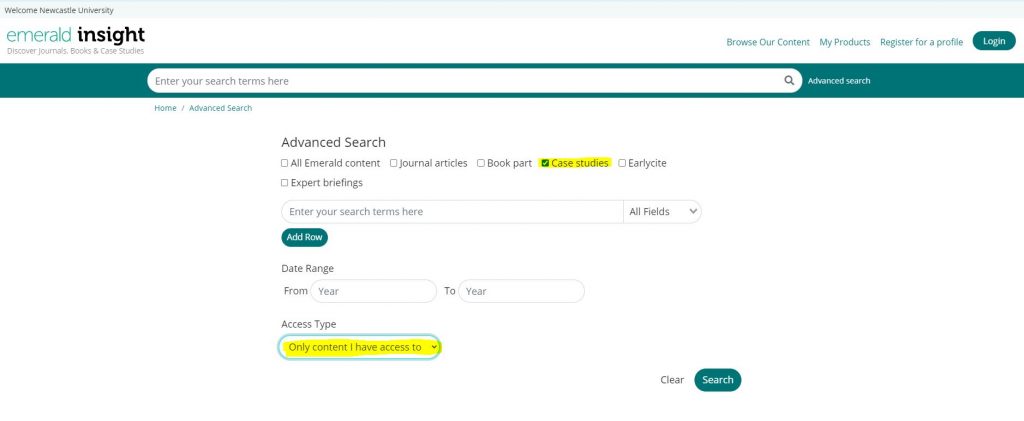
Within the Case Studies search box you can enter your keywords or browse by subject.

Please ensure you have selected the Only content I have access to in the bottom drop-down menu to display only case studies we have within our subscription:

Screen shot of Emerald Insights highlighting where to choose Case studies and 'Only content I have access to'.


Access

EEMCS are available through our catalogue, Library Search. If you are on campus no password is required. If you are off campus you will need to log in using your University campus ID and password.

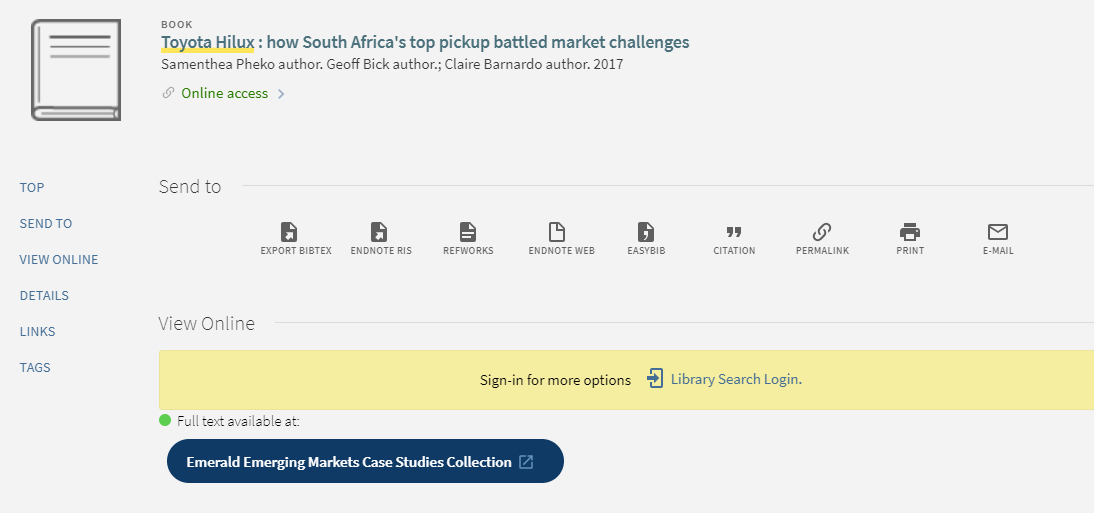
All case studies are also individually catalogued on Library Search so you can also locate each one listed separately on there.

Teaching notes for academics

The platform also provides teaching notes for academics, these suggest teaching strategies, target audience and possible responses to discussion questions that can help facilitate classroom discussion.

For academics to access the teaching notes, we will require an access URL which features a code. Please email the Liaison Team to obtain this.

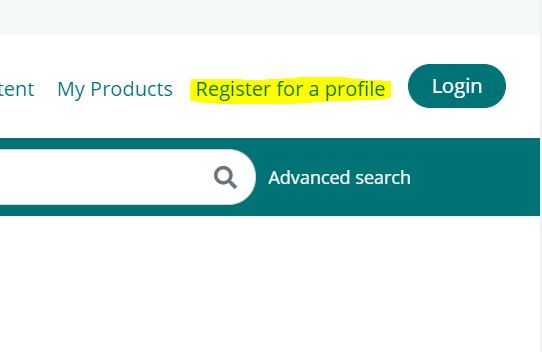
You will need to have a personal account set up on the Emerald platform. You can set this up by clicking on the Login option in the top right hand corner.

To set up an account click on Register for a profile and complete the form:

Zoomed in screen shot of Emerald Insights showing where to register for a profile.

Once you have set up an account and are logged in, when you click on the access URL we can supply you, then you should be able to see the teaching notes. The notes are available at the end of each case. Users only need to click on the access URL once, after that when you log in and access each case you will automatically see the additional notes. Follow the instruction here for activating your access token.

Copyright and Distribution

All case studies are catalogued individually on Library Search so we would recommend you circulate or embed into Blackboard the catalogue record for the case study from our catalogue.

This means we get usage data from those accessing the Emerald platform.

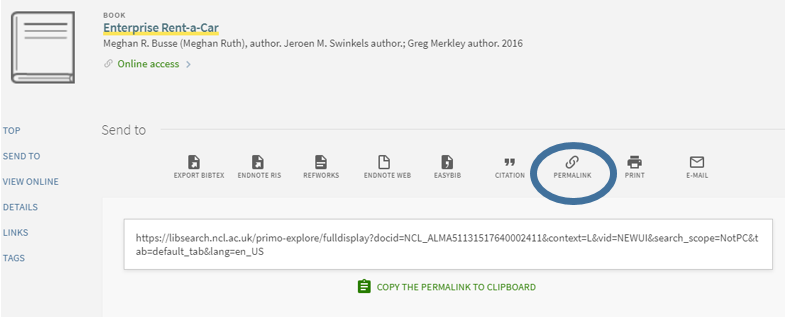
To get a permanent catalogue link access the record on Library Search and click on the Permalink icon. Then paste the URL into your teaching materials, within Blackboard or your online reading list.

The licence also allows authorised users (e.g. staff/students) to print a ‘reasonable’ number of case studies. Academics can also make individual cases available through Blackboard as this is a password restricted environment. Students can then download and save/print cases from within the VLE.

Help materials

Once logged into EEMCS there are a help articles available.

For further resources on business cases, check out our Business Cases Resource Guide.

Finding Information: The key to your search

Keys hanging on hooks on a piece of wood.

When it comes to finding academic information, there are a few things you need to think about before you start your search, such as where to actually look for information and the types of information you want to find in your search.  Another thing that is worth taking the time to think carefully about is keywords.

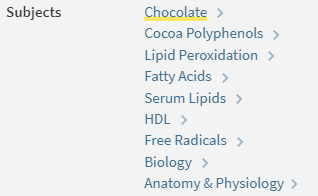
Keywords, sometimes called subject terms, are simple words and phrases that describe information; you can see them in the item record on Library Search and in Subject Databases.

An example of keywords from an article on Library Search

The results that your search returns are based on this information – if your keywords match an item’s keywords, that item will appear in your results.

To get the best results, then, you’ll need to develop a balanced list of targeted keywords – these keywords may come from your essay title or research question, from your subject knowledge or wider reading – you can even borrow them from the subject terms you find on relevant articles!

As ideas and topics can be expressed in different ways you’ll also need to think about synonyms and terms related to your keywords to make sure you can find all of the relevant information.

To find out more about keywords, synonyms and searching take a look at this short video:

There are some useful tricks you can use with your keywords to save you time when you search, take a look at the Academic Skills Kit to learn about Boolean, wildcards and truncation!

Resource in Focus: SAGE Business Cases

'Cut to the case' banner for Sage Business Cases

Overview of SAGE Business Cases

This platform provides access to over 2,500 business case studies, which cover a variety of topics and industries focusing on global brands and companies.

Subjects covered includes:

  • Human Resource Management
  • Marketing
  • Operations Management
  • Corporate Social Responsibility
  • Entrepreneurship
  • And many more

Case studies also include teaching notes (only available to Business School Staff Members), discussion questions and learning objectives.

Searching

On the landing page you can:

  • Browse by subject
  • Browse by content partner
  • Browse by academic level

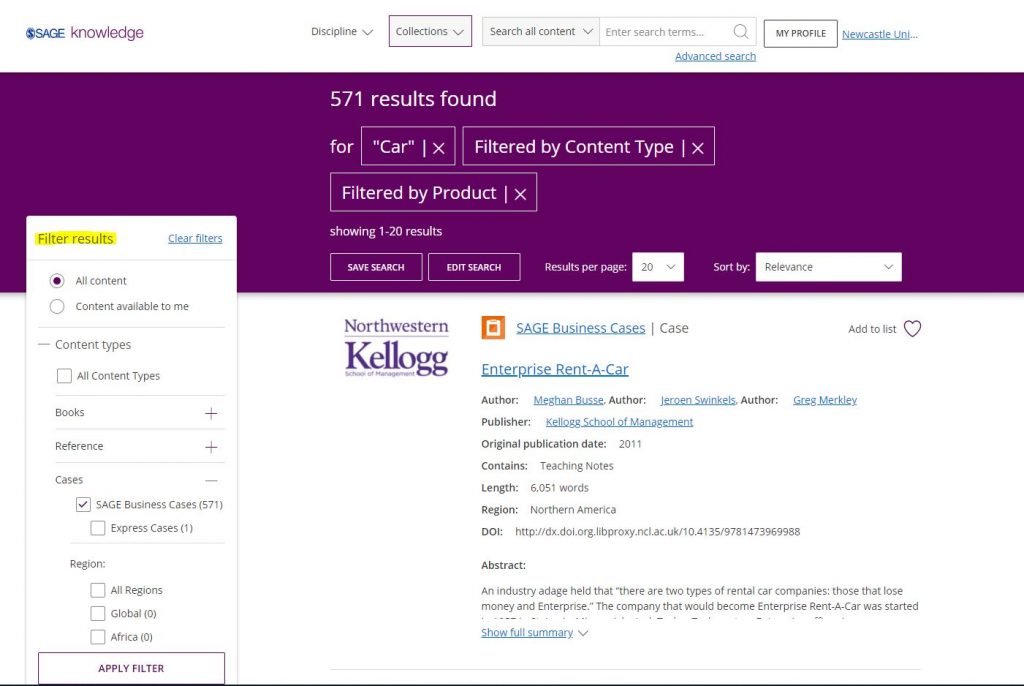
Or apply your keywords and use the filter options down the left hand size to narrow your results list:

Screen shot of keyword search on Sage Business Cases.

Access

Sage Business Cases is available through our catalogue, Library Search. If you are on campus no password is required. If you are off campus you will need to log in using your University campus ID and password.

All case studies are also individually catalogued on Library Search so you can also locate each one listed separately on there.

Teaching notes for academics

The platform also provides teaching notes for academics, these suggest teaching strategies, target audience and possible responses to discussion questions that can help facilitate classroom discussion.

For academics to access the teaching notes, we will require an access code. Please email lib-socsci@ncl.ac.uk to obtain this.

You will then need to have a personal profile set up on the Sage Knowledge platform. You can set this up by clicking on My Profile which is located in top right hand corner of Sage platform screen.

In the My Profile tab, you need to enter your details and then tick the box next to SAGE Business Cases Instructor Access and enter the access code.

This should then mean when you try and view any teaching notes associated to a case study, you will now have access.

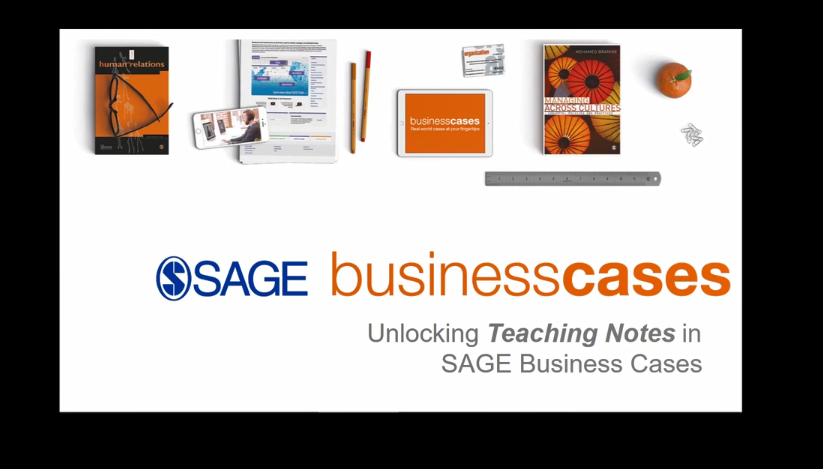
A help video about unlocking teaching notes is available at: https://vimeo.com/260082960

Copyright and Distribution

All case studies are catalogued individually on Library Search so we’d recommend you circulate or embed into Blackboard the catalogue record for the case study from our catalogue.

This means we’ll get usage data from those accessing the SAGE platform.

To get a permanent catalogue link access the record on Library Search and click on the Permalink icon. Then paste the URL into your teaching materials, within Blackboard or your online reading list:

Screen shot of Library Search highlighting where to find the Permalink for entries.

The licence also allows authorised users (e.g. staff/students) to print a ‘reasonable’ number of case studies. Academics can also make individual cases available through Blackboard as this is a password restricted environment. Students can then download and save/print cases from within the VLE.

Help materials

Once logged into SAGE Business Case Studies there are a range of resources available, this video:

For further resources on business cases, check out our Business Cases Resource Guide.

Finding Information: Types of Information

Light bulbs

In our previous blog we explored how looking for information in the right place can help save you time and effort.  However, sometimes, the right place to look can depend on what type of information you’re looking for.

While you’re probably familiar with books and you may have been introduced to journal articles, these are just two of the types of academic information available to you.  Depending on your research question or essay title you might also find it useful to explore, for example, conference proceedings, maps, company information or newspapers

Each type of information has its particular use; books provide an in-depth overview of a topic; journal articles are more specialised and focus in-depth on a particular area of a topic, and newspapers give you a useful perspective on events.  While Library Search can help you find a large range of information types, some types of information are only available in special databases or archives.  Before you start your search, it’s therefore important that you decide what types of information you will need to complete your assignment most effectively.  You can find out more about different information types on our Finding Information Guide and in the video below:

When you know which types of information you need for your assignment or project take a look at our Resource Guides, which provide useful links and guides to appropriate sources.

Warm up your referencing techniques


Referencing is the acknowledgement of the sources that you use in your work. You must reference all sources that you use in your assignments, projects or dissertations, and includes quotes, ideas, facts, images, videos, audio, websites, statistics, diagrams and data.

Over the next two weeks we will be producing a series of blogs focusing on how to reference successfully in your work. We will cover…

  • explain why referencing is important
  • advice on how to produce consistent and reliable referencing
  • help on how to manage your information to make your life easier and assignments less stressful
  • point you in the direction of where to find advice and help

So come in from the cold and warm up with some referencing help and keep your eyes peeled for our upcoming blogs.

Finding Information: Knowing Where to Look

Photograph of several closed doors, one painted yellow the others painted white.

When you’re looking for information to help you write your essays, assignments or projects it can be tempting to turn to the source of information you use every day – Google.  While Google can be useful in some ways (such as finding company websites or journal author’s profiles), it wasn’t exclusively designed to help you find good quality, academic information that is reliable and relevant.  This means you’ll likely have to spend more of your time wading through huge amounts of information and fact-checking resources for accuracy.

Thankfully, Google isn’t your only option – there are a number of different places to look that have been created with the aim of providing you with the information that you need, such as your reading lists, Library Search, and key Subject Databases.

Take a look at this video to find out more about how these sources can help you:

For more help on finding information, take a look at the Academic Skills Kit.

A little conversation with Mintel

As a globally recognised market analyst, Mintel produces hundreds of reports into UK-specific consumer markets every year. Each report provides a unique overview of a market’s dynamics and prospects, giving you the knowledge to devise informed and profitable marketing strategy. Mintel is also one of the many Business specialist databases that we subscribe to here at Newcastle University, which you can access via Library Search, or along with many other of our resources via our Business Subject Guide.

Mintel also produce an excellent podcast, A Little Conversation Podcast, on YouTube which covers ideas and new perspectives on how we eat, drink, shop, groom and think – from the key issues impacting society to trends in food, beauty, tech and retail, they discuss what consumers want and why.

So if you are looking for an alternative resource in market research, have a look at these podcasts. You can subscribe to their podcast via their website or where you normally download your podcasts.

Here’s their latest podcast which is looking consumer behaviour of upcoming holiday shopping:

Evaluating Information: Choosing the Cream of the Crop

Field of Wheat

With the high volume of information available to you online when you begin your research, it can be difficult to know which of the sources you find to actually use in your assignments or essays.  Ultimately, you’ll want to choose the information that is of good quality and that can help you to answer your research questions most effectively.  This means you need to make some critical decisions about the information you have found.  Even if the materials you find are from reliable sources, such as Library Search or a Subject Database like Scopus you’ll need to consider how the information you’ve found compares to other information and if it is suitable for your purposes.

To help you make effective critical decisions you’ll need to think about these key areas:

Currency – is the information up-to-date?

Relevance – does it help you answer your research question?

Authority – who wrote it?  How qualified are the authors?

Accuracy – how did the authors of the information reach their conclusions? What evidence and data have they used?

Purpose – Why was it written?

The video below looks at these in more detail:

See the Academic Skills Kit for more advice on selecting suitable information for your assignments and for more on the ins and outs of critical thinking take a look at this great blog from the Writing Development Centre: Shopping Around for a Critical Opinion

Decoding your reading list

In the past few weeks you have probably been presented with module handbooks for everything you’re studying, with a list of references to things you are being told to read. Sometimes these will all be in the same referencing style and formatted in a way that you can understand easily what type of information it is. But sometimes, it might be more tricky to work out what exactly it is you are looking for. You can find yourself searching for a journal article, only to discover that it’s a book chapter, and you’ll never find it in a journal database.

If you are feeling a bit confused by your reading list, don’t worry. It’s a common problem and decoding references does get easier as you become more familiar with the referencing conventions of your subject.

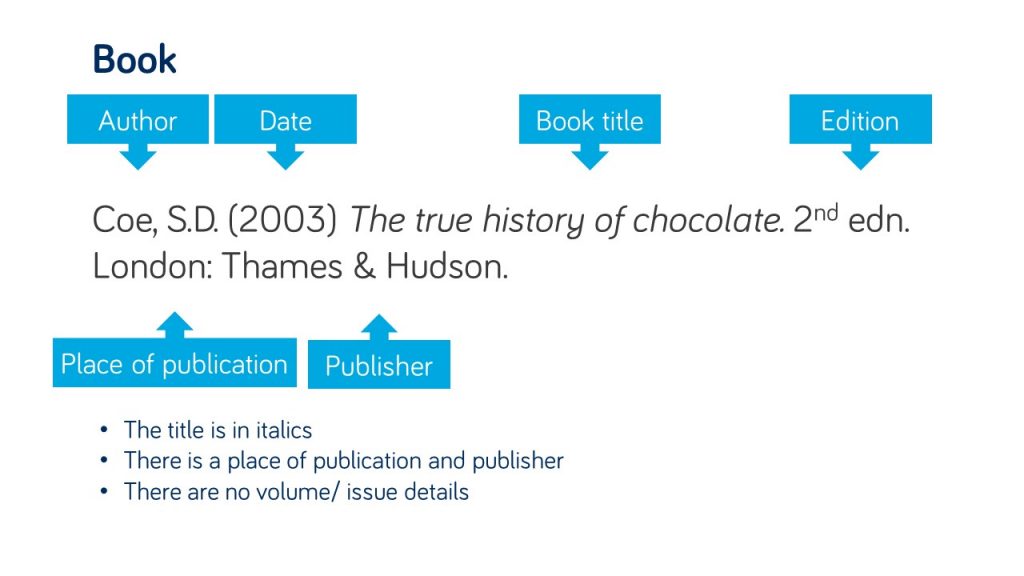
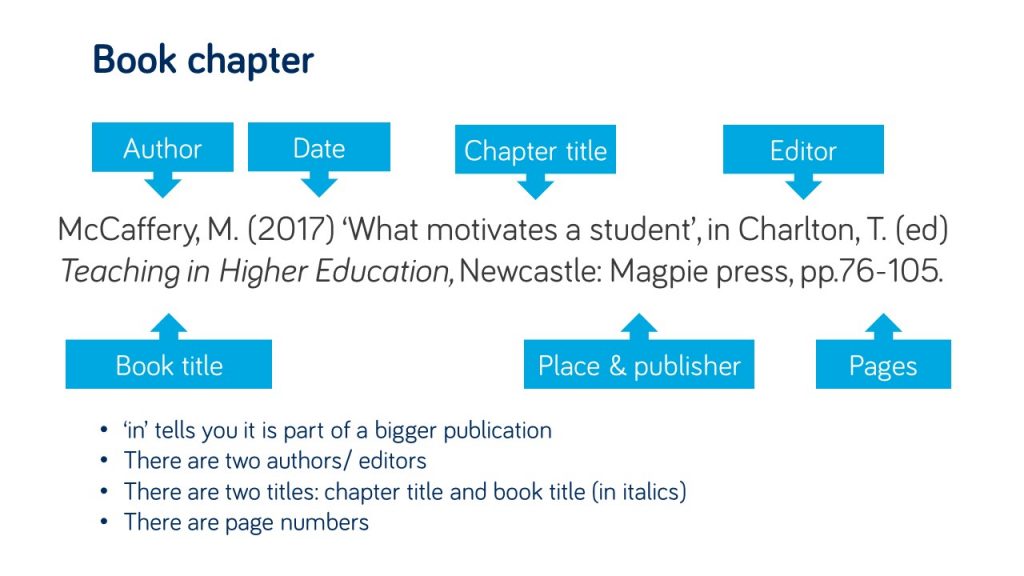
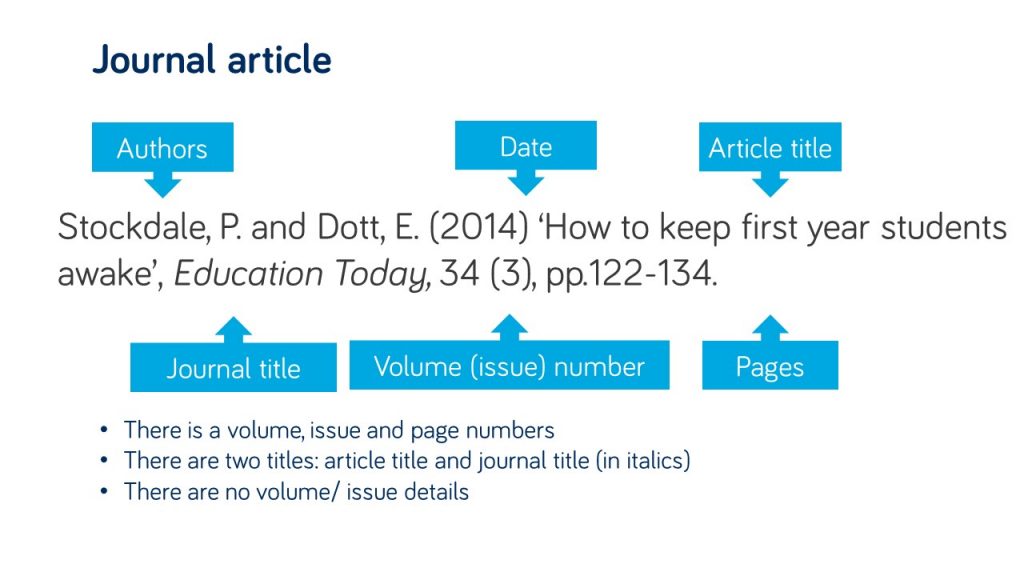
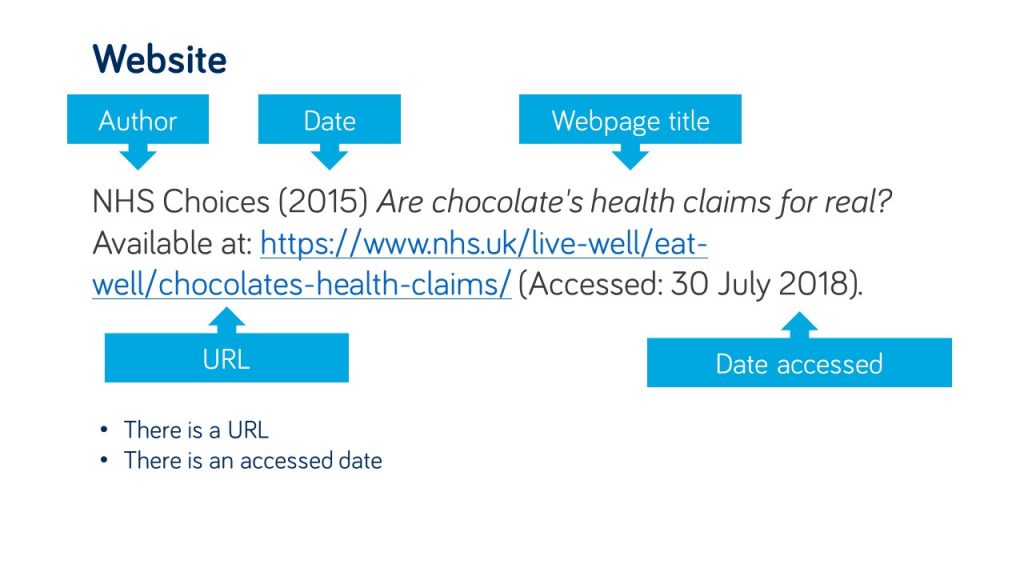
There are some easy things to look out for in your references that will help you identify what type of information it is, and the key details, such as the author and title, that you would need to use in order to find it successfully. Take a look at the examples in the gallery to see what to watch out for.

Reference for a book in the Harvard style with the title in italics.
Reference for a book chapter in the Harvard style which includes the chapter and whole book title.
Reference for a journal article that includes the article title, volume and issue of the journal.
Reference for a website in harvard style which includes a url and accessed date.

Your reading list is also linked from your module course on Canvas. Individual items on your reading list will link through to Library Search, showing you print book availability and linking to e-book and e-journal full text wherever possible. This means you wont need to do a separate search.

Find out more about reading lists on the Library website.