New modules added to our SAGE Research Methods collection

Following a successful trial of the resources in 2022-23, we have added two additional modules to our SAGE Research Methods collection. Through the Library you now have access to a host of guidance, worked examples, teaching resources and practice materials from SAGE Research Methods, SAGE Research Methods Video, SAGE Research Methods Datasets and SAGE Research Methods Data Visualisation.

Datasets

SAGE Research Methods Datasets is a collection of hundreds of teaching datasets and instructional guides that give you the chance to learn data analysis through hands-on practice.

This new resource is a bank of topical, practice datasets, indexed by method and data type. For academic staff, the datasets have been optimised for use in your teaching and can be used for in person teaching or within Canvas materials. This will save you the time of sourcing and cleaning data for use by you and your students.

The decisions researchers make when analysing data can be a mystery to students embarking on research for the first time. Through practicing analysis using real data from SAGE Research Methods Datasets, you can see how analytic decisions are made, helping you become confident researchers.

  • Quantitative datasets are taken from surveys and experiments and come with instructions to analyze the data in SPSS or R.
  • Qualitative datasets are taken from academic research projects, providing bite-size examples from interviews, focus groups, documentary sources, and more, plus advice on how to approach analysis.

You will find lots of guidance on how to get the most out of the datasets module on the SAGE Research Methods LibGuide.

Data Visualisation

SAGE Research Methods Data Visualisation will help all researchers, from beginners to more advanced practitioners develop the fundamentals of data and design necessary to create impactful visualisations. Through a series of practical video tutorials, text guides and practice datasets, the resources will help you identify the chart types that best fit your specific data story.

Researchers increasingly grapple with complex or big data and need to present their data in an understandable, easy to interpret, and informative way to disseminate their research successfully. Mastering the skills and techniques of data visualisation is, therefore, key for any researcher. This new resource will help you and your students to communicate data with impact so that audiences can grasp difficult concepts or identify new patterns and relationships easily.
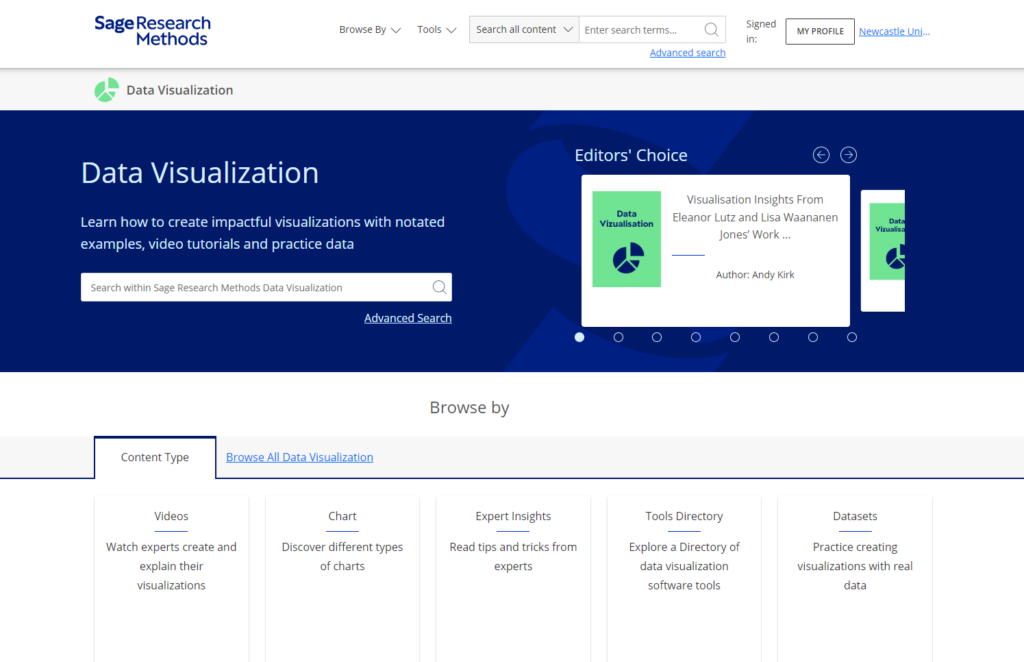
You are able to search and browse by data and chart type to find how to guides and explainer videos, explore a directory of data visualisation software and access datasets to help you practice communicating data.

Guest Post: A 3rd year’s hints and tips, all things law and non-law

About me

My name is Lia, and I am a 3rd year undergraduate law student. The modules I am doing this year are Employment, Careers, Company, Mediation, Evidence and Commercial. I am originally from Peterborough but love Newcastle so much that I want to stay here after I’ve finished studying! My career aspirations are hopefully to become a commercial solicitor in Newcastle.

What do I know now that I wish I knew when I first started?

My 1st year was very different to the norm as I was the Covid year, which made my 2nd year even harder having to learn to adapt to in-person teaching. My advice would be to work 9-5 during the week and give yourself as much time off in the evenings so that you can go out, hang out with your friends, and do extracurricular societies and sports clubs.

1st year and 2nd year are all about making mistakes and learning from them, so never be too hard on yourself. It is more important to always get feedback from coursework and exams, knowing that whatever questions you have other students, the librarians and lecturers will all be able to help.

Seminars are also everyone’s saviours as they literally ask you to prepare the exam questions. I think you should prepare these to your best ability and try do some follow up work on the seminar after you have had everyone’s input.

Client Interviewing

In my 2nd year I entered the client interviewing competition with my friend, Daisy. This was highly rewarding as we learnt how to conduct ourselves when meeting clients and eventually won the competition overall.

The best part of our prize was that we got free work experience at Ward Hadaway, a regional law firm in Newcastle. I completed seats in Real Estate and Commercial litigation whilst I was there.

Text reads: To the winners Daisy and Lia, Newcastle University Law Society Client Interviewing Competition 2022. Two photographs show each winner smiling.
Image from Newcastle Uni Law Society Instagram @nulawsociety

Now, in my 3rd year, I am one of the client interviewing officers this year for the law society. This year Daisy and I are hoping to make the competition better than ever and help participants develop their skills by offering more training sessions than previous years and more competitions. I really advise any 1st or 2nd years to do this as an extra-curricular as it doesn’t take up too much time, looks great on your CV and is judged by Ward Hadaway solicitors who offer money and work experience as a prize!

Favourite Places…

To Study

To Eat Out

For Drinks

Find UK and international news with Nexis Uni

If you’re looking for UK or international news from the last thirty years or so to today, then make sure you explore Nexis. The Nexis database has recently moved to a new platform (Nexis Uni): we think you’ll find it is easier to search than the old version, and it has some really useful features.

If you’re used to ‘old’ Nexis, don’t worry: the content on Nexis Uni is exactly the same, and you can still use the ‘expert’ search features if you want to.

What does it cover?

Nexis Uni enables you to search over 17,000 news, business and legal sources. This includes most UK national and regional newspapers, together with international sources, including newspapers, newswires and news magazines in multiple languages. Coverage of news titles often dates back to the 1990s and includes today’s news. Coverage is text only, and doesn’t include images, layout, adverts etc.

Nexis Uni also gives access to specialist business information, including dossiers on major UK and international companies, together with specialist legal information.

How to search news on Nexis Uni?

There are various ways to limit your search to newspapers/news sources, but the simplest is to select the News button from the Guided Search section:

Guided Search

Type in your search term (use ” ” if searching for a phrase), select your date range, and click Search.

Limit by location of publication

Once your results are displayed, you can then further limit your search by date, publication type, location, language and more.

If you want to search news from a particular country, such as the UK, select Location by Publication >International> and then choose your continent and country.

If you would like to try more complex searching (e.g. searching in a particular section of the newspaper, or combining terms together in various ways), then click on Advanced search from the home page.

There is more detailed guidance about searching in the Nexis help centre.

Searching/browsing a particular newspaper

If you want to find a particular newspaper, choose Menu>All Sources, and then type the newspaper’s name in the Search within sources box. Click the three dot menu to get more information about coverage of the newspaper in Nexis Uni (NB ignore the phrase which says Archived source: no longer updated).

You can also use this route to add one or more newspapers as search filters, if you just want to search across certain titles only: to do this, type the newspaper title in the top search box entitled All Nexis Uni.

Personalisation features

If you’re using Nexis Uni regularly, we’d recommend you create a Nexis account, which enables you to set up alerts (click the bell icon at the top of your results listing), save searches, annotate and bookmark items, and share these with others. You can read more about alerts here.

Alert button

Please note: if you had previously set up alerts or saved searches on ‘old’ Nexis, they won’t migrate to Nexis Uni, so you’ll need to set them up again.

Where can I get more help?

Click the large question mark icon at the bottom right of the screen to get to the Nexis Help Centre >Support Resources, which includes videos and short guides.

Should I use Lexis or Nexis for UK news searching?

The ‘news’ section on the Lexis legal database enables you to search UK national and regional (but not international) newspapers. Nexis Uni is produced by the same company, and should have the same UK news coverage as Lexis, though Nexis Uni also includes a wider range of news sources such as broadcast news and news wires. We also think you’ll find the Nexis search and personalisation options are better, and easier to use, so we’d recommend Nexis. However, you might prefer to stick with Lexis if you use it regularly for legal information.

Podcasts to warm your ears

Photo by Pavel Anoshin on Unsplash

I’m not a massive podcast listener, but the ones I do listen to are entertaining, comforting and familiar. The wonderful thing about podcasts is that no matter what you are interested in, I bet there is a podcast out there on it – there is definitely something for everyone. You can also download and listen to them anywhere and anytime on your phone (and most of them are free) – I like to download them and listen whilst walking the dog or play them through the radio on long drives. How do you listen to yours?

So, this Winter holiday, download some new podcasts and get out in the fresh air to awaken all of your senses – you may even learn something along the way!

Here are some Christmassy inspired podcast episodes to get you in the mood:

  • 99% Invisible – For those who love design and architecture, myself and my fellow Librarians can highly recommend this podcast series. 99% Invisible is about all the thought that goes into the things we don’t think about — the unnoticed architecture and design that shape our world. Here’s a couple of Christmassy themed episodes for you to enjoy:
  • The Truth: Santa’s NineThe Truth create their own original short stories that are sometimes dark, sometimes funny, and always intriguing. Each episode is only 20-30 minutes long. This episode tells the tale of two best friends that take part in a Christmas Eve heist only to discover their boss isn’t who they thought he would be.
  • Scienceish: Christmas Special – Haven’t listened to this series before, but looks right up my street! Rick Edwards (presenter) and Dr. Michael Brooks (Editor of the New Scientist), delve into the science behind popular culture. Enjoy last year’s Christmas special from Scienceish where Rick and Michael conclude Season 2 by revisiting their favourite questions – fringe theories, spider goats, and simulated universes.
  • The Infinite Monkey CageChristmas Special: The Science of Magic – The Infinite Monkey Cage is a BBC Radio 4 comedy and popular science series, hosted by physicist Brian Cox and comedian Robin Ince. Enjoy last year’s Christmas special that looks at the science behind some of our best loved magic tricks and illusions.

Other top podcasts series to discover for any time of year:

  • Spark from CBC Radio – This has been one of my favourite podcasts for a few years now. The host Nora Young explores how technology, innovation and design affects our lives.
  • Happy Place – Fearne Cotton’s Happy Place podcast series builds on the success of the top 10 bestseller HAPPY where Fearne draws on her own experiences and shares advice from experts on how to work through feeling blue to finding joy each and every day. I need this right now!
  • Desert Island Discs – Another one of my go-to podcast series. Yes you can listen to many a famous celebrity on this, but what I really enjoy is learning about many interesting figures in sciences, arts, education, politics etc. Those who you will have never heard of before, but who have had very interesting lives and done some amazing things in the World.
  • Made of Human – Comedian Sofie Hagen chats to comedians, authors, actors, musicians, activists, medical professionals, podcasters, influencers and artists about how to do life. (Spoiler alert: no one really knows)
  • Table Manners with Jessie Ware – Jessie Ware hosts a podcast about food, family, and the beautiful art of having a chat, direct from her very own dinner table. With a little bit of help from her chef extraordinaire mum Lennie, each week guests from the worlds of music, culture and politics drop by for a bite and a bit of a natter. Oversharing guaranteed.

What’s your favourite podcast?

Winter Craft-along Online: Part 3

Our final Winter craft blog sees us making pom-poms with a fork and how to make tree ornaments with twigs. We are also showcasing some wonderful crafts that our Library team have been working on recently.

Fork pom poms

This is all new to me… pom poms… using a fork!? What crafting wizardry is this? This video clearly shows you how you can make super quick pom poms, and all you need is wool, a fork and scissors. Like magic!

So what can you make with your pom poms? Well, whatever you like really.

How about use white wool and make two pom poms, tie together and make a snowman? Use brown wool and make into reindeers or multicoloured wool and make pom pom garlands for your tree. Have a look on Pinterest for more inspiration.

Twig stars

Time to go out and get some fresh air for this one. All you need is small twigs, strong tape or glue (hot glue gun is perfect, but only if you have one), and twine/string. These stars can be used as decorations or, as seen in the video, as parcel toppers. Gorgeous!

Crafty librarians

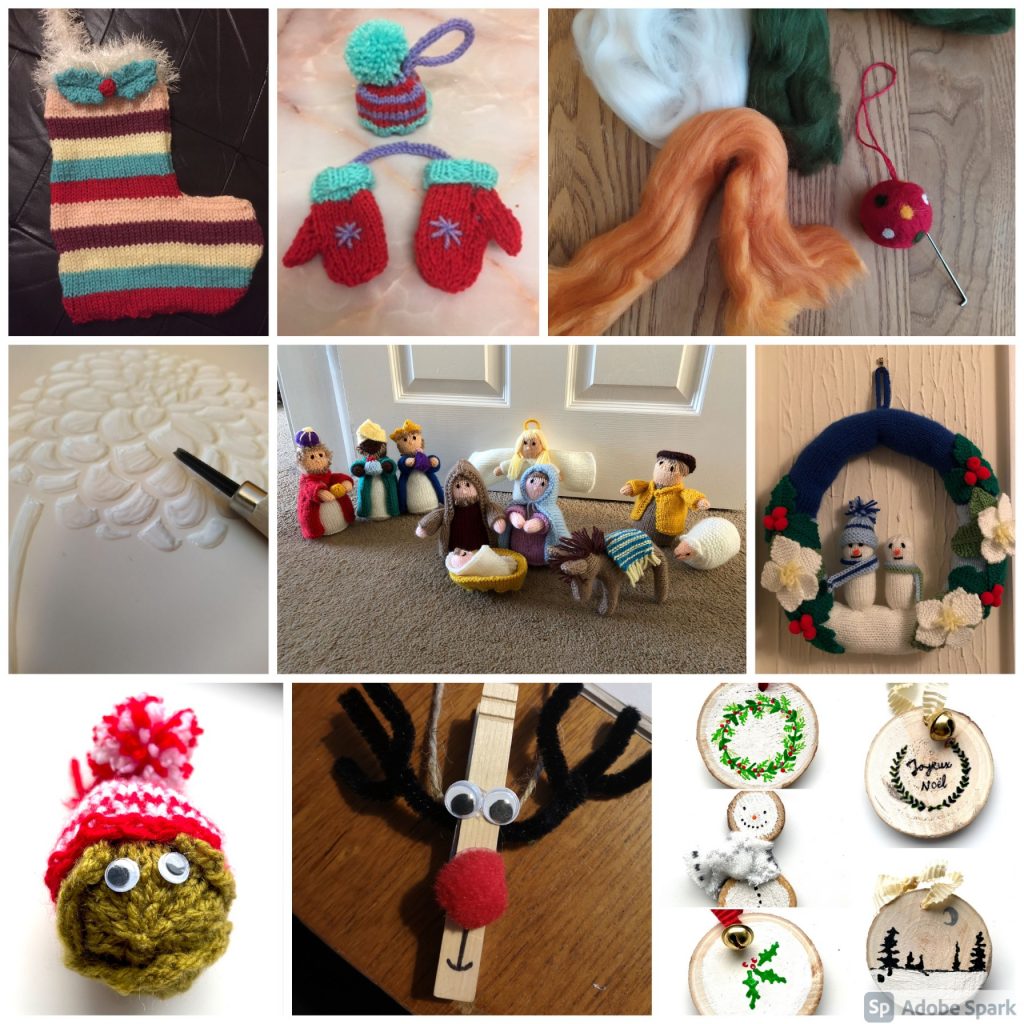
There are so many talented members of staff in our Library, so I wanted to share with you a mere tasting of the crafts that are being created this year:

Share the Joy

We would love to see your crafts, so why don’t you share a photo and tag us in Twitter, Instagram or Facebook, and use the hashtag #NULWinterCrafts2020.

I hope you have enjoyed our Winter Craft-along online blogs – Part 1 and Part 2 – and have found a pocket of time in your busy days to make something Wintery and Christmassy. I also hope it has inspired you to go out and discover other arts and crafts that you could make… because, remember, crafting is not just for Christmas 🙂

Winter Craft-along Online: Part 2

Winter Craft-along Online banner

As promised, here is our next instalment of Winter crafts – so glue guns at the ready for some more crafting antics.

As in our previous blog, we are embracing all things sustainable, and challenging you to make your crafts using materials found around the house. This time you will need an old jam jar, a pair of socks and some fruit!

Glass jar lanterns

For this one you will need an old, clean glass jar and some cheap PVA glue (the video says to use Mod Podge, but cheap PVA glue works just as good), tissue paper to decorate your jar and a tea light (real or battery operated). The video shows Christmas trees and snowflakes, but let your imagination run crazy – you could do a snowman, father Christmas, a snowy scene or a nativity. Really easy, but looks so effective, and who doesn’t love tea light lanterns when the nights are dark and cold.

No-sew snowmen

This is where your old (clean!) sock can be turned into a jolly snowman. For this you will need one white sock, some elastic bands or Loom bands, uncooked rice, 4-5 buttons (I bet you have some random buttons kicking about the house?), PVA glue, a bit of scrap ribbon or some wool for his scarf and then some more wool if you would like to make him a pom-pom for his hat. I am definitely going to have a go at making this – so easy, but looks so good.

Dried fruit garlands

I’ve been meaning to have a go at making these for ages, not only do they look good, but I bet it makes your house smell amazing! For this one you will need some citrus fruit – this can be oranges, limes, lemons, or even grapefruit – maybe you have some sitting in your fruit bowl that have seen better days and could be given a new lease of life? You can also use cloves and press them into the slices before you pop them in the oven, to make them smell so good. In the video is says the temperature in Fahrenheit – all of the blog and instructions I have read it just says to set your oven at the lowest temperature available on your oven. Cook low and slow and make sure you turn them over half-way through. You will also need string or twine to string them up. I have seen them on Christmas wreaths and as Christmas tree decoration – have a play and see what you can make with them.

Share the Joy

We would love to see your crafts, so why don’t you share a photo and tag us in Twitter, Instagram or Facebook, and use the hashtag #NULWinterCrafts2020.

Look out for our final blog with a couple more crafts for you to try and inspiration from our Library staff.

Winter Craft-along Online: Part 1

For a few years now the Library has hosted Crafts at Christmas – a wonderful event that brings together staff and students into our Libraries for a time to unwind and focus our creative energies on some Winter crafts. Sadly this year we are unable to host our usual event, so instead we have created a series a blogs highlighting some excellent, but very simple, crafts that you can do in the comfort of you own home.

Our sustainability challenge

This time of year can be not only expensive but full of waste. So our challenge to you is to make these Winter crafts from as many materials that you have lying around the house as possible, such as old wrapping paper, last year’s Christmas cards, or old balls of wool lying around etc.. You’ll be amazed what beautiful crafts you can make out of the stuff you normally recycle or throw away.

3D paper snowflake

Last year I made these stunning 3D paper snowflakes out of the paper packing you get in your Amazon delivery! We make these snowflakes every year in our Crafts at Christmas events – they look really complicated, but are really easy. Why don’t you give them a go. All you need is paper, scissors, a stapler and sticky-tape…

Origami paper box

Another really simple paper craft, but instead of buying origami paper why don’t you make them out of old wrapping paper or even old, thin Christmas cards. These wee boxes are great for holding sweet treats for a loved one.

Recycled paperback folded Christmas tree

This is another super easy and very effective paper craft that you can do using an old book or magazine or catalogue. You don’t need any other materials other than the pages of the book, but you can decorate the tree afterwards if you like (I made origami lucky stars for the top of my tree):

Paper ball decorations

These are so pretty and all you need is string, glue and paper – we suggest using magazines and leaflets that you have had through the front door. Takeaway menus are great for it!

Share the Joy

We would love to see your crafts, so why don’t you share a photo and tag us in Twitter, Instagram or Facebook, and use the hashtag #NULWinterCrafts2020.

Look out for Part 2 and Part 3 with even more crafts for you to try.

Spruce up your referencing: When is a website not a website?

Photo by Dominik Dombrowski on Unsplash

We have all heard it said that languages spoken in northern arctic regions have considerably more words for snow than those spoken in southern climates. When dealing with something in detail every day it is often helpful to categorise and clarify its nuances.

A common mistake made in academic referencing is grouping all sources found online under the overarching category of a website. However, your aim should be to reference the information you have in front of you rather than where it was sourced. Grouping all items found online as a website would be the equivalent to referencing a book only by the publisher details, rather than the author and title. Or, by referring to both a snowball and a snowflake as simply snow.

For example, a government publication found online would be referenced like this in Chicago:

United Kingdom. Department for Education. Cloud computing: how schools can move services to the cloud. London: The Stationary Office, 2016. Accessed: November 4, 2019. https://www.gov.uk/government/publications/cloud-computing-how-schools-can-move-services-to-the-cloud. 

An electronic journal article might appear like this in APA:

Gillum, J. (2012). Dyscalculia: Issues for practice in education psychology.  Educational Psychology in Practice, 28(3), 287-297. doi:10.1080/02667363.2012.684344

While a video posted on the Tate website would look something like this in Harvard:

TateShots (2016) Grayson Perry: think like an artist. Available at: https://www.tate.org.uk/whats-on/tate-modern/talk/what-makes-artist-grayson-perry-conversation-sarah-thornton (Accessed: 11 November 2019). 

Identifying the type of information you are using, as well as the source, is an essential evaluation skill which helps in developing a greater critical approach to information. In many cases you will be unconsciously using your judgment to assess the value of information for your purpose. So when you are using any source of information, ask yourself what it is you are looking at, what details are recorded about it, and whether it measures up as a quality piece of information. You’ll find more guidance about evaluating information on our Evaluating Information guide.

Finding Information: Troubleshooting your search results

Photograph of tools, including a hammer, spanner and measuring tape, laid out on a table

You’ve ran your information search and looked at your results with a critical eye only to find that they’re not quite working for you – what can you do now?

In this blog we’ll be looking at the top three problems encountered when searching for information and how to improve your search to get the results you need:

Finding too much

If your search has brought back thousands of results and you’re getting overwhelmed with the options:

Search a more specialised resource

Using a subject-specific database will help narrow the focus of your search to your particular areas of interest.  Take a look at your Subject Guide to find databases and eBook collections tailored to your subject area.

Apply limits

Make use of the ‘refine’ options usually found on the left-hand side of Library Search or your subject database.  Limit your results by date, subject area or information type.  Remember, you may need to justify your limits to your supervisor so think carefully about your choices. 

Combine search terms with ‘AND’

AND is a Boolean operator, a term you can use to have more control over your search. If you want to find information that must contain two different keywords (or phrases), place a capitalised AND operator between them. Your search engine or subject database will only find information that features both, narrowing your results. The more search terms you combine with AND, the narrower your search will be.

Finding too little

If your search has brought back a handful of useful articles but you need a wider range of results:

Combine terms with ‘OR’

OR is another Boolean operator that helps you to control your search more effectively.  Use OR with your search terms that have synonyms or related terms. Your search engine or subject database will find information that features either word or phrase, significantly broadening your results.

Try controlled vocabulary

If you’re not getting enough results, it may be that your search terms or keywords aren’t quite working for you.  Controlled vocabulary are a standardised list of words and phrases used on some databases to ensure that searches retrieve all relevant results, even when authors use different terms. Examples of databases that use this technique include ERIC, PsycInfo, CAB abstracts, Compendex and Medline. If these apply to you and your discipline, you’ll find out how to use them on your Subject Guide.

360 Searching

If you’ve found some useful articles, one simple way to find more relevant material is to take a look at the references used by the authors.  This will lead you to find older material that was published before your original article which may also be useful.  Library Search and some subject databases including Google Scholar and Scopus also allow you to see who has cited the articles you have found in their work (look for the ‘cited by link’).  This is called citation searching and allows you to find more up-to-date analysis of your topic.  By looking back at the references and forward at the citations, you get a 360 degree view of the research.

Finding nothing useful?

If your search has brought back results that aren’t relevant to your research question or you are finding it difficult to find the right search terms or databases to use, you might find it helpful to book a one-to-one appointment with your Liaison Librarian.

You can also find more help and advice on the Academic Skills Kit.

Finding Information: The key to your search

Keys hanging on hooks on a piece of wood.

When it comes to finding academic information, there are a few things you need to think about before you start your search, such as where to actually look for information and the types of information you want to find in your search.  Another thing that is worth taking the time to think carefully about is keywords.

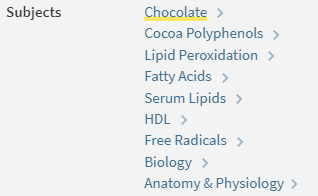
Keywords, sometimes called subject terms, are simple words and phrases that describe information; you can see them in the item record on Library Search and in Subject Databases.

An example of keywords from an article on Library Search

The results that your search returns are based on this information – if your keywords match an item’s keywords, that item will appear in your results.

To get the best results, then, you’ll need to develop a balanced list of targeted keywords – these keywords may come from your essay title or research question, from your subject knowledge or wider reading – you can even borrow them from the subject terms you find on relevant articles!

As ideas and topics can be expressed in different ways you’ll also need to think about synonyms and terms related to your keywords to make sure you can find all of the relevant information.

To find out more about keywords, synonyms and searching take a look at this short video:

There are some useful tricks you can use with your keywords to save you time when you search, take a look at the Academic Skills Kit to learn about Boolean, wildcards and truncation!